

Xbox Series Controller Not Turning On? Check AAs, Pack and USB
Need this part? We stock tested replacement parts with same-day UK dispatch and a 12-month warranty.
If your Xbox Series controller is not turning on, compare battery power and wired USB separately. Start with a supported fresh pair of AAs, fitted in the marked directions, then test through a compatible direct USB data connection. A controller that lights up but will not connect presents a different problem from one that never shows a sign of power. This guide covers the standard Xbox Series X|S Xbox Wireless Controller, including model 1914. For an Elite controller or a third-party controller, check its own power instructions.
Last updated: November 25, 2026

Check the battery compartment before charging anything
Remove the battery cover and look for the model label. Check whether the controller uses individual AAs or an installed rechargeable pack. For the first comparison, use a known-working matched pair of supported AAs. Fit them with the positive and negative ends aligned to the markings. Do not mix old and new cells. If you see leaked residue, heat damage or a distorted pack, stop using the compartment and seek service rather than scraping or bridging the contacts.
Individual rechargeable AAs should be charged in a separate charger intended for those cells. The controller’s USB connection does not charge loose AAs in its battery compartment. A kit is a separate product. The Microsoft rechargeable battery and cable listing describes its compatible USB-C controller pack. With a different kit, follow the pack manufacturer’s charging instructions. Some kits have their own charging method or contacts, so a controller cable is not a universal charger for every pack.
Run the wired comparison separately
Remove the batteries or pack, then connect the controller directly to an awake Xbox or a compatible host with a known-working data cable. Leave hubs and charging stands out. Use a cable that matches the ports at both ends. Look for the Xbox button lighting and for the host actually recognising the controller as an input device. A cable can provide power without carrying data, so a light by itself is not a complete wired test. If the first cable does not work, change the cable or the host port one at a time.
| Observed result | What to compare next |
|---|---|
| Wired input works without batteries, but fresh AAs give no response | Check polarity and battery seating. If the result repeats, have the battery contacts or battery power path assessed. |
| Fresh AAs work, but the installed pack does not | Confirm the pack is approved for this controller and use its proper charging method before replacing it. |
| Light appears but no wired inputs are detected | Test a known data lead and another compatible host port. Separate power from communication. |
| Light flashes and the console does not respond | Check pairing to the intended device. Do not count a flashing light as no power. |
| No response from a fresh pair or a verified USB setup | Record both tests and seek diagnosis. Avoid buying a battery pack on that evidence alone. |
For a useful battery comparison, note whether the controller goes dark as soon as you unplug USB or stays powered but falls off the wireless connection. If it still has lights, try the intended console’s normal pairing process with known-good power available. If its lights go out immediately with fresh AAs fitted, note that the controller failed at the moment the power source changed. Report the result alongside the cable and host you tested. A short video of the transition can be more informative than a description of an intermittent fault.
When ordering, check what is actually in the kit: a pack, a charging lead, a dock-specific cover or some combination. Ask the seller to confirm compatibility against the controller label. Do not substitute a press-fit cover or loose cell to make an incompatible kit stay seated.
Separate power from pairing and explain the result
Microsoft’s controller information explains that the Xbox Wireless Controller can connect to several types of device. If it powers on but fails to control your Xbox after use on a computer or phone, verify which device it is paired with. Check whether it remains stable through the wired connection. For a controller that failed during an update, tell the repairer what was interrupted. Consult the supported device procedure rather than repeatedly disconnecting it during another update.
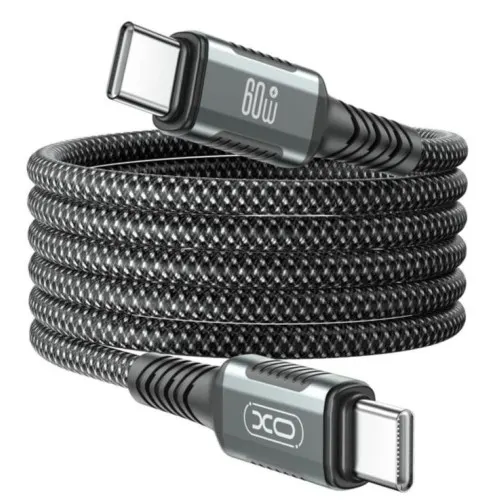
The iFixit model 1914 troubleshooting guide distinguishes power, battery pack and connection faults. Use your observations to report whether the Xbox button lit, whether a device recognised input, and whether wired operation continued after a gentle ordinary move of the controller. If the plug is loose, stop putting pressure on it. For cable selection see Digi4u’s USB-C data guide and this USB-C data cable example for connections where both ends are USB-C. The console parts guide covers identifying the correct hardware revision before ordering.
Use a second working controller if available
If you have another standard Xbox Series controller, use it to validate the cable and port before comparing your own. Plug the working controller into the same awake host with its batteries removed and confirm that a button press moves the menu. Then disconnect it and try the unresponsive controller with the same cable. This rules out a test setup that cannot carry input. If both controllers fail that test, try a second data cable or port before drawing a conclusion about the original controller.
If fresh AAs work and the problem returns only with a third-party pack, check the label on the pack and the kit instructions. A pack with its own socket may need to be charged by that socket, and a dock kit may have a battery cover matched to the dock. Record whether the pack ever powers the controller on its own after following those instructions. If the pack does work on its own, note whether the original complaint was about battery runtime, charging or losing a connection mid-game.
Xbox Series controller power questions
Should I buy a rechargeable pack if the controller only works over USB?
Test fresh supported AAs first. If the controller fails on both AAs and its existing pack, confirm the compartment and its power path before buying another pack.
Can the Xbox button flash when the controller has power?
Yes. Treat flashing as a sign of activity and check connection to the intended device. A dead controller and a controller attempting to connect should be recorded as different faults.
How can I rule out a charge-only USB lead?
Use a cable already verified to carry data between compatible devices. Then check whether the host recognises controller input, rather than relying on the button light alone.