


iPhone 15 Screen Replacement: Models, Panels and What Changes
Need this part? We stock tested replacement parts with same-day UK dispatch and a 12-month warranty.

The iPhone 15 range splits into four separate screen assemblies, and the differences between them are not cosmetic. Fitting the wrong panel produces a device that lights up, then behaves oddly in ways the customer notices immediately.
The job itself is close to the iPhone 14, with a display that opens from the front and sensors that have to be transferred. The parts decision is where most of the risk sits.
Which iPhone 15 screen fits which model?
Each of the four models uses its own assembly.
The iPhone 15, 15 Plus, 15 Pro and 15 Pro Max have different panel sizes, connectors and frame dimensions. A standard 15 panel will not fit a 15 Pro, and the Plus and Pro Max are larger again.
Match the model number before ordering. The marketing name is not enough once a device has been repaired or resold, because the housing may have been changed and the screen may already be a replacement.
The four assemblies are close in size but not in fit. A 15 Pro panel in a standard 15 frame will sit proud at one edge, and the gap is visible before the device is even switched on.
What changed with the Dynamic Island?
The cut-out moved, and the sensor arrangement followed.
The iPhone 15 moved the whole range to the Dynamic Island design, which changes the shape of the display cut-out and the way the front sensors are arranged behind it. The panel is not a drop-in replacement for a 14.
That matters when a shop is buying a used or refurbished assembly. A panel described as “15 series” may be for any of the four models, and the cut-out is one of the fastest ways to tell them apart on the bench.
The cut-out also affects the screen protector and the front camera alignment. A protector cut for the 14 will not fit the 15, and a camera that sits slightly off-centre after a repair is usually a sign that the wrong assembly was fitted.
Which grades are worth stocking?
Soft OLED for volume, with a small original line.
Soft OLED is the workhorse grade for independent repair: good colour, reliable touch and a price that leaves room for labour. Original pulls and refurbished originals cost more and suit customers who want the closest match to the panel that came off.
Incell copies are the budget option and should be sold as such. A customer who pays for a soft OLED and receives an incell panel will notice the difference in brightness and viewing angle, even if they cannot name it.
Keep the range small. One good soft OLED line and one original line cover most jobs, and a shop that stocks four brands of the same grade ends up with stock it cannot rotate.
How do you confirm the model?
Settings, About, model number, then the frame.
The model number identifies the device, and the frame colour identifies the assembly if it includes one. Write both on the job sheet before the part is ordered, because the cost of the wrong panel is much higher than the cost of checking.
The check takes a minute and prevents the most expensive mistake in the job. It also gives the shop a record if the customer later disputes which part was fitted.
Do it before the device is opened. Once the panel is off, the label on the back of the display is a useful confirmation, but it is not a substitute for knowing the model before the part is ordered.
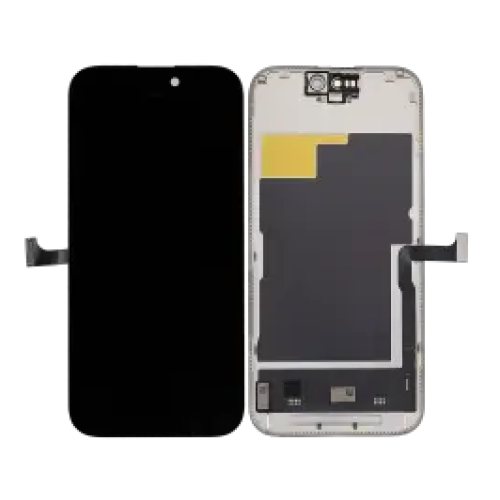
What does the job involve?
Heat, a front opening and a sensor transfer.
The iPhone 15 opens from the display side. Heat softens the perimeter adhesive, a suction cup and pick start the lift, and the panel folds open while the flexes remain connected.
Disconnect the battery before anything else, then release the display flexes. The sensor assembly sits on the back of the panel and has to be moved across if the replacement is a bare panel rather than a framed assembly.
Keep the device on a clean mat and work with the panel supported. The 15 display is thin, and the adhesive around the top edge is easy to tear if the panel is lifted vertically.
What is different from the iPhone 14?
The panel shape, the sensor layout and the calibration.
The 15 uses a different display shape and a revised sensor arrangement, so the transfer sequence is not identical to the 14. A technician who has done many 14 jobs will still need to check the flex routing on the first 15.
The calibration behaviour is also different. True Tone and the display’s original data are tied to the panel, and a replacement may lose the feature unless the original IC is transferred or the assembly is programmed.
The gasket is model-specific too. A 14 gasket will not follow the 15 perimeter, and a device that is resealed with the wrong one will lift at a corner within days.
How do you protect the earpiece and sensors?
Warm the adhesive and lift the flex without bending it.
The earpiece and ambient light sensor are mounted on a flex adhered to the back of the panel. Heat softens the adhesive, and a thin blade releases the flex without putting a crease in it.
Keep the sensor windows clean and avoid touching the adhesive side. Contamination shows up as brightness or proximity faults after the repair, and those are hard to diagnose once the device is closed.
Use heat rather than force. The flex is thin and the adhesive releases cleanly at the right temperature, while a cold blade will tear the flex before the adhesive gives way.
What should you test before sealing?
Touch, brightness, proximity, Face ID and calls.
Run a full-screen touch test, check the panel at minimum and maximum brightness, cover the ambient light sensor, test proximity during a call and confirm Face ID. Each check catches a different transfer error.
Do it before the adhesive goes down. The routine is the same one set out in testing a replacement screen, and it takes less time than a second repair.
Test with the device assembled enough to boot. A flex that works while the panel is open can fail when it is folded into its final position, and the test has to match how the device will be used.
How should you store iPhone 15 screens?
Flat, in the box, by model.
Store each assembly in its own packaging until it is fitted. Stacked panels and tools resting on a box are the most common causes of a screen that arrives with a pressure mark or a cracked corner.
Organise by model rather than by grade. The 15, 15 Plus, 15 Pro and 15 Pro Max look similar in a box, and the wrong one is easy to grab when the shelf is arranged by grade alone.
Keep the batch label. It is the only way to connect a failed panel to the shipment it came from, and it costs nothing to keep with the box.
What should the job be priced at?
Panel, labour, sensor transfer and returns.
A framed assembly costs more but removes the sensor transfer from the job. A bare panel costs less and adds bench time, and the quote should reflect which one is being fitted rather than a single price for both.
Include the calibration conversation in the price. If True Tone will be lost, the customer is receiving a slightly different product, and the quote should make that clear before the work starts.
Add an allowance for the occasional failed panel. Screen warranties are part of the cost of the service, and a price built without them only works when nothing goes wrong.
What about True Tone and calibration?
Expect it to be lost unless the data comes across.
True Tone depends on calibration data stored with the original display. A bare aftermarket panel has no access to that data, so the feature usually disappears unless the original IC is transferred or the new assembly is programmed.
Tell the customer before the repair. A device that loses True Tone without warning feels like a downgrade, and the conversation is much easier before the work than after it.
When should you decline the job?
When the frame is bent or the board has been worked on.
A bent frame means the new panel will not sit flat, and the repair will fail regardless of the part quality. A board with previous microsoldering is a different risk, because the fault may not be in the screen at all.
Both are legitimate reasons to decline or to quote differently. The policy for that decision is set out in when to decline a repair.
What is the one rule for iPhone 15 screens?
Match the model, then decide whether you need the frame.
The model decides the panel, and the frame decision decides the time and the risk. Both should be settled before the device is opened, not discovered during the repair.
Around it sit the ordinary disciplines: disclose the grade, test every sensor, explain True Tone and record the part. Apple documents display behaviour at about genuine iPhone displays and parts history at iPhone parts and service history, replaced panels are waste under the Waste Electrical and Electronic Equipment Regulations 2013, product safety sits with the Office for Product Safety and Standards, and retail customers keep their rights under the Consumer Rights Act 2015.
FAQ
Does an iPhone 14 screen fit an iPhone 15?
No. The 15 has a different panel shape, sensor layout and connector, so the assemblies are not interchangeable. Match the model number before ordering.
What screen grade should I stock for the iPhone 15?
Soft OLED is the practical volume grade, with a small line of original pulls or refurbished originals for customers who want the closest match. Incell copies are a budget option and should be sold as such.
Will True Tone work after an iPhone 15 screen replacement?
Usually not with a bare aftermarket panel, because the calibration data is tied to the original display. Transferring the original IC or programming the new assembly can preserve it.
How long does an iPhone 15 screen replacement take?
Around an hour for an experienced technician, including opening the display, transferring the sensors, testing and resealing.
Panels for the 15 that fit the frame and the flex. Digi4u stocks iPhone 15 assemblies in the grades UK shops actually quote.
