


iPhone 15 Screen Replacement Parts: Soft OLED Buying Guide for UK Shops
Need this part? We stock tested replacement parts with same-day UK dispatch and a 12-month warranty.

UK shops quoting iPhone 15 screen replacement work need a parts lane that separates 15, 15 Plus, 15 Pro and 15 Pro Max before the heat pad goes on. Soft OLED diagnostic assemblies are the usual aftermarket choice for visual restoration on this generation, but Face ID testing, True Tone disclosure and adhesive kits decide whether the handback stays sold. This guide is for purchasing and bench leads who stock Digi4u panels rather than for consumers comparing high-street labour menus.
iPhone 15 / Plus / Pro / Pro Max panel differences
Four marketing names mean four incompatible screen SKUs.
Size, Dynamic Island geometry, connector family and Pro refresh expectations differ enough that a mis-pulled bag ruins both glass and schedule.
The base iPhone 15 and iPhone 15 Plus share the non-Pro visual language but not the same panel dimensions. Pro and Pro Max add Pro-tier display expectations that customers notice under shop LEDs. Never treat “15 Soft OLED” as a universal bin label. Digi4u lists separate Soft OLED diagnostic SKUs for iPhone 15, iPhone 15 Plus, iPhone 15 Pro and iPhone 15 Pro Max — purchasing should bookmark those hubs and match the A-number on the donor.
Apple’s service and Self Service Repair materials underline model-specific display procedures (Apple Self Service Repair; Apple screen repair overview). Third-party teardown and guide libraries such as iFixit’s iPhone 15 device page help new staff learn fastener maps without guessing (iFixit iPhone 15; iFixit iPhone 15 screen guide).
| Model lane | Parts habit | Common mix-up |
|---|---|---|
| iPhone 15 | Base Soft OLED diagnostic | Pulling Plus panel by habit |
| iPhone 15 Plus | Larger Soft OLED diagnostic | Quoting base 15 price/SKU |
| iPhone 15 Pro | Pro Soft OLED diagnostic | Using non-Pro panel |
| iPhone 15 Pro Max | Pro Max Soft OLED diagnostic | Assuming Pro flex fits |
Soft OLED diagnostic packs: what is included
Read each Digi4u title for diagnostic scope and extras.
Soft OLED diagnostic packs restore a working OLED image path; they do not silently equal a genuine Apple calibrated display.
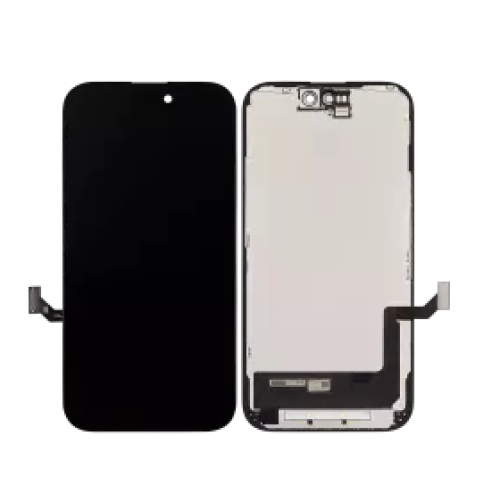
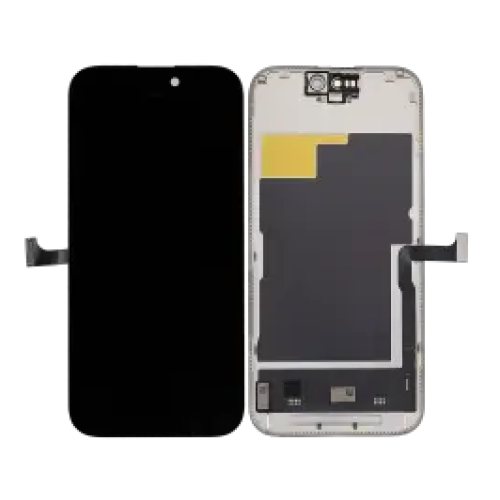
On Digi4u, 15-series Soft OLED diagnostic listings typically centre on the display assembly itself. Tools, adhesive, earpiece mesh and sensor brackets may be separate line items. Purchasing should keep a checklist beside the SKU: panel, adhesive sheet, mesh, lower screws standard, and any IC-transfer tooling if your process requires it. The wider iPhone screen hub is the right place to compare Soft OLED diagnostic titles across generations when you are building a min/max stock sheet.
Diagnostic wording matters on the customer ticket. It signals an aftermarket Soft OLED path intended for professional fitting and pre-install testing, not a claim of Apple genuine calibration. Apple explains how nongenuine displays can change Multi-Touch, brightness and True Tone behaviour, and how Parts and Service History may label a display Unknown (Apple: About genuine iPhone displays; Apple: Parts and Service History).
Face ID and True Tone after screen swap
Test Face ID and disclose True Tone risk before handback.
Soft OLED restores the panel; it does not automatically restore every software-calibrated feature Apple ties to genuine parts.
Face ID modules are separate from the OLED glass, yet aggressive prying, torn flexes or misplaced brackets still create “screen job” Face ID failures. Run Face ID unlock and attention features before opening when the donor still works, then again after the new panel is seated and before adhesive cure. If Face ID fails only after the swap, stop and inspect flex routing rather than sealing the phone.
True Tone may be absent or inconsistent on aftermarket Soft OLED. Put that in the quote language. Customers who were sold “exactly like original” return over white balance even when touch is perfect. Use Apple’s Parts and Service History screen as a training aid so front-of-house staff can explain Unknown versus Genuine labels without improvising (Apple Parts and Service History).
Frame and adhesive kit checklist
Budget adhesive and mesh even when the OLED arrives assembled.
Reused adhesive is a leading cause of dust ingress and weak seal returns on 15-series glass.
Before the job starts, stage: correct Soft OLED SKU, model-matched adhesive, earpiece mesh if contaminated, isopropyl suitable for residue, plastic cards, and heat control that will not crease the Soft OLED flex. If your shop transfers components from the donor, add ESD-safe tweezers and a microscope step to the SOP. Digi4u also stocks related repair tools discussed elsewhere on the blog, including driver types covered in the phone repair screwdriver types article — use the right bits rather than rounding pentalobe and tri-point fasteners.
Frame-preassembled versus bare stacks change time estimates. If the listing is a Soft OLED diagnostic assembly without a full chassis frame, do not promise frame-swap timing on the booking calendar.
How to verify part listing against your donor model
Match A-number, then match the exact Digi4u URL title.
Marketing names on the till receipt are not enough when Plus and Pro donors sit in the same multi-charger bay.
While the phone still boots, capture Settings → General → About model number and iOS version. Photograph the broken glass state for the job record. Cross-check Digi4u product titles character by character: “iPhone 15” versus “iPhone 15 Pro” errors are expensive. If the donor does not boot, use rear markings and confirmed customer paperwork, and refuse to guess between Pro and non-Pro.
Keep a printed or tablet-side matrix of 15-series A-numbers next to the parts shelf. Update it when Apple revises regional model codes. Purchasing leads should periodically re-open the live product pages rather than trusting last quarter’s spreadsheet alone.
Bench test sequence before customer handback
Open-device optical and touch tests beat sealed-phone surprises.
Repeat a shorter functional set after adhesive so flex creep is caught before the customer leaves.
Suggested sequence for 15-series Soft OLED: (1) incoming flex and glass inspection with SKU photo; (2) dry connect and boot; (3) full white/black/grey slides; (4) dense touch grid including edges around Dynamic Island; (5) brightness extremes; (6) proximity and earpiece; (7) Face ID; (8) cameras quick check while open if you are already in the chassis; (9) adhesive and seal; (10) repeat touch, Face ID and call proximity. iFixit’s published screen guide is a useful training cross-check for step order, not a substitute for your insurer-approved SOP (iFixit guide).
Record failures against SKU, not against “Apple screen” as a vague category. That record decides which Digi4u Soft OLED lines you reorder.
Wholesale vs single-unit ordering for UK shops
Order to your weekly 15-series intake, not to vanity stock depth.
Digi4u serves both single-unit and multi-unit buyers; this brief does not publish MOQ or trade price lists, so build cart size from your own job forecast.
Shops that see daily 15-series walk-ins usually keep at least one Soft OLED diagnostic per lane (15 / Plus / Pro / Pro Max) plus adhesive. Quieter benches can order overnight against Digi4u’s weekday same-day dispatch cut-off of 16:00 Monday to Friday, with weekend orders going next working day. Non-battery screen carts typically use Royal Mail 48 Tracked with free shipping over £100 on that standard method; if you add standalone lithium batteries to the same basket, DPD rules apply instead. Details remain on the delivery policy page and should be re-checked when thresholds change.
Do not invent volume discounts in customer quotes. Price the Soft OLED line item from your live Digi4u invoice and your labour rate only.
Related parts: charging port and battery while open
Offer charging-port and battery inspection while the 15-series chassis is open.
That cross-sell is operational, not upselling theatre: connectors and ageing batteries are visible once the display is removed.
If the customer already reports slow charge or boot loops, test the charging path before sealing a new Soft OLED. Replacing only the glass when the port is contaminated creates a same-week return that looks like a “screen fault”. Battery swell that pressures a new OLED is another avoidable comeback. Digi4u’s wider iPhone catalogue under the iPhone parts hub is the place to source those related lines when the ticket justifies them. Remember standalone lithium batteries ship DPD-only under Digi4u policy, which affects how you batch supplier orders.
UK product-safety expectations for businesses handling electrical goods are outlined by government guidance useful for staff handbooks (GOV.UK product safety; UK WEEE-related legislation index).
Conclusion
iPhone 15 screen work is a Soft OLED stocking problem first and a screwdriver problem second. Separate the four model lanes, read diagnostic pack contents, disclose True Tone and parts-history messages, and run Face ID plus touch QC before adhesive. Digi4u’s 15-series Soft OLED diagnostic listings and UK weekday dispatch cut-off give shops a practical replenishment path without inventing genuine-part claims.
15-series panels do not replace 13-series connectors or sizes; for technicians still seeing weekly 13 tickets, use the iPhone 13 Soft OLED buying checklist.
Screen swaps do not fix scratched rear lens glass; for lens-cover SKUs and alignment notes see iPhone camera lens glass replacement UK.
Moving from 15-series glass to 16-series Soft OLED needs a fresh Digi4u SKU map — iPhone 16 screen replacement parts UK.
FAQ
How much does it cost to replace an iPhone 15 screen?
Retail labour prices vary by city and whether the shop uses genuine-channel or aftermarket Soft OLED parts. Digi4u sells replacement panels to UK buyers rather than quoting a fixed national repair fee. Ask your parts invoice plus your shop labour rate, and state the panel grade on the customer quote so price compares like-for-like.
Is glass-only replacement realistic on iPhone 15?
Most independent UK shops replace the full display assembly rather than attempting glass-only laminating on 15-series donors. Glass-only needs specialist equipment and still risks damaging the OLED stack. Soft OLED diagnostic assemblies are the common trade path for cracked or dead 15-series displays.
Is it worth fixing a broken iPhone 15 screen?
For out-of-warranty phones that still pass battery and Face ID checks, a Soft OLED assembly plus disclosed parts messaging is often cheaper than device replacement. Write the grade and any iOS Unknown-part notice into the quote. If the logic board or Face ID hardware is already failing, screen spend may not be rational.
Do Soft OLED diagnostic packs include frames and adhesive?
Contents vary by SKU. Digi4u Soft OLED diagnostic listings for iPhone 15 models should be read line-by-line for frame, mesh and tool inclusions. Budget for a fresh adhesive kit and, where needed, earpiece mesh even when the panel arrives as an assembly.
Will Face ID still work after an iPhone 15 screen swap?
Face ID hardware sits outside the display glass, but flex handling and incorrect transfers can still break it. Test Face ID before and after the swap. Soft OLED restores the image path; it does not automatically restore every calibrated feature Apple reserves for genuine parts.
