
How to Register a Trade Account
Wholesale Account — https://www.digi4u.co.uk
This guide walks you through applying for a Wholesale Account on digi4u. Once approved you will have access to our trade pricing across our full range of phone repair parts and accessories.
You need a standard digi4u account first. The trade application is found inside your account dashboard under Upgrade user group — follow the steps below.
Applying for a Wholesale Account
Digi4u Wholesale Registration Steps
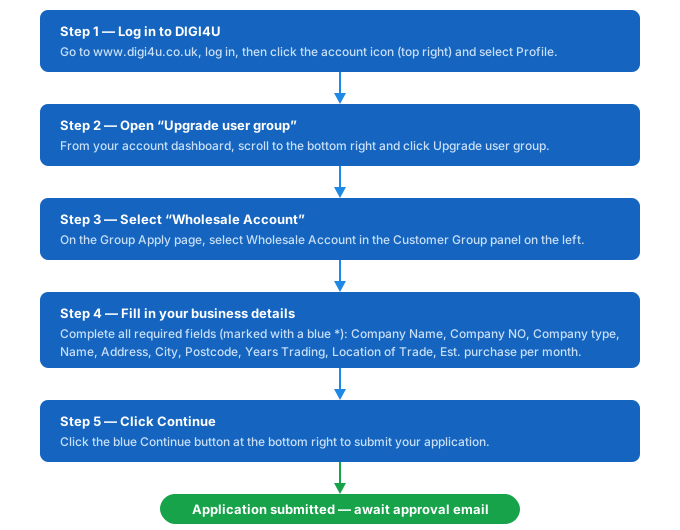
Go to https://www.digi4u.co.uk, log in, then click the account icon in the top navigation bar and select Profile from the dropdown.
Inside your account dashboard you will see a grid of options. Scroll to the bottom right and click Upgrade user group.
On the Group Apply page, select Wholesale Account in the Customer Group panel on the left. The radio button should fill blue to confirm.
Fill in the Your Personal Details form. Fields marked * are required.
| Field | What to Enter | Required |
|---|---|---|
| Company Name | Your registered business name | * Yes |
| Company NO | Your Companies House registration number | * Yes |
| Company type | Select from the dropdown | * Yes |
| VAT Number | Your UK VAT number if VAT registered | Optional |
| Name | Your full name (primary contact) | * Yes |
| Address 1 | First line of your business address | * Yes |
| Address 2 | Second line if applicable | Optional |
| City | Your business city or town | * Yes |
| Post Code | Your business postcode | * Yes |
| Years Trading | Select from the dropdown | * Yes |
| Location of Trade | Tick all that apply — Physical Store, Amazon, Website, Other | * Yes |
| Est. purchase per month | £500–£1k / £1k–£2k / £3k–£5k / £5k–£10k | * Yes |
Once all required fields are filled in, click the blue Continue → button at the bottom right to submit your application.
Need Help With Your Application?
If you run into any issues, or if your application is taking longer than expected, get in touch and we will sort it out.
- Email: customerservice@digi4u.co.uk
- Website: https://www.digi4u.co.uk