


Choosing a Screen Separator Machine: What Matters
Need this part? We stock tested replacement parts with same-day UK dispatch and a 12-month warranty.

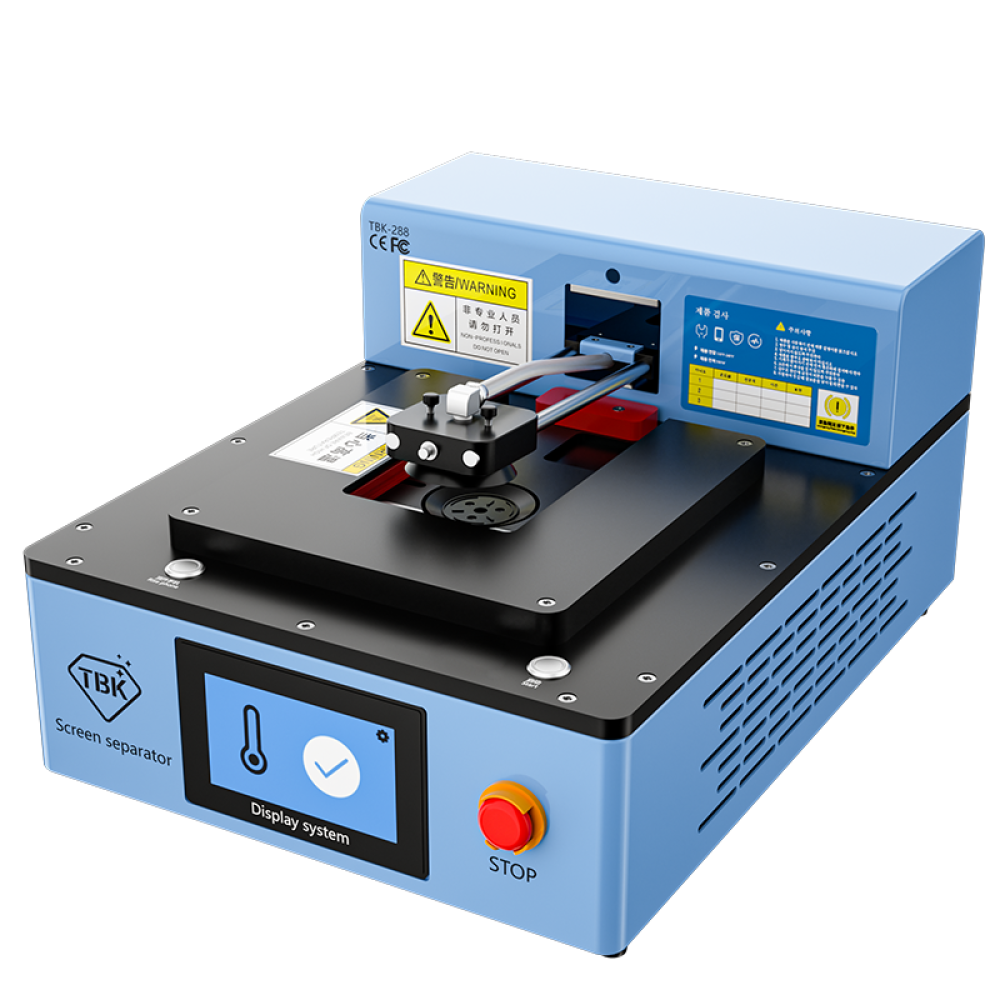
A screen separator is the machine that starts a glass-only repair: it heats a bonded display evenly and lets the panel be released from the broken glass underneath. It is also the piece of equipment shops buy most often without knowing what they actually need.
The differences between a cheap unit and a good one are not cosmetic. They decide whether a panel comes off intact or cracks, and whether the machine still works in two years. This is what to look at.
What does a separator actually do?
It heats a bonded panel evenly so the adhesive releases.
The machine holds the display against a heated plate under vacuum and applies controlled temperature across the whole surface. Because the heat is even, the adhesive releases uniformly rather than in one corner, which is the condition that cracks panels when it is achieved with hot air.
That is the whole function. Everything else on the machine, from the vacuum pump to the timers, exists to make that heating step repeatable rather than dependent on the operator’s judgement.
What matters most when choosing one?
Temperature control, plate size and vacuum strength.
Temperature control is the feature that pays for itself first. A machine with a thermostat and a stable plate holds a set temperature rather than cycling around it, and that stability is what lets the same model be processed the same way every time.
Plate size decides which devices the machine can handle, and vacuum decides whether the display stays flat while it is worked on. Those three specifications, together with build quality, separate a machine that earns its keep from one that sits under the bench.
What size plate do you need?
Large enough for the biggest device you intend to repair.
Separators come in sizes from small phone-only plates to units that handle tablets. A plate that is too small for a device means the panel overhangs and heats unevenly, which is exactly the problem the machine exists to solve.
Most shops settle on a mid-size plate that covers phones comfortably and handles a 10-inch tablet at a push. Where tablet work is a target, buying for that from the start is cheaper than replacing the machine later, and the wider workflow is described in what a FOG panel is and when to buy one.
How much should you spend?
Enough to get real temperature control, and no more.
The cheapest units control heat with a simple switch and hold temperature poorly, which makes results inconsistent. A mid-range machine with a digital controller, a vacuum pump and a plate of useful size covers everything a phone shop needs.
The upper end of the market is for production volumes rather than for accuracy, and a small shop buys features it will never use. What to avoid is spending the minimum, because an inconsistent separator produces cracked panels, and the cost of those panels quickly exceeds the saving. A shop separating four or five panels a week will notice the difference within a month, and one doing one a month never will.
Does it replace the heat mat?
No, they do different jobs.
A heat mat warms a whole device to release a display from its frame, which is the first step of most screen repairs. A separator warms a panel that has already been removed to release it from its glass, which is a later step in a glass-only workflow.
Both are needed for that workflow, and the temperatures and techniques differ. The principles behind the first step are described in what temperature to pre-heat to and why, and they do not change because a separator has arrived on the bench.
What else does the workflow need?
Cleaning, lamination and pressure.
Separating a panel is the first of four steps. The glass and adhesive residue then have to be cleaned off, a new glass or FOG assembly has to be laminated on with OCA, and the finished panel has to be finished under pressure to remove the bubbles that form during lamination.
Buying a separator without the rest of that equipment leaves a shop with half a process. The point to judge is whether the whole workflow is affordable, not whether the first machine is, and the wider bench question is described in what to buy first for board work.
What are the risks of buying too early?
That the machine costs more than it saves.
A glass-only workflow only pays when there is a steady supply of panels worth saving. Where a shop replaces two or three screens a week and none of them are expensive, buying a full lamination setup ties up thousands of pounds and adds a process to learn.
The honest test is whether the shop already turns away glass-only work that a customer would have paid for. If it does not, the machine is a solution to a problem the business does not have yet.
How do you get good at using one?
On broken panels you were going to throw away.
Every shop accumulates cracked screens that are not worth repairing, and they are the ideal practice material. Running a panel through the full cycle, from separation to lamination to pressure finishing, builds the judgement that no instruction manual provides.
The failures are informative. Bubbles point at the lamination step, cracks point at uneven heat, and residual adhesive points at the cleaning stage, which is exactly how a technician learns where the process went wrong.
What should you buy first, second and third?
Separator, then laminator, then pressure finishing.
That order matches the workflow and spreads the cost. The separator is the machine that unlocks the process, the laminator makes the result usable, and the pressure stage turns an acceptable job into a professional one.
Buying in that order also lets the shop practise on each step before adding the next. A shop that buys all three at once learns three new skills simultaneously and usually learns none of them properly. One new skill at a time is the faster route.
| Step | Equipment | What it decides |
|---|---|---|
| Removal from the frame | Heat mat or hot air | Whether the panel survives the first step |
| Separation from the glass | Separator | Whether the panel comes off intact |
| Cleaning | Solvent and hand tools | Whether the new glass sits flat |
| Lamination | Laminator and OCA | Whether the display is optically clear |
| Finishing | Pressure chamber or autoclave | Whether the bubbles stay away |
What are the common mistakes?
Too much heat, and rushing the cleaning.
Heat is the variable that damages panels. Running a separator hotter than necessary shortens the working window and discolours the display, and the correct setting is the lowest one that releases the adhesive rather than the highest the machine offers.
Rushing the cleaning is the second. Any adhesive left on the panel shows as a shadow once the new glass is laminated, and the finished screen looks dirty in a way that cannot be corrected afterwards.
Do you need a vacuum pump?
Yes, for anything but the smallest panels.
The vacuum holds the display flat against the heated plate while the glass is worked away from it. Without it, the panel can lift at one edge, which changes the temperature it sees and is the condition that cracks screens.
A built-in pump is more convenient than a separate unit and takes less bench space, which matters in a small shop. Where a machine offers the plate without the vacuum, it is worth treating the saving as an incomplete purchase.
How do you look after the machine?
Keep the plate clean and the temperature honest.
Adhesive residue builds up on the plate and changes how heat transfers into the panel, so wiping it down after each session is part of using the machine rather than housekeeping. A dirty plate produces results that vary from one job to the next. That variability is the thing to avoid, because a process that behaves differently each time cannot be taught or priced.
The controller is the other thing worth checking periodically, because a machine that drifts from its set temperature will damage panels without any obvious cause. Checking it against a probe once a quarter is enough to catch a fault before it costs a screen. Keeping a note of the settings that work for each model is the other half of maintenance, because it turns a repeatable process into a documented one that a new technician can follow from the first day.
What is the one rule for buying a separator?
Buy for the work you already turn away.
That single test prevents the most expensive mistake in equipment purchasing, which is buying capability the business cannot yet use. If the shop regularly declines glass-only repairs, the machine pays for itself; if it does not, the money is better held.
Around it sit the ordinary disciplines: practise on scrap panels, keep the temperature low, clean properly and complete the workflow rather than half of it. Equipment that is replaced rather than reused is waste under the Waste Electrical and Electronic Equipment Regulations 2013, the safety expectations around heat and electricity are set out by the HSE at electrical safety and risk assessment at work, tools placed on the market fall to the Office for Product Safety and Standards, and retail customers keep their rights on any work carried out under the Consumer Rights Act 2015.
FAQ
Do I need a screen separator to start repairing phones?
No. Separators are for glass-only repairs, where a working panel is released from broken glass and re-laminated. Screen and battery replacements need a heat mat and hand tools, not a separator.
How much should a repair shop spend on a screen separator?
Enough to get real temperature control, a vacuum pump and a plate that covers the devices you repair. The cheapest units hold temperature poorly and crack panels, and the panels cost more than the machine.
What size separator plate should I buy?
One large enough for the biggest device you intend to work on. A plate that is too small leaves the panel overhanging and heating unevenly, which defeats the purpose of the machine.
What else do I need to do glass-only repairs?
Cleaning materials, a laminating machine and OCA, and a pressure stage to remove bubbles. A separator on its own leaves the workflow half-finished, so judge the cost of the whole process rather than the first machine.
Bench equipment that earns its keep. Digi4u supplies separators, laminating tooling and the consumables that go with them.
{
“@context”: “https://schema.org”,
“@type”: “FAQPage”,
“mainEntity”: [
{“@type”: “Question”, “name”: “Do I need a screen separator to start repairing phones?”,
“acceptedAnswer”: {“@type”: “Answer”, “text”: “No. Separators are for glass-only repairs, where a working panel is released from broken glass and re-laminated. Screen and battery replacements need a heat mat and hand tools, not a separator.”}},
{“@type”: “Question”, “name”: “How much should a repair shop spend on a screen separator?”,
“acceptedAnswer”: {“@type”: “Answer”, “text”: “Enough to get real temperature control, a vacuum pump and a plate that covers the devices you repair. The cheapest units hold temperature poorly and crack panels, and the panels cost more than the machine.”}},
{“@type”: “Question”, “name”: “What size separator plate should I buy?”,
“acceptedAnswer”: {“@type”: “Answer”, “text”: “One large enough for the biggest device you intend to work on. A plate that is too small leaves the panel overhanging and heating unevenly, which defeats the purpose of the machine.”}},
{“@type”: “Question”, “name”: “What else do I need to do glass-only repairs?”,
“acceptedAnswer”: {“@type”: “Answer”, “text”: “Cleaning materials, a laminating machine and OCA, and a pressure stage to remove bubbles. A separator on its own leaves the workflow half-finished, so judge the cost of the whole process rather than the first machine.”}}
]
}
