


iPad Air Charging Port Replacement: Flex, Variant and Test
Need this part? We stock tested replacement parts with same-day UK dispatch and a 12-month warranty.

An iPad Air charging fault is usually a flex problem, but the diagnosis has to come before the part. The port sits at the bottom of a sealed tablet, and opening the device for the wrong reason costs more time than the flex costs to buy.
The part itself is more specific than it looks. The Wi-Fi and cellular versions use different charging flexes, and the Air 4, Air 5 and Air 6 are not interchangeable.
Which charging flex fits the iPad Air?
A model-specific USB-C flex for that generation.
The iPad Air 4, Air 5 and Air 6 each use their own charging assembly, and within each generation the Wi-Fi and cellular variants differ. The connector is USB-C across the range, but the flex layout and the antenna connections are not the same.
Match the A-number and the connectivity before ordering. A Wi-Fi flex fitted to a cellular tablet may charge but leave the cellular antenna disconnected, and the customer notices the signal loss later.
How do you confirm the model and connectivity?
From the A-number on the back and the settings screen.
The A-number identifies the generation and the connectivity variant, and it is printed on the lower rear cover. Settings, General, About confirms the model name, but the A-number is what suppliers quote against.
Write both on the job sheet. The full matching method is set out in matching iPad parts by model, and the connectivity check is the step most often skipped.
What does the flex include?
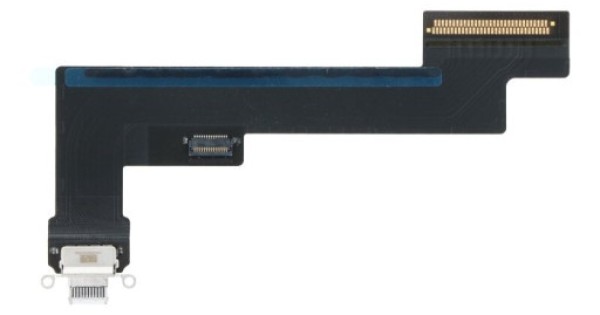
The socket, the antenna contact and sometimes a mic.
The charging flex carries the socket and the antenna contact that sits against the frame. On some generations it also includes a microphone or a sensor connection, so the listing has to be read rather than assumed.
Check whether the part is described as original or aftermarket. The original flex usually fits the frame more precisely, which matters on a tablet where the socket has to align with the aluminium opening.
Why do iPad ports fail?
Debris, cable strain and liquid.
Tablets are often charged on a sofa or in bed, with the cable taking the weight of the device. That strain damages the socket and the flex joint, and the fault appears as a port that only works at a certain angle.
Debris is the second cause. Compacted lint stops the plug seating, and the device then charges slowly or not at all even though the port looks clean.
Liquid is the third, and it is the one most likely to become a board fault. A tablet that has been near a drink can corrode the flex and the board at the same time, so the port replacement fixes half the problem and the device still behaves badly.
That is why the current draw matters before the tablet is opened. A device that draws an abnormal amount is telling you the fault is not a worn socket, and opening it for a flex swap would be the wrong repair.
How do you diagnose before opening?
Clean, test a known cable, then check current draw.
Inspect the socket under bright light and remove any lint with a plastic probe. Try a known-good cable and charger, then check the current draw with a meter to see whether the tablet is drawing anything at all.
A tablet that draws current but does not charge may have a battery or board fault rather than a port fault. The diagnostic sequence is set out in iPad charging port repair.
What does the replacement involve?
Open the display, remove the shield, swap the flex.
The iPad Air opens from the front, so the job starts with heat around a long perimeter and a careful lift. Once the panel is free, the battery is disconnected and the lower shield is removed.
The flex is held by screws and adhesive, and the socket aligns with a machined opening in the frame. Fit the new flex loosely, check the alignment, then tighten.
Check the replacement against the old part before it goes in. The antenna contact and the socket height should match, and the screw holes should line up without forcing the flex into place.
Route the flex away from the speaker and the shield edge. A cable that is trapped under the shield can work on the bench and fail once the tablet is closed, which is the most frustrating kind of comeback.
Keep the old adhesive off the new flex. A stray strip under the socket lifts it slightly, and the plug then fails to seat fully even though the port looks correct.
How do you avoid damaging the display?
Heat evenly and support the panel flat.
A 10.9-inch panel flexes more than a phone screen. Lifting one corner while the rest is still bonded cracks the glass or damages the LCD, and the repair then costs a panel as well as a flex.
Work around the perimeter in short sections and keep the panel supported once it is free. The screen routine is described in iPad Air screen replacement.
What about the antenna and speakers?
Check both before the tablet is resealed.
The charging flex carries an antenna contact, and the speakers sit close to the lower edge. A flex that is not seated properly can leave the tablet charging but with poor Wi-Fi or cellular reception.
Test the speakers as well. The lower speaker is easy to disturb during the shield removal, and a dead channel is obvious to the customer on the first video they play.
How do you test after fitting?
Charge, data, speakers, Wi-Fi and cellular.
Confirm the tablet charges from a known-good cable, appears on a computer for data, plays sound from both speakers, and connects to Wi-Fi. On a cellular model, check that the mobile signal returns.
Test the port at an angle. A socket that only works when the cable is held straight is not seated correctly, and it will fail again within weeks.
Check the charging speed as well as the fact of charging. A tablet that accepts a charge but never reaches its rated wattage may have a data-line fault in the flex, and that is easy to miss on a quick test.
When is it a board fault?
When a known-good flex changes nothing.
If the tablet still draws nothing or still refuses to charge after a correct flex, the fault is on the board. The charging circuit and the power path are the usual suspects, and that is a board-level repair rather than a parts swap.
Say so before ordering a second flex. The customer is paying for a diagnosis, and the difference between a flex and a board repair is significant.
What does a typical iPad Air port job look like?
Two hours, most of it opening and resealing the tablet.
A tablet arrives with a port that works only when the cable is propped up. The socket is cleaned and tested, the current draw is checked, and the decision is made to replace the flex rather than the board.
The display is heated around the perimeter and lifted in short sections. The battery is disconnected, the lower shield comes out, and the old flex is released from the frame.
The new flex is fitted loosely, the socket is aligned with the machined opening, and only then are the screws tightened. The tablet is booted with the panel resting in place and tested for charging, data, speakers and wireless reception.
The old adhesive is removed from both surfaces, a new sheet is applied, and the panel is pressed evenly around the edge. The tablet then sits for long enough for the adhesive to set before it goes back to the customer.
What should the job be priced at?
The flex, the opening, the adhesive and the test.
An iPad port job takes longer than the part price suggests. Opening a laminated tablet, cleaning the frame, fitting the flex and resealing takes two hours on a good day.
Include a new adhesive sheet in the quote. A tablet resealed with a phone strip will lift at the corner, and the return costs more than the adhesive would have.
Charge for the opening as its own cost. A customer comparing a tablet port repair with a phone port repair is comparing two very different amounts of labour, and the quote should make that visible rather than hiding it in the part price.
It also protects the shop when the job turns out to be a board fault. The opening work has already been quoted, so the conversation moves to the next repair rather than to a discount.
What is the one rule for iPad Air ports?
Confirm the generation and the connectivity before ordering.
Two fields on the job sheet: the A-number and whether the tablet is Wi-Fi or cellular. Those decide the part, and the part decides whether the repair works.
Around it sit the ordinary disciplines: clean and test first, support the panel, align the socket before tightening and test the antenna and speakers. Apple publishes iPad service information at iPad repair, replaced flexes are waste under the Waste Electrical and Electronic Equipment Regulations 2013, bench safety comes under risk assessment at work, product safety sits with the Office for Product Safety and Standards, and retail customers keep their rights under the Consumer Rights Act 2015.

FAQ
Are the Wi-Fi and cellular iPad Air charging flexes the same?
No. They are different parts, and fitting a Wi-Fi flex to a cellular tablet can leave the mobile antenna disconnected. Confirm the A-number and the connectivity before ordering.
Can I clean an iPad Air charging port without opening it?
Yes, and it should be the first step. A plastic probe and bright light will remove compacted lint, and a known-good cable will confirm whether the port still needs replacing.
How long does an iPad Air charging port replacement take?
Around two hours for an experienced technician, including opening the display, fitting the flex, resealing and testing charging, data and the antenna.
Why does my iPad Air still not charge after a new flex?
The fault may be on the board rather than in the flex. Check the current draw and test with a known-good flex before ordering another part.
iPad port flexes by model and connectivity. Digi4u supplies iPad Air charging flexes with the variant confirmed before dispatch.

