


MacBook Parts by Model Number: How to Match a Screen, Battery or Trackpad to the Chassis
Need this part? We stock tested replacement parts with same-day UK dispatch and a 12-month warranty.

MacBook part orders fail for one reason more than any other: the order was placed against a marketing name. “MacBook Air 13-inch” covers a long run of machines with different panels, different connectors and different batteries, and the customer’s laptop is only one of them.
The number that removes the ambiguity is stamped on the machine itself. This article covers how to find it, what it actually identifies, and what to confirm before you commit to an order.
What do the A-numbers on a MacBook actually identify?
The chassis, not the specification.
The A-number on the underside of a MacBook identifies a physical chassis design. Panels, batteries, trackpads and flex cables are matched to that design, not to the size or the marketing name. Two machines sold as the same size with the same badge can carry different A-numbers, and parts for one will not fit the other.
For a repair shop this makes the A-number the ordering key. It is printed in small text near the hinge on the bottom case, and it is also reported in the system information panel under the model identifier, which gives you a way to confirm the reading without turning the machine over twice.
How do you find the right MacBook panel for a specific machine?
Read the A-number, then match the assembly type.
Start with the A-number from the bottom case, then confirm it against the model identifier in system information. With that number you can select the correct category rather than guessing from the screen size. The second half of the job is confirming what the assembly includes, because a complete display assembly and a bare panel are different products with very different fitting work.
Getting both right is what stops the most expensive MacBook ordering mistake, which is receiving a part that is correct in size and wrong in every other way.

Which MacBook generations share parts and which do not?
Assume nothing is shared until the A-number says so.
The practical rule for a repair shop is to treat every A-number as its own parts family. MacBook Air and MacBook Pro have both been through multiple chassis revisions under names that stayed the same, and each revision moved connectors, changed the display assembly construction or altered the internal layout.
Where parts do interchange, that is a useful margin opportunity, but it is worth confirming on the bench rather than assuming from a supplier listing. A quick physical comparison of connector shape and mounting points takes less time than processing a return.
What does the display assembly include on each generation?
Either a complete lid or a panel that must be bonded.
Some MacBook generations take a complete display assembly, where the panel arrives already bonded into the lid and the job is a hinge and cable swap. Others are supplied as a bare panel that has to be bonded into the customer’s existing lid, which changes the tooling, the time and the risk profile of the job.
That distinction is worth confirming before you quote, because the two routes differ by a substantial amount of bench time. It is also why the same “screen replacement” can cost very different amounts on two machines that look identical to the customer.
| What you are ordering | What the job involves | Main risk |
|---|---|---|
| Complete display assembly | Hinge and cable swap into the customer’s base | Damaging the camera or antenna cables during transfer |
| Panel only | Separating and re-bonding the panel into the existing lid | Breaking the panel or the lid during separation |
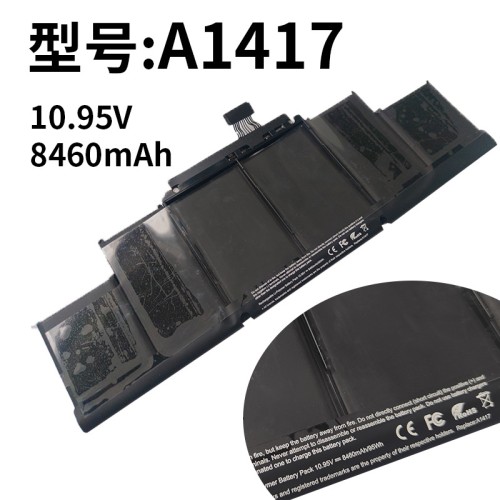
| Battery | Adhesive removal across a bonded pack | Puncturing a cell during removal |
| Trackpad | Access depends on whether the battery sits above it | Bending the battery while gaining access |
What should you check before you order a MacBook part?
Four things, all before the order goes in.
Confirm the A-number from the machine rather than from the customer’s description. Confirm whether the part is a complete assembly or a component. Check whether any related part has to be disturbed to reach the one you are replacing, because on several generations the battery sits over the trackpad and has to come out first. And confirm that the part is listed against the same A-number in both the supplier’s title and the supplier’s compatibility notes.
That last check matters more than it sounds. Supplier listings occasionally carry a marketing name in the title and the real compatibility in the detail, and reading only the title is how a correct-looking part turns out to be the wrong one.
How does a MacBook repair differ from an iPhone repair?
More adhesive, more fragile cables, and less tolerance for a second attempt.
iPhone repairs are largely modular: parts are held by screws and brackets and can usually be revisited without destroying anything. MacBook repairs involve bonded batteries, thin display cables that kink if they are routed wrong, and in some generations a display assembly that was not designed to be opened at all.
The practical consequence for a shop is that MacBook work rewards preparation more than speed. Having the right adhesive, the right pry tools and a plan for routing the cables before you start has a much bigger effect on the outcome than it does on an iPhone.
How do you handle the cost conversation?
Anchor it against the replacement machine, not against the part.
Customers considering a MacBook repair are almost always weighing it against buying a replacement, and the comparison they make is with what a new machine costs rather than with what the part costs. Apple publishes its own service routes and pricing in its Mac laptop repair service pages, and a separate route for display repairs, which gives the customer a reference point whether or not they use it.
For a shop, the useful framing is condition-based. A machine in good order justifies a display or battery repair. A machine with a damaged chassis and a failing battery rarely does, and saying so plainly is what earns the next job rather than losing this one.
Where a repair is carried out for a retail customer in the UK, the statutory rights you have to honour sit on top of the warranty you offer, and they are set by the Consumer Rights Act 2015. Obligations around the safety of goods you place on the market sit with the Office for Product Safety and Standards.
What should you record on the job sheet?
The A-number, the part number and the condition on arrival.
Record the chassis A-number, the part number you fitted, the date, and the condition of the machine when it arrived, including any existing damage to the lid or the base. On a machine where a display assembly has to be transferred between lids, photograph the customer’s lid before you start.
MacBook disputes tend to be about whether existing damage was caused by the repair or was already there, and a dated photograph settles that in one look. For shops new to MacBook work, this is the single habit that prevents the most arguments.
Should you hold MacBook stock?
Narrow and deep on the chassis you actually see.
MacBook parts are expensive to hold across a wide range, and demand is far more concentrated than on iPhone. Most shops are better served by holding batteries and common cables for two or three chassis numbers they see regularly, and ordering screens per job against the confirmed A-number.
The exception is a shop doing a steady volume of one model, where holding a display assembly or two turns a two-day turnaround into a same-day one. That is a margin decision rather than a stock decision, and it depends on how often the same machine comes through the door. If you are weighing up panel selection more broadly, the same scoring approach used for choosing between screen brands applies here.
What should you do when a MacBook part does not fit?
Stop, photograph everything, and check the A-number again.
The instinct on a MacBook job is to make the part fit, because the machine is already open and the customer is waiting. That instinct is what turns a returnable part into a scrap part, and a manageable delay into a damaged machine. Connectors that are forced, cables folded into a space they were not designed for, and display panels flexed to align with hinge mounts all break in ways that are difficult to attribute afterwards.
Almost every fit failure traces back to one of three causes. The A-number was read from the wrong place, the part is a component where a complete assembly was needed, or the listing matched a marketing name rather than the chassis. All three are answered by the same evidence, which is a photograph of the machine’s A-number next to the label on the part that arrived.
That photograph is also what a supplier needs in order to swap the part rather than debate it. Suppliers process fit claims quickly when the evidence shows the chassis and the part together, and slowly when the claim is a description of the problem. Take the picture before you call, and keep the packaging until the job is finished.
It is worth knowing what the machine itself records about its parts, which Apple documents in iPhone Parts and Service History for iPhone and in its own service documentation for Mac. On a machine that has already been repaired elsewhere, that record tells you something about the chassis before you order anything for it.
FAQ
How do I find my MacBook model number?
Turn the machine over and read the small print near the hinge. The model number is the A-number, such as A1708 or A2337. That number identifies the chassis, and it is the number to order parts against. The marketing name on the box is not precise enough, because one name can cover several different chassis.
Is it worth replacing a MacBook battery?
It is usually worth it when the machine is otherwise sound, because a battery is a far smaller cost than a replacement laptop and the repair restores usable runtime. It is worth less when the chassis is damaged or the machine is old enough that a new battery will outlive its usefulness. Check the machine’s overall condition before quoting.
Why do MacBook screen orders go wrong more often than iPhone orders?
Because MacBook chassis identifiers change more often and the marketing name hides that. MacBook Air and MacBook Pro names are reused across generations with different panels and different connectors. Ordering against the A-number, and checking whether the part is a complete assembly or a bare panel, removes most of the risk.
Can I replace a MacBook battery myself?
It is possible, but the battery is usually bonded into the chassis rather than held by screws, and the cells are thin enough that levering one out can puncture it. That is a fire risk, not just a broken-part risk. If you are not set up for adhesive removal, treat it as a job for a shop with the right tools.
MacBook work rewards one habit above all others: order against the number on the machine. Read the A-number, confirm what the assembly includes, check what has to be moved to reach it, and write all three down before the order goes out. The jobs that go wrong are almost always the ones where the marketing name was treated as a specification.
Looking at MacBook work for the first time? Digi4u supplies MacBook screens, batteries, trackpads and cables to UK repair shops, organised by chassis number, with trade pricing, same-day dispatch and up to 12 months warranty. Send us the A-number and we will confirm what is in stock.
