


Wireless Charging Not Working: Coil, Magnet and Alignment
Need this part? We stock tested replacement parts with same-day UK dispatch and a 12-month warranty.

Wireless charging fails in a quieter way than a cable. There is no error message and no damaged connector to see, only a phone that does not charge when it is placed on a pad.
The cause can be the charger, the alignment, the coil, the magnet array or the charging circuit. Testing them in order is faster than replacing parts.
What should you test first?
The charger and the position of the phone.
Try a known-good charger with the phone placed centrally. Wireless charging is sensitive to alignment, and a phone that is a centimetre off may not connect at all.
Try the same charger with another phone. If that works, the charger is fine and the fault is in the device.
How does alignment affect charging?
The coil has to sit over the charger coil.
A magnetic charger makes alignment easy, but a plain pad relies on the user placing the phone correctly. A thick case or a metal plate can move the coil out of range.
Remove the case and try again. A case that is too thick, or one with a magnet in the wrong place, is a common cause of intermittent charging.
What does the magnet array do?
It holds the phone in the right position.
On magnetic models, a ring of magnets aligns the phone with the charger. If the array is damaged or missing, the phone may still charge on a plain pad but fail on a magnetic one.
A rear glass replacement can disturb the array, which is why the adhesive and the alignment matter on that repair.
How do you test the coil?
With a known charger and a known phone.
Place the device on a charger that works with another phone. If it does not charge, the coil or its connection is the suspect.
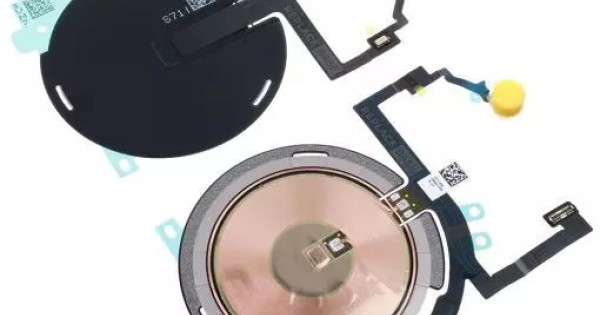
Check the coil flex for a crease or a tear. The coil sits behind the back glass and is easy to damage during a rear repair.
When is it the charging circuit?
When the coil is good and the device still does not charge.
If a known-good coil and charger still fail, the fault is in the wireless charging circuit on the board. That is a board-level repair.
The same circuit may also affect other charging behaviour, so check whether the device charges by cable before deciding.
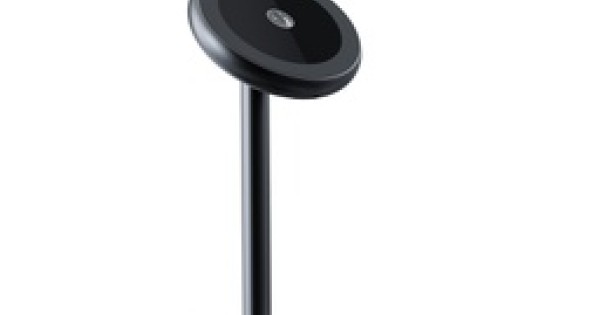
What about the case and the charger cable?
Both can reduce or stop the charge.
A thick case increases the distance between the coils and reduces efficiency. A case with a metal plate or a card holder can block the field entirely.
The charger’s own cable matters as well. A weak cable may power a small charger but fail to deliver enough for a fast wireless charge.
How do you test charging speed?
With a known device and a timed charge.
Place a known-good phone on the charger and note the percentage gain over ten minutes. If the gain is normal, the charger is working at its rated level.
Then repeat with the customer’s device. A slower gain points at the coil or the alignment rather than the charger.
What if it charges intermittently?
Usually alignment, a damaged coil or a loose connector.
An intermittent charge that stops when the phone is moved suggests a coil connection that is not secure. A charge that stops when the phone warms up suggests a different fault.
Test with the phone still and then with a slight movement. The pattern tells you which part to inspect.
How do you inspect a rear repair?
Check the coil, the magnets and the adhesive.
A back glass replacement can leave the coil misaligned, the magnet array shifted or the flex pinched. Open the device and check all three before ordering a new coil.
The rear repair method is described in iPhone back glass replacement.
What do you tell the customer?
What works, what does not, and what the repair involves.
If cable charging works and wireless does not, say so. That narrows the fault to the coil or the wireless circuit.
If the fault is a case or a charger, say that too. A customer who is sold a repair they did not need will not return.
How do you price the repair?
The coil, the rear glass work and the test.
A coil replacement is a moderate job that involves opening the device and removing the back glass. Price the labour as well as the part.
If the fault is on the board, the price changes entirely. Quote the diagnosis first.
| Symptom | Likely cause | Test |
|---|---|---|
| No charge at all | Charger or coil | Known charger, another phone |
| Charges off-centre only | Alignment | Reposition without a case |
| Stops when moved | Coil connector | Inspect the flex |
| Slow charge | Case or weak cable | Remove the case, try another cable |
| Works on plain pad only | Magnet array | Check the ring behind the glass |
| No charge after rear repair | Coil misaligned | Compare with the original |
The table is a quick reference, not a substitute for the tests. A charger that works with another phone is the fastest way to rule out the accessory.
Case thickness varies more than customers expect. A case marketed as “wireless charging compatible” can still be too thick for a 15W charger.
A magnetic charger that holds the phone but does not charge usually points at a damaged magnet ring or a coil that has shifted. Both are visible once the back glass is off.
Test the wireless charge at the end of a rear repair as a standard step. It takes a minute and catches the fault before the customer does.
Record the charger used and the result. If the customer’s charger is the problem, the note settles the conversation.
| Check | How | What it proves |
|---|---|---|
| Known charger | Another phone | Charger works |
| No case | Direct placement | Case is not blocking |
| Alignment | Centre the phone | Coil overlap |
| Timed charge | Ten minutes | Charge rate |
| Coil flex | Visual inspection | Tear or crease |
| Magnet ring | Compare position | Array intact |
| Board | Known coil | Circuit fault |
The checks move from the cheapest to the most expensive, which is the right order for both the shop and the customer.
Most wireless faults are solved before the device is opened.
| Part | Function | Failure sign |
|---|---|---|
| Charger coil | Sends power | No charge on any phone |
| Phone coil | Receives power | No charge on any charger |
| Magnet ring | Aligns the phone | Only works off-centre |
| Coil flex | Connects to the board | Intermittent charge |
| Shield | Holds the contact | Works only when pressed |
| Charging circuit | Regulates power | Coil good, no charge |
| Case | Protects the phone | Blocks or slows charge |
Each part has a distinct failure sign, which is why the tests can be ordered rather than guessed.
A charger that fails on every phone is easy to identify. A phone that fails on every charger is also easy, once a known-good charger is used.
The hard cases sit in between: a phone that charges on one pad but not another, or a case that works in winter and fails in summer.
Record the charger model and the case when the customer reports an intermittent fault. Those two details explain most of the difficult cases.
A phone that charges on a flat pad but not on a stand is usually an alignment problem, not a coil fault.
A phone that charges slowly on every pad may have a coil that is partially damaged, or a rear repair that left the coil misaligned.
Compare the charging rate with a known device before and after any rear work. The rate is a better measure than the presence of a charge.
Record the rate in the job sheet. It turns a vague complaint into a number the next technician can use.
A phone that charges on a magnetic charger but not a flat pad usually has an alignment or coil-position issue.
A phone that charges on a flat pad but not a magnetic one may have a damaged magnet ring or a case that interferes.
Test both types of charger before deciding which part to inspect.
A customer who only owns one type may never have noticed the fault until they changed accessory.
Keep a known magnetic charger and a known flat pad on the bench for testing.
Two chargers and two phones cover almost every wireless diagnosis.
Record which combination failed, because the answer points directly at the part. Two known chargers and two known phones cover almost every wireless diagnosis, and a pair of known chargers on the bench is enough for most days.
What is the one rule for wireless charging?
Test the charger, the case and the alignment before the coil.
Most wireless charging complaints are solved without opening the device. A known charger, no case and a central placement rule out the simple causes first.
Around it sit the ordinary disciplines: test with another phone, check the coil flex, inspect a previous rear repair and quote the diagnosis separately. Magnetic charging standards are described in MagSafe and Qi2 compatibility, back glass work in iPhone back glass replacement, and charger choice in fast chargers and GaN. Consumer contracts sit under the Consumer Rights Act 2015, disposal under the Waste Electrical and Electronic Equipment Regulations 2013, product safety with the Office for Product Safety and Standards, electrical safety under HSE electrical safety, and customer records under ICO guidance for organisations.
FAQ
Why does my phone only charge wirelessly sometimes?
Intermittent charging usually means alignment, a thick case or a coil connection that is not secure. Try a known charger without a case before opening the device.
Can a case stop wireless charging?
Yes. A thick case, a metal plate or a card holder can move the coil out of range or block the field. Remove the case and test again.
Does a back glass replacement affect wireless charging?
It can. The coil and magnet array sit behind the glass, and a misaligned or pinched flex will stop or weaken the charge.
When is wireless charging a board fault?
When a known-good coil and charger still fail. That points at the wireless charging circuit on the board, which needs board-level diagnosis.
Coils and chargers that line up. Digi4u stocks wireless charging parts and magnetic chargers with the model stated.
