


MacBook Not Charging: Port, Cable, Battery or Board
Need this part? We stock tested replacement parts with same-day UK dispatch and a 12-month warranty.

A MacBook that will not charge is a diagnosis problem before it is a parts problem. The fault can sit in the charger, the cable, the port, the battery or the charging circuit on the board.
Working through them in order takes twenty minutes and prevents replacing a battery that was never at fault.
What should you check first?
The charger, the cable and the wall socket.
Try a known-good charger and cable before anything else. A failing USB-C cable can deliver power to a phone and fail on a laptop, because the laptop draws more current.
Check the wall socket as well. A socket that powers a lamp may still fail under the load of a laptop charger.
How do you tell whether the MacBook sees the charger?
From the menu bar and the system report.
macOS shows whether the device is connected to power and whether it is charging. System Information reports the wattage and the charger type, which tells you what the MacBook thinks it has.
If the menu bar says “not charging” but the charger is connected, the device sees power but is not accepting it. That points at the battery, the port or the charging circuit.
How do you check the port?
Look inside, try another port, and test the cable in both.
USB-C ports collect lint and can wear at the contacts. A bright light and a plastic probe will show whether the port is clean and whether the pins are straight.
On a MacBook with two ports, try both. A fault that follows one port is a port problem; one that follows both is more likely the charger or the board.
What does the battery condition tell you?
Whether the cell is serviceable, not whether it charges.
A battery can report a service condition and still accept a charge, and a healthy battery can sit in a device that will not charge. The condition is useful context, not a verdict.
Check the cycle count as well. A machine with a high count and a service warning is a candidate for a cell, but the charging path still has to work.
When is it the charging circuit?
When a known-good charger and port still fail.
If the MacBook sees the charger but does not charge, and the battery is known good, the fault is on the board. The charging circuit and its power path are the usual suspects.
That is a board-level repair. It needs a schematic, a meter and the skill to work on a dense board, and it is not a parts swap.
What about the MagSafe models?
The connector, the cable and the adapter each fail separately.
Older MacBooks use a MagSafe connector, which can be damaged by a pulled cable or a bent pin. The LED on the connector is a useful signal: amber means charging, green means full, and no light means no power.
Try a known-good adapter before opening the machine. A failed adapter is much cheaper than a board repair.
How do you test the battery?
With the charger connected and a load on the machine.
Open a demanding application and watch the charge level. A battery that drops while plugged in is not accepting current, which points at the battery or the charging circuit.
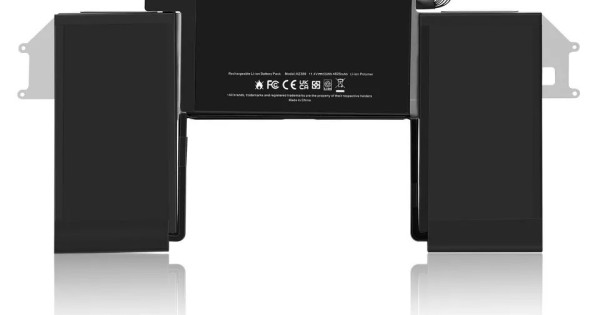
Check the connector as well. A battery connector that is not fully seated can produce the same symptom, and reseating it costs nothing.
When should you replace the battery?
When the cell is serviceable, swollen or unable to hold charge.
A swollen battery is replaced regardless of the charging behaviour, because it is a safety item. A cell that holds charge but cannot deliver current is also a candidate.
A cell that is healthy and still refuses to charge points elsewhere. Replacing it will not fix the fault.
How do you price the diagnosis?
As a separate step, with a range for the repair.
The fault could be a cable, a port, a battery or a board, and the price range is wide. Quote the diagnosis first, then the repair once the cause is known.
That structure protects the shop from absorbing a board repair inside a battery price, and it gives the customer a clear decision.
What should you tell the customer?
What the tests showed and what happens next.
If the fault is a cable or a port, say so and quote the simple repair. If it is the board, explain the difference in cost and time before starting.
A customer who understands the sequence is far less likely to assume the shop is guessing.
| Symptom | Likely cause | Test |
|---|---|---|
| No light, no charge | Charger or cable | Known-good charger |
| Charger recognised, not charging | Battery or board | System report and load |
| Charges in one port only | Port fault | Try both ports |
| Charge drops under load | Battery or circuit | Demanding app while plugged in |
| Service battery warning | Cell condition | Cycle count and runtime |
| No charge after liquid | Board corrosion | Inspect the charging area |
The sequence matters. Start with the cheapest and most reversible checks, then move inwards.
A charger that is under-rated for the machine will charge slowly and may not keep up under load. Check the wattage rather than assuming any USB-C charger will do.
If the machine charges only when switched off, the fault is likely in the charging circuit rather than the battery. That is a board-level diagnosis.
Record the charger wattage and the port used on the job sheet. The detail explains why a fault appears at home but not on the bench.
Quote the diagnosis separately so the customer can see the difference between a cable and a board repair before committing.
| Check | Tool | Result to record |
|---|---|---|
| Wall socket | Known load | Live or dead |
| Charger | Known-good unit | Wattage |
| Cable | Known-good cable | Charges or not |
| Port | Light and probe | Clean, bent or worn |
| System report | macOS | Charger recognised |
| Battery | Load test | Holds or drops |
| Board | Current meter | Draw and rail |
Seven checks in sequence, each narrowing the fault. None of them requires opening the machine until the last two.
That order is what keeps a simple cable fault from becoming a board repair.
| Model type | Connector | Common fault |
|---|---|---|
| MacBook Air M1 | USB-C | Cable or port wear |
| MacBook Pro 13 | USB-C | Port or charging circuit |
| MacBook Pro 14/16 | MagSafe 3 and USB-C | Connector or adapter |
| Older MacBook Air | MagSafe 2 | Connector or adapter |
| Older MacBook Pro | MagSafe 1 or 2 | Connector or cable |
The connector type sets the first test. A MagSafe LED gives a quick answer, while a USB-C machine needs the system report.
Adapters fail as often as cables, particularly on the older MagSafe models. Try a known-good adapter before opening the machine.
On USB-C machines, try both ports. A fault that follows one port is a port repair; one that follows the machine is a board or battery problem.
Record the connector type and the charger wattage. The combination explains most charging complaints before any part is ordered.
A machine that charges only when the lid is at a certain angle has a cable or hinge problem rather than a battery fault.
A machine that charges when switched off but not when running points at the charging circuit. Those two patterns are worth knowing before the device is opened.
Test with the battery connected and the charger attached, then watch the current draw while the machine boots. The change across boot is often the clearest signal.
Record the draw at each stage, because the numbers explain the fault better than a description.
A machine that charges only when the battery is disconnected is a board fault, not a battery fault.
That pattern is worth testing before any part is ordered, because it changes the repair entirely.
Tell the customer what the pattern means and what the next step costs.
A charger that is rated below the machine’s requirement will charge slowly and may not keep up under load.
Check the wattage on the adapter, not just the connector type.
Record the wattage on the job sheet so the next test uses the same baseline. That number is the baseline for the next test.
How do you prevent repeat faults?
Use the right charger and keep the port clean.
A cheap charger that does not meet the laptop’s power requirement will charge slowly and stress the port. A cable that is pulled out by the cord damages the connector over time.
Advice at the counter is part of the repair. A customer who knows how to charge the machine properly gets more life from the fix.
What is the one rule for MacBook charging?
Test the charger and the port before you open the machine.
Most charging faults are outside the laptop. A known-good charger and a clean port rule out the simple causes before any part is ordered.
Around it sit the ordinary disciplines: check both ports, read the system report, test under load and quote the diagnosis separately. MacBook model matching is described in matching MacBook parts by model number, battery work in MacBook battery replacement, and charger selection in fast chargers and GaN. Consumer contracts sit under the Consumer Rights Act 2015, disposal under the Waste Electrical and Electronic Equipment Regulations 2013, product safety with the Office for Product Safety and Standards, electrical safety under HSE electrical safety, and customer records under ICO guidance for organisations.

FAQ
Why does my MacBook say not charging when it is plugged in?
The MacBook sees power but is not accepting it. Check the charger wattage, the cable, the port and the battery condition before assuming a board fault.
Can a USB-C cable charge a phone but not a MacBook?
Yes. A laptop draws more current, and a cable that is damaged or under-rated can fail at the higher load. Test with a known-good cable rated for the machine.
Does a service battery always need replacing?
Not always. A battery can report a service condition and still work. Replace it when it is swollen, cannot hold charge or cannot deliver current under load.
When is a MacBook charging fault a board repair?
When a known-good charger, cable and port still fail to charge a healthy battery. That points at the charging circuit and needs board-level diagnosis.
Chargers and ports for the whole range. Digi4u stocks MacBook parts and charging accessories on trade terms.
