


True Tone Missing After a Screen Replacement: Causes and Options
Need this part? We stock tested replacement parts with same-day UK dispatch and a 12-month warranty.

True Tone is one of the first things a customer notices after a screen replacement, and one of the last things a shop explains. The display looks slightly colder or warmer than before, the setting disappears from Control Centre, and the repair is suddenly a complaint.
The cause is not a faulty panel. True Tone depends on calibration data tied to the original display, and a replacement assembly does not carry that data unless the technician moves it across.
What is True Tone and what controls it?
An automatic white balance using the light sensor.
True Tone shifts the display’s colour temperature to match the light around the device. It relies on the ambient light sensor and on calibration data stored with the display, which is why the feature is tied to the panel rather than to the device alone.
When either part of that chain changes, the feature can stop working. A replacement panel without the original data is the most common cause, and a damaged ambient light sensor is the second.
Why does it disappear after a screen swap?
Because the new panel has no matching calibration data.
The device expects a display whose characteristics it already knows. A bare aftermarket assembly is a different panel with different characteristics, and without the original data the device cannot apply the correction, so it disables the feature.
The setting may vanish from Control Centre entirely rather than simply stopping. That is the device telling you the feature is unavailable, not that the panel is defective.
That is why the feature is described as missing rather than broken. The device is not failing to apply a correction; it is declining to offer one because the data it needs is absent.
Is it the panel or the programming?
Often the programming, not the panel itself.
A good quality assembly can support True Tone if the original display data is transferred or the new panel is programmed correctly. A cheap assembly may lack the hardware needed for that transfer, which is a different limitation.
That distinction matters when a shop is choosing a grade. The cheapest panel may work perfectly as a display and still lose True Tone, while a slightly more expensive assembly with a removable IC keeps the option open.
Can it be restored?
Sometimes, depending on the assembly and the tools.
If the original display is available and the IC can be transferred, the data can move to the new panel. Some assemblies are designed for this, and the process is part of the same IC transfer technique used for other display functions.
If the original panel is gone, the data may be recoverable from a backup or by programming the new assembly with the correct tool. Neither is guaranteed, and the customer should be told before the repair rather than after.
The cost of that step is the reason some shops do not offer it as standard. It adds time and equipment to a job that already has a tight margin, and the customer has to see value in the feature before paying for it.
Ask whether the customer actually used True Tone before quoting the transfer. A short question at the counter separates the people who will notice the loss from those who never touched the setting, and it keeps the quote honest either way.
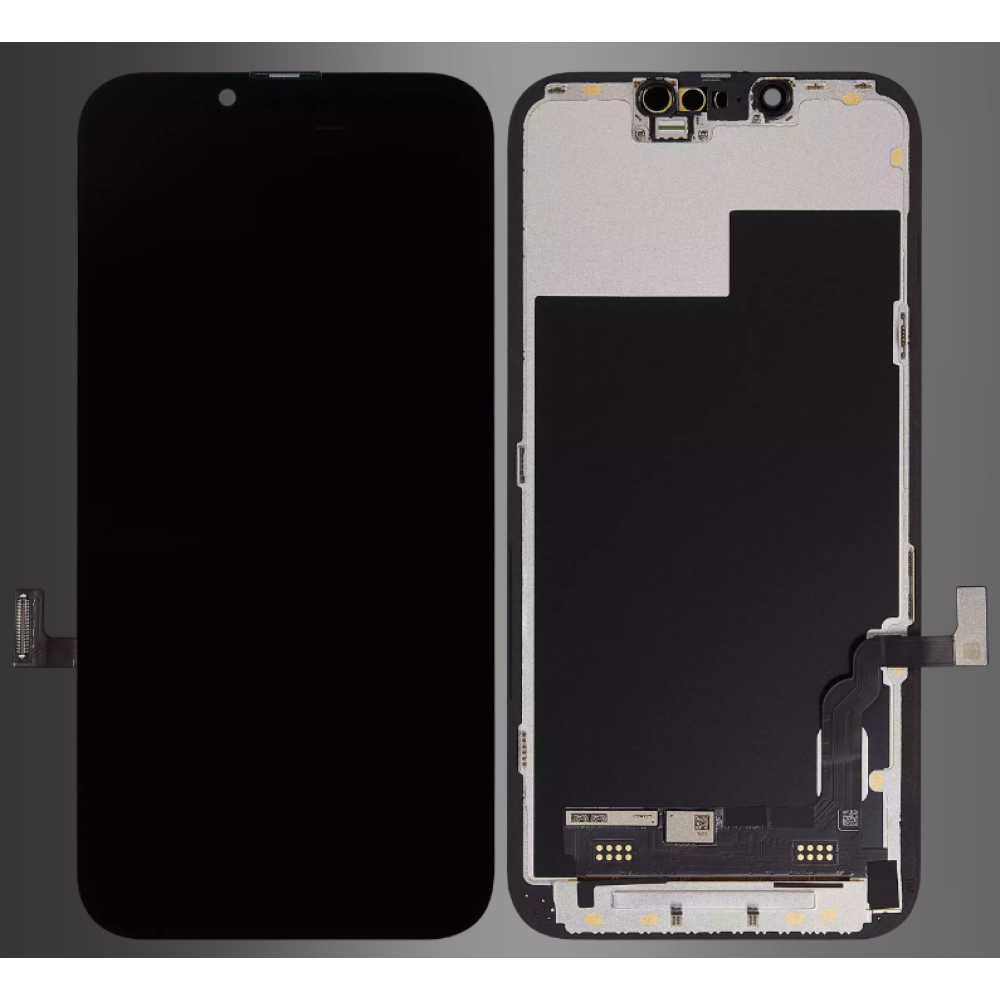
What does IC transfer do?
It moves the original display data to the new panel.
The IC on the display flex carries the identification and calibration data the device expects. Transferring it from the original panel to the replacement keeps that data in the chain, which is why True Tone can survive the swap.
The technique is not trivial. It requires a steady hand, the right station and a panel designed to accept the transfer, and the failure modes are the same ones described in IC transfer and touch failure.
Which models are affected?
Most iPhone models from the X era onward.
True Tone has been part of the iPhone display system for years, and the data relationship has become stricter as the models have advanced. Recent Pro models are the most sensitive, because the display carries more calibration than earlier generations.
Older models can also lose the feature, but the data is sometimes easier to carry across. The model determines the method, so the job sheet should record the exact device rather than a family name.
What should you tell the customer before the repair?
Whether True Tone is expected to survive, and why.
Tell them before the work, not after. A customer who is warned that the feature may be lost can decide whether to pay for the IC transfer, while one who discovers it afterwards treats the repair as a failure.
Keep the explanation simple. True Tone matches the screen to the room, the setting is tied to the original panel, and a replacement may not carry it unless the original data is moved across.
Offer the choice rather than making it for them. Some customers care about True Tone and will pay for the transfer; others never used it and would rather have the lower price. Both are reasonable answers.
The same conversation applies to auto-brightness. If that stops as well, the fault is in the shared sensor flex rather than the display data, and the repair route is different.
How do you test for it?
Open Control Centre before and after the repair.
Check that the True Tone button is present and that toggling it changes the display temperature. Do this before the device is opened, so you know whether the feature worked to begin with.
Repeat the test after fitting the new panel and before sealing. If the button has gone, the data transfer has not worked, and the customer conversation needs to happen now rather than at collection.
What about ambient light sensor faults?
A damaged sensor produces the same symptom.
If the ambient light sensor flex is torn during the transfer, True Tone can stop even with the original data intact. Auto-brightness usually fails at the same time, which is the clue that separates a sensor fault from a data fault.
Test auto-brightness alongside True Tone. A display that changes brightness when the sensor is covered is working; one that does not has a sensor or flex problem, and the panel may be fine.
How do you record it?
One line on the job sheet, with a photograph.
Record whether True Tone was present before the repair and whether it survived. A photograph of Control Centre takes seconds and settles any later question about what the device did before it was opened.
The same record supports a supplier conversation. If a batch of assemblies consistently loses the feature, the photograph and the batch reference turn an impression into evidence.
What does a True Tone complaint look like at the counter?
Usually a customer holding the phone next to another device.
The customer says the screen looks colder than before, or that a friend’s identical phone looks warmer. They may have found the True Tone toggle missing and concluded that the replacement panel is faulty.
The job sheet from the original repair is the first thing to check. If True Tone was not recorded at intake and the original panel is gone, the shop cannot prove the feature worked before, and the conversation becomes a negotiation rather than a diagnosis.
If the original panel is still in stock, the data can sometimes be recovered. If it is not, explain what the feature depends on and offer the options that remain, rather than promising a fix that may not exist.
That conversation is much easier when the risk was disclosed at the quote stage. A customer who chose the cheaper panel knowing True Tone might be lost is a customer who understands the outcome.
A note on the invoice is enough: the grade fitted, whether True Tone was tested, and what the customer was told. That record is worth more than a long explanation at collection.
It also gives the next technician something to work from if the device returns.
When should you decline to promise it?
When the original panel is unavailable.
Without the original display, the data may not be recoverable, and promising True Tone would be a promise the shop cannot keep. Say so at the quote stage and let the customer choose the grade with that in mind.
That is not a limitation to hide. It is a fact about how the display system works, and explaining it makes the shop look more competent rather than less.
What is the one rule for True Tone?
Check it before the repair and disclose the risk after.
A two-second check at intake and a sentence at the counter prevent almost every complaint. The panel can be good and the feature still be lost, and the customer needs to know that before the adhesive goes down.
Around it sit the ordinary disciplines: record the model, test auto-brightness, keep the original panel until the job is signed off and note the grade. Apple documents display behaviour at about genuine iPhone displays and parts history at iPhone parts and service history, replaced panels are waste under the Waste Electrical and Electronic Equipment Regulations 2013, product safety sits with the Office for Product Safety and Standards, and retail customers keep their rights under the Consumer Rights Act 2015.
FAQ
Why does True Tone disappear after a screen replacement?
True Tone depends on calibration data tied to the original display. A replacement panel without that data cannot apply the correction, so the device disables the feature.
Can True Tone be restored after a screen replacement?
Sometimes. If the original display or its IC is available, the data can be transferred to a compatible assembly. Without the original panel, recovery is not guaranteed.
Does a genuine panel always keep True Tone?
Not automatically. The panel has to carry the correct data for that device, which is why the transfer or programming step matters as much as the part itself.
How can I check True Tone before a repair?
Open Control Centre and toggle the True Tone button. If it is present and changes the display temperature, the feature was working before the device was opened.
Panels and programming options stated up front. Digi4u lists assembly grades so a True Tone conversation starts with facts.
