


NFC Not Working After a Repair: Antenna, Glass and Contact
Need this part? We stock tested replacement parts with same-day UK dispatch and a 12-month warranty.

NFC failures are quiet. The phone still works, the camera is fine, and the customer only discovers the problem at a payment terminal or a door reader.
After a repair, the usual cause is the antenna contact behind the back glass or the frame. The repair itself was fine; the contact did not survive it.
What does NFC use in an iPhone?
An antenna behind the top of the back glass.
The NFC antenna sits near the camera area, connected to the board through a contact or a flex. It is separate from the wireless charging coil, although the two sit close together.
That means a back glass repair can affect NFC without affecting wireless charging, and vice versa.
Why does it fail after a repair?
A bent contact, a trapped flex or a missing shield.
When the back glass is removed, the antenna contact can be bent or torn. When it is refitted, the contact may not press against the board properly.
A frame swap can also leave the original contact misaligned. The part is small and easy to overlook when the focus is on the glass.
How do you test NFC?
With a card or a tag the phone can read.
Hold an NFC tag or a contactless card against the top of the phone and open an app that reads it. A working phone will register the tag within a second or two.
Test before and after the repair. A baseline is what proves the fault was introduced rather than pre-existing.
| Symptom | Likely cause | Check |
|---|---|---|
| No tag detected | Antenna contact | Inspect the contact behind the glass |
| Works only when pressed | Contact pressure | Check the shield and the pad |
| Payments fail, tags work | Software or bank app | Check the wallet settings |
| NFC works, charging does not | Coil, not antenna | Test wireless charging separately |
| Intermittent detection | Loose flex | Reseat the antenna connector |
| No NFC after frame swap | Contact misaligned | Compare with the original frame |
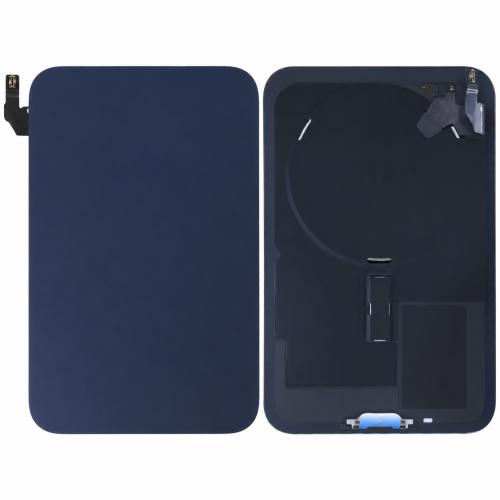
How do you check the contact?
Open the device and inspect the antenna pad.
The contact should sit flat and press against the board when the glass is fitted. A bent tab or a missing shield will stop it making contact.
Compare the position with the original part if it is available. A millimetre of misalignment is enough to break the connection.
Can it be repaired without replacing the glass?
Sometimes, if the contact can be straightened.
A bent contact can occasionally be eased back into position. A torn flex or a missing pad needs a new part.
Assess before ordering. A contact repair is much cheaper than a new back glass.
What about software?
Check the wallet and the settings before opening the device.
A card that has expired, a wallet app that needs updating or a region setting can all stop payments while the hardware works.
Test with a tag as well as a card. If the tag reads, the hardware is working and the problem is in the payment app.
What do you tell the customer?
What the test showed and what the repair involves.
If the tag reads but payments fail, explain that the hardware is working and the issue is with the card or the app.
If the contact is damaged, explain that the antenna sits behind the glass and was disturbed during the repair.
How do you prevent it?
Protect the contact during every rear repair.
Note the position before removing the glass, and check it before fitting the new one. A photograph at the start is the simplest protection.
The rear repair method is described in iPhone back glass replacement and the removal options in back glass removal methods.
What is the one rule for NFC?
Test a tag before and after the repair.
A tag test takes seconds and proves whether the hardware works. Without a baseline, the shop cannot show whether the fault was introduced.
Around it sit the ordinary disciplines: photograph the contact, check the shield, test payment separately and record the result. Wireless charging is described in wireless charging faults, magnetic standards in MagSafe and Qi2, consumer contracts under the Consumer Rights Act 2015, disposal under the Waste Electrical and Electronic Equipment Regulations 2013, product safety with the Office for Product Safety and Standards, customer records under ICO guidance for organisations, and electrical safety under HSE electrical safety.
The first step is always a baseline. Test a tag before the repair starts, even on a device that is only in for a screen. It takes seconds and it settles the question of whether the fault was introduced.
A tag test is more reliable than a payment test, because it removes the bank, the card and the app from the equation. If the tag reads, the antenna works.
Payment failures with a working tag usually sit in the wallet app, an expired card or a region setting. Those are not repair issues and should not be charged as such.
When the tag does not read, open the device and inspect the contact. The pad should be clean, flat and pressing against the board when the glass is fitted.
A bent tab can sometimes be eased back into position with a plastic tool. Do not use metal, because the contact is thin and easy to break.
If the pad is torn or missing, the part is replaced. That may be the back glass assembly or a separate antenna flex, depending on the model.
Check the shield as well. A shield that is missing or bent can stop the contact pressing down, even when the pad itself is fine.
Photograph the contact before closing. If the customer returns with the same complaint, the photograph shows what was done.
Test the tag again after the repair and before the customer leaves. A second test on the counter is the final proof that the repair worked.
Record the model, the part and the test result. NFC is invisible until it fails, and the record is what turns a guess into a documented repair.
| Test | How | What it rules out |
|---|---|---|
| Tag read | Hold a tag at the top | Antenna and circuit |
| Card read | Wallet with a card | Payment app |
| Second app | Another reader | App fault |
| Case off | Direct contact | Case interference |
| Contact check | Open and inspect | Bent pad or shield |
| Compare frame | Original part | Misalignment |
Each test removes one possible cause. By the end, the remaining cause is specific enough to repair.
That discipline is what stops a shop replacing a back glass when the real fault is an expired card.
Keep the tag on the bench as a standard tool. A single NFC tag is all the test equipment the job needs.
It also gives the shop a way to demonstrate the repair to the customer at collection.
| Repair | NFC risk | Check |
|---|---|---|
| Back glass | Contact disturbed | Tag test before and after |
| Frame swap | Contact misaligned | Compare with the original |
| Screen | Low, but check | Tag test at intake |
| Charging port | Shield disturbed | Inspect the contact |
| Battery | Low | Tag test after closing |
The table shows why a tag test belongs in the intake routine for any rear repair.
A screen repair rarely affects NFC, but the test is so quick that there is no reason to skip it.
A charging port repair can disturb the shield that holds the contact, so the check belongs there too.
Record the result for every repair, not just the ones where NFC is mentioned. The baseline is the value.
A tag test at intake is also a useful way to spot a device that has been opened before. A missing shield or a bent contact is visible once the test fails and the device is inspected.
If the customer uses a case with a card holder, test with the case on as well. A card can interfere with the field, and the phone may work perfectly without it.
That test is quick and avoids a repair that would not have changed anything.
Record whether the case was present during the test. It explains an intermittent complaint that never appears on the bench.
Keep a known tag with the test kit and replace it if it stops reading on a known-good phone.
A phone that reads tags but fails at a payment terminal may have a wallet or bank issue rather than an antenna fault.
Test with a second card and a second terminal before opening the device.
If both fail, the hardware is the suspect; if only one fails, the card or terminal is.
Record which terminal and card were used. That detail makes the conversation with the customer much shorter.
A phone that has been in a case with a magnetic mount may have a magnet close to the antenna.
Test without the mount before assuming a hardware fault.
That check is quick and avoids a repair that would not have changed anything.
Record the accessory if it is present.
A customer who uses a magnetic mount every day may only notice NFC failures when they pay. Test without the mount before assuming a hardware fault, then record the accessory on the job sheet for the next visit.
That record is what makes an intermittent complaint repeatable, and repeatable faults are the ones a shop can actually fix. A repeated fault is a fault the shop can fix, and it is worth writing down.
FAQ
Why did NFC stop working after a back glass repair?
The antenna contact behind the glass was bent, trapped or misaligned. It has to press against the board to work.
How can I test NFC on an iPhone?
Hold an NFC tag or a contactless card against the top of the phone and open a tag-reading app. A working phone registers it within a second or two.
Can NFC be fixed without replacing the back glass?
Sometimes. A bent contact can be straightened, but a torn flex or missing pad needs a new part.
Does wireless charging use the same antenna?
No. NFC and wireless charging use separate parts, although they sit close together, so one can fail while the other works.
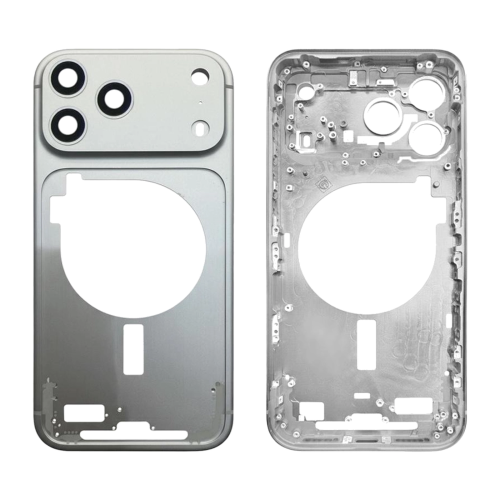
Parts that keep the antenna path intact. Digi4u supplies back glass and frame assemblies with the NFC contact in mind.
