


iPhone 12 Battery Replacement: Matching the Cell and the Connector
Need this part? We stock tested replacement parts with same-day UK dispatch and a 12-month warranty.

The iPhone 12 is now old enough for battery replacement to be routine and new enough to still be worth repairing. The job is well understood, but the model and the connector still cause mistakes.
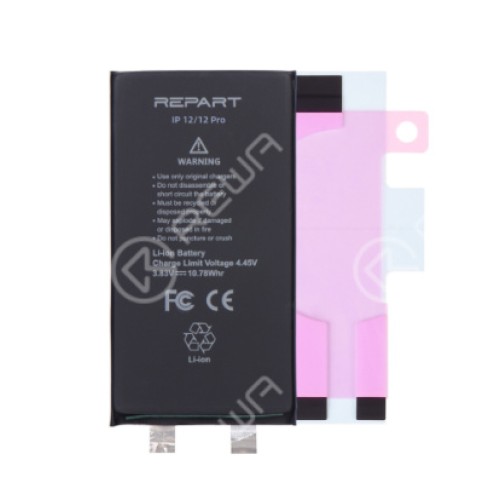
A battery that fits the 12 Pro may not fit the 12 mini, and a cell that matches on paper can have the wrong connector orientation. The check takes a minute and prevents the most common failure.
Which battery fits the iPhone 12?
A model-specific cell, not a family part.
The iPhone 12, 12 mini, 12 Pro and 12 Pro Max each use a different battery. The 12 and 12 Pro are close in capacity but the connector and the mounting differ.
Match the model number before ordering. A2633 is the standard iPhone 12, and the code should appear on the order and the job sheet.
How do you confirm the model?
Settings, About, model number.
The model number is the only reliable identifier once a device has been repaired or reboxed. The marketing name is not enough, because the housing may have been changed.
Record it before the part is ordered. The identification method is described in checking the iPhone model before ordering.
What capacity should the replacement have?
The original rating for that model.
The 12 and 12 Pro use a cell in the region of 2,800 mAh, and the replacement should match the original specification. A cell that claims much more in the same size is quoting a peak figure.
Check the connector and the flex on arrival. A cell that matches on the label but not in the hand is a return waiting to happen.
Why do iPhone 12 batteries fail now?
Cycles, heat and constant charging.
A device charged daily for four years has been through well over a thousand cycles. Capacity loss becomes visible as shorter runtime and shutdowns under load.
Heat accelerates it, particularly wireless charging and gaming while plugged in. That history explains why two 12s of the same age behave differently.
How do you read battery health?
As an estimate, alongside behaviour.
The health figure is derived from voltage behaviour rather than measured directly. It is useful context but does not describe whether the cell can deliver current under load.
A device reporting 85 per cent can still shut down at 30 per cent. The explanation is set out in what the battery health percentage tells you.
What does the parts pairing message mean?
That the device cannot authenticate the cell.
iOS can show a service message when a battery is replaced with a part it does not recognise, and it may stop reporting health. The device usually still works.
Tell the customer before the repair. A warning that is explained is information; one that is discovered afterwards is a complaint.
What does the replacement involve?
Opening the display and lifting the cell.
The iPhone 12 opens from the display side. Heat softens the perimeter adhesive, a suction cup lifts a corner and a pick runs the edge.
Once the panel is free, the battery is disconnected and the pull-tabs are drawn out slowly. If they snap, the cell is eased out with solvent and a plastic tool.
How do you avoid damaging the display?
Open like a book and support the panel.
The display flexes are short and run along one side. Lifting the panel vertically or laying it flat without support puts tension on them.
Disconnect the battery before anything else and keep the panel on a clean mat. A screen damaged during a battery job turns a routine repair into an expensive one.
How do you calibrate after fitting?
One full charge and discharge.
A full cycle lets the device relearn the cell’s range. It does not change the capacity, but it aligns what the device reports with what the cell can do.
Record the before and after behaviour. If shutdowns continue after a new cell and a cycle, the fault is elsewhere.
When is the fault not the battery?
When it charges slowly or drains while off.
A port with debris, a worn cable or a failing charging circuit can all produce symptoms the customer attributes to the battery. A device that drains while switched off is usually a board fault.
Test the charging path before ordering a cell. The diagnosis is described in diagnosing a charging port.
What should the job be priced at?
The cell, the opening and the gasket.
The battery is a modest part; the labour is not. Opening a glued display, cleaning the frame and fitting a new gasket takes longer than the cell replacement itself.
Include a small allowance for the occasional warranty claim. A price built on the assumption that none fail is a price that loses money on the first return.
What should you record?
The model, the part and the health before and after.
Photograph the settings screen at intake and note the reported figures. That record supports the customer conversation and any later claim.
Note whether a pairing message appeared. It is the single most common reason a customer returns believing the repair failed.
| Symptom | Likely cause | Test |
|---|---|---|
| Shuts down at 30% | Cell cannot deliver current | Load test |
| Drains overnight | Cell or board draw | Standby current check |
| Charges slowly | Port, cable or cell | Known cable and current draw |
| Health shows 85% | Estimate, not capacity | Behaviour under load |
| Health missing after swap | Parts pairing | Service message check |
| Hot while charging | Cell or charging circuit | Temperature and draw |
The table is a starting point, not a diagnosis. A single symptom can have three causes, and the test is what separates them.
Record the result of each test on the job sheet. The pattern across several tests is what points at the cell rather than the charging path.
A device that passes every test but still feels slow to the customer may need a software check rather than a part. Battery health is only one input.
Keep the old cell until the job is signed off. If the new cell behaves unexpectedly, the original is a known quantity for comparison.
Explain the result in plain language at collection. A customer who understands what was tested is far less likely to return with the same complaint.
| Check | What it shows | Record |
|---|---|---|
| Model code | Which cell fits | A2633 on the job sheet |
| Health figure | Estimated capacity | Photograph the settings |
| Load test | Current delivery | Shutdown or stable |
| Charge test | Charging path | Rate and temperature |
| Pairing message | Part authentication | Shown or absent |
| Cycle count | Usage history | Number at intake |
Six checks, each taking a minute, and the diagnosis is documented rather than remembered.
That record is what makes the difference between a repair and a conversation about a repair.
| Model | Battery family | Confirm |
|---|---|---|
| iPhone 12 | 12 series cell | A2633 |
| iPhone 12 mini | Smaller cell | Model code |
| iPhone 12 Pro | 12 Pro cell | Model code |
| iPhone 12 Pro Max | Largest cell | Model code |
| Regional variant | Same family | Part label |
The table is a reminder that the family name is not enough. The model code is the field that decides the order.
A 12 Pro cell may physically fit a 12, and the connector is not guaranteed to match. Check both before fitting.
When the part arrives, compare it with the old cell before opening the device. That comparison is the last chance to catch a wrong order.
Record any difference in capacity or connector, even if the part still fits. The note explains the behaviour if the customer reports a problem.
The job is routine, but the record is what separates a professional repair from a swap. Photograph the settings, the label and the finished device.
If the customer reports the same shutdowns after the repair, check the charging path before blaming the new cell.
A second diagnosis is cheaper than a second battery, and it is the honest next step.
The same rule applies to a device that charges slowly after a new cell. The cell may be fine and the port may be the fault.
Check the port and the cable before ordering another battery.
A shop that tests in the right order keeps the customer and avoids a second part.
A battery job is also a good moment to check the charging port for lint, because the device is already open.
That check takes seconds and can prevent a second visit for a separate fault.
Record the condition of the port on the job sheet. It is a five-minute check with the device already open on the bench, and it is worth doing every time.
What is the one rule for iPhone 12 batteries?
Confirm the model, then explain the warning first.
The model code protects the part choice and the conversation protects the repair. Both take less than a minute and prevent the two failures that turn a routine job into a return.
Around it sit the ordinary disciplines: disconnect the cell first, support the display, fit a new gasket and record the result. The health figures are explained in cycle count versus health, Apple documents batteries at about genuine iPhone batteries and parts history at iPhone parts and service history, replaced cells are waste under the Waste Electrical and Electronic Equipment Regulations 2013, handling comes under risk assessment at work, and retail customers keep their rights under the Consumer Rights Act 2015.
FAQ
Which battery fits the iPhone 12?
The cell designed for that model. The 12, 12 mini, 12 Pro and 12 Pro Max use different batteries, so confirm the model number before ordering.
Will a new iPhone 12 battery show a warning?
It may show a service message and stop reporting health if the device cannot authenticate the part. The phone usually still works, but the customer should be told first.
How long does an iPhone 12 battery replacement take?
Around forty-five minutes to an hour, including opening the display, fitting the cell, replacing the gasket and running a charge test.
Does the battery need calibration?
One full charge and discharge helps the device relearn the range. It does not change the cell’s capacity or guarantee the health figure resets.
The right cell for the 12 and the 12 Pro. Digi4u supplies iPhone batteries with the model checked before dispatch.
