


Repair Management Systems: What a Shop Actually Needs
Need this part? We stock tested replacement parts with same-day UK dispatch and a 12-month warranty.
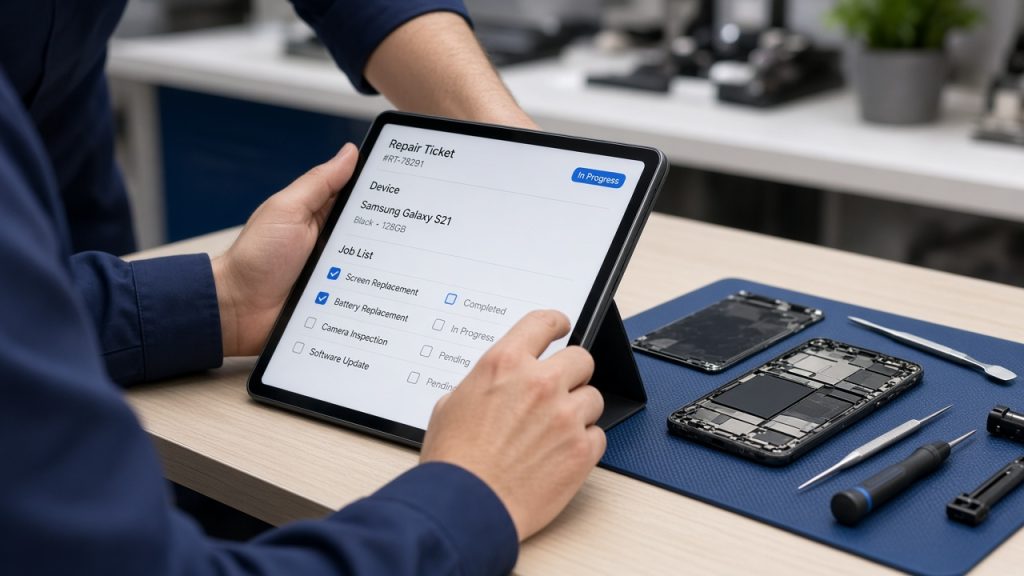
Most small repair shops start with a notebook, move to a spreadsheet and then wonder whether they need software. The answer depends on the volume, not on the ambition.
A repair management system is not a website and it is not a till. It is the record of what came in, what was done, what it cost and what went back.
What should a repair system do?
Track a device from intake to collection.
At minimum it should record the customer, the device, the fault, the parts used, the price and the status. Everything else is a convenience.
It should also make the next action obvious. A job that is waiting for a part should look different from one waiting for a test.
If the system cannot answer “where is this repair?” in seconds, it is not doing its main job.
What does a job sheet need?
Model, fault, accessories, price and a signature.
The model code and the fault description protect both the shop and the customer. The accessories list prevents the “my SIM was in it” conversation.
The price and the terms should be visible at intake, not added at collection. A signature confirms the customer saw them.
A photograph of the device at intake is worth adding where the system supports it.
How do you track parts?
By line, against the job.
The parts used should be recorded on the job, with the batch where it matters. That record is what allows a warranty claim later.
Stock should reduce when the part is used, not when the job is invoiced. Otherwise the shelf and the system drift apart.
A simple pick log is enough for a small shop; the aim is that the count matches the shelf.
How do you handle customer updates?
With a status and a date, not a note in your head.
A job that is waiting for a part should have an expected date and an owner. The system should show which jobs need a call today.
That single view prevents most delay complaints. The customer hears from the shop before they have to ask.
Record the contact attempt as well, so the next person knows what was said.
| Field | Why it matters | Where it is used |
|---|---|---|
| Model code | Correct part | Ordering |
| Fault | Diagnosis and quote | Bench |
| Accessories | Returns and disputes | Collection |
| Parts used | Warranty and margin | Claim |
| Status | Customer updates | Counter |
| Price | Invoice and VAT | Books |
What about invoicing and VAT?
It should produce a proper invoice, not a receipt.
The invoice needs the business details, the VAT number where registered, the part and labour split, and the date.
That format makes the quarterly return straightforward and gives the customer a document they can keep.
The bookkeeping routine is described in invoices, VAT and records.
How do you choose a system?
Start with the process, then find the software.
Write down the five things the shop does every day and check whether the system supports them without workarounds.
Ask for a trial with real jobs, not a demo. A demo shows the best case; a trial shows the Friday afternoon.
Check the export. If the data cannot be taken out, the shop is locked in.
What does migration look like?
Start with open jobs, not with history.
Move the jobs currently on the bench into the new system and keep the old records for reference.
Importing years of history rarely pays for the effort. The next repair is what matters.
Run both systems for a week if the shop is busy, then switch.
What should you avoid?
Systems that need a consultant to change a price.
If the shop cannot add a service or edit a template without support, the system will lag behind the business.
Avoid features nobody will use. A CRM module that nobody opens is cost without benefit.
Avoid long contracts before the trial has proved the fit.
How do you train the team?
On real jobs, one feature at a time.
Start with intake and status, because those are used every hour. Add invoicing once the first two are reliable.
Write a one-page guide for the counter and keep it visible.
Review the first week’s entries and fix the misunderstanding before it becomes a habit.
What does it cost?
Less than the time it saves at the right volume.
A small shop may pay a modest monthly fee; a busy one pays more but recovers it in fewer missed callbacks and faster invoicing.
The cost that matters is not the subscription. It is the admin time and the jobs lost to a poor process.
Compare the fee with an hour of the owner’s time each week.
How do you measure the benefit?
Fewer missed updates, faster invoicing and a clean stock count.
Measure the month before and the month after. If nothing changed, the system is not being used properly.
The wider numbers are described in repair shop KPIs.
Review the benefit after a quarter and decide whether to keep, change or drop the system.
When is a spreadsheet enough?
When one person runs the bench and the volume is low.
A well-structured sheet with columns for model, fault, price and status can work for a solo shop. The risk is that it is edited by hand and drifts.
Move to a system when two people need to see the same job at once, or when the stock count stops matching.
That is a clearer trigger than a growth target.
What is the one rule for a repair system?
If it does not make the next action obvious, it is not helping.
A system should tell the shop what to do next: call this customer, order this part, test this device. Anything else is storage.
That test also applies to the software’s dashboard. A screen full of charts that nobody acts on is decoration, not management.
The useful view is a list of jobs with the next action and the date. Everything else can wait.
When the list is clear, the shop can answer the phone without opening three tabs.
That is the practical benefit, and it is easier to measure than a feature list.
Start with the list, then add the features that make it accurate.
Do not start with the features and hope the process follows.
That order is what separates a system that is used from one that is abandoned.
Review it after a month and remove anything that is not helping the next action.
A shorter system is easier to keep accurate, and accuracy is what makes it useful.
Keep the job sheet fields stable, and change only what the team actually needs.
The same discipline applies to the parts list: fewer, accurate lines beat a long catalogue nobody trusts.
One useful test is to ask a new member of staff to find a job and tell you its status. If they need help, the system is not clear enough for the counter.
Another is to ask them to invoice a completed job and match the parts used. If that takes more than a few minutes, the stock and the job record are not connected properly.
Those two tasks cover most of the daily use. A system that handles them well is a good system, whatever else it offers.
Keep the training to those tasks first and add the rest later. A team that is fluent in the basics will adopt the extras.
Review the system every quarter against the process. If a step has been added at the bench that the system does not reflect, fix one or the other.
That review is also the moment to remove a field nobody uses. Long forms slow the counter and reduce accuracy.
A short, accurate record is worth more than a comprehensive one that is half-filled.
That principle applies to the software and to the paper form it replaced.
A shop that writes the process first will choose a simpler system and use more of it.
A shop that buys the software first spends the first month adapting the work to the tool.
The difference shows in the second month, when the novelty has worn off.
Keep the process document with the system notes, and review both together.
A system also needs a backup. Export the job list and the stock at least weekly, and keep the file somewhere other than the machine that runs the software.
A shop that loses its job list loses its ability to answer the phone. The backup is not an IT detail; it is part of the service.
Test the restore once, so the process is known before it is needed.
Write down who owns the backup and how often it runs. A backup that depends on somebody remembering is not a backup.
Add the routine to the closing checklist, alongside locking the stock.
A simple weekly export to a separate drive is enough for most small shops, and it takes less time than one missed callback.
Around it sit the ordinary disciplines: record the model and fault, log the parts, keep the status current and export the data. Stock planning is described in planning stock by the numbers, customer data under ICO guidance for organisations, consumer contracts under the Consumer Rights Act 2015, product safety with the Office for Product Safety and Standards, VAT at register for VAT, and company filing at running a limited company.

FAQ
Do I need repair management software for a small shop?
Not always. A spreadsheet can work for a solo shop, but move to a system when two people need the same job at once or the stock count stops matching.
What should a repair job sheet include?
Model code, fault, accessories, price, terms and a signature, plus the parts used and the batch where it matters.
How do I choose a repair system?
Write down the five things the shop does daily, trial the system on real jobs, and check that the data can be exported.
How long does migration take?
Usually a week for a small shop if you move open jobs first and keep the old records for reference rather than importing years of history.
Systems work when the parts are consistent. Digi4u lists grades and batch references so a job record means something.
