


MacBook Air A2337 Screen Replacement: Panel, Hinge and Cables
Need this part? We stock tested replacement parts with same-day UK dispatch and a 12-month warranty.

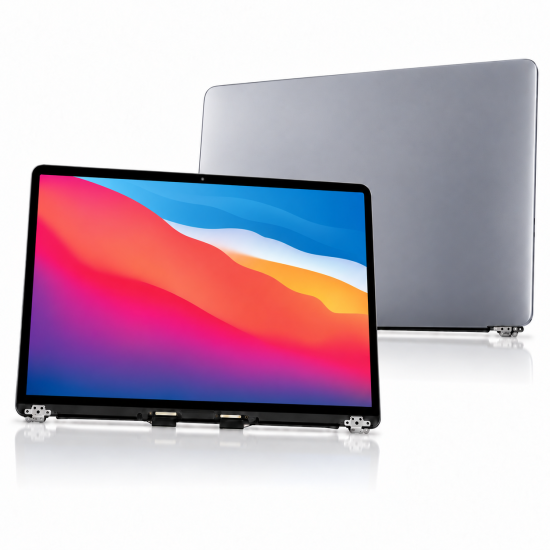
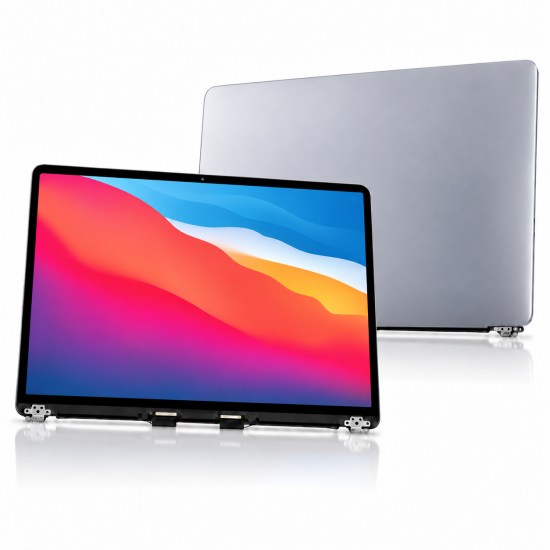
A2337 is the MacBook Air M1 lid family, not a bare LCD glass. Confirm the A-number on the base or in System Information, order a colour-matched full display assembly (or a disclosed panel-only route when that is the real job), release the hinge cables before the lid moves, then test brightness, camera, Wi-Fi antennas and hinge feel before you close the case.
Last updated:
Digi4u is a Cardiff-based UK supplier of MacBook screens, related parts and tools for owners and repair shops.
Which MacBook Air models use the A2337 screen?
The 2020 M1 Air chassis — not the Intel Air panels.
A2337 covers the MacBook Air 13-inch (M1, 2020) family. It is not interchangeable with Intel Air lids such as A2179 or A1932. Connector layout, hinge geometry, camera board position and antenna routing differ even when the closed laptop looks similar on a desk.
Match the A-number before you buy. A marketing name such as “MacBook Air 13” is not enough. Apple reused that name across generations with different lids. If the underside label is worn, open System Information / About This Mac and cross-check the model identifier, then photograph both the label and the old assembly for the job record. Related method: matching MacBook parts by model number.
| Identifier | Typical machine | Fit with A2337 lid? |
|---|---|---|
| A2337 | MacBook Air 13 (M1, 2020) | Yes — target assembly |
| A2179 | MacBook Air 13 (Intel, 2020) | No — different panel/hinge family |
| A1932 | MacBook Air 13 (Intel, 2018–2019) | No |
| A2338 | MacBook Pro 13 (M1) | No — Pro chassis, not Air lid |
Full assembly vs panel-only: which part should you order?
Most A2337 jobs are full lid assemblies; panel-only is a specialist route.
A complete display assembly includes the LCD, lid shell, webcam/sensor cluster and hinge hardware as one unit. That is what most UK shops stock for cracked glass, ink blotches, lines and impact damage. Panel-only (LCD without transferring the full lid cosmetics) can save cost when the aluminium lid and hinges are perfect, but it needs more labour, specialised tooling and a higher risk of cosmetic mismatch or damaged flexes during glass work.
Disclose the route before the customer authorises the job. A cheaper “panel” quote that quietly becomes a full lid once the tech opens the machine destroys trust.
| Option | Best when | Main trade-off |
|---|---|---|
| Full lid assembly | Cracked lid glass, ink damage, unknown prior repairs, busy benches | Higher parts cost; faster, more predictable fit |
| Panel-only / glass service | Perfect cosmetics on the original lid; experienced display tech | Longer labour; higher rework risk |
| Used original lid | Customer wants closest OEM colour/True Tone behaviour | Cosmetic wear; must still test antennas and camera |
| Aftermarket assembly | Budget repair with clear grade disclosure | Brightness/colour variance; confirm warranty text |
How do you confirm colour and grade before fitting?
Match Space Grey, Silver or Gold, then disclose original, refurbished or aftermarket.
A2337 lids shipped in multiple finishes. Ordering the wrong colour forces a re-order or an unhappy handover. Original and carefully refurbished assemblies give the closest colour and sensor behaviour; aftermarket lids can look slightly warmer or cooler under shop lights and may need clearer brightness expectations.
Show the customer the part when practical, note cosmetic marks on the ticket, and write the grade and warranty wording on the invoice. Digi4u lists live A2337 assemblies such as the grey A2337 LCD and the silver A2337 LCD on the MacBook hub.
What is the safe high-level sequence for an A2337 lid swap?
Power down, open the base, disconnect the battery, free the display cables, then move the lid.
Keep screws in a labelled tray — lengths and shoulder shapes vary. Support the lid through every stage so the short flexes are never carrying the weight of the aluminium. Do not treat YouTube speed-runs as a substitute for a model-specific procedure; iFixit’s public Late 2020 Air screen guide is a useful reference for the hinge and antenna order of operations, but shops should follow their own risk assessment and ESD practice.
Transfer Wi-Fi antenna hardware carefully when the replacement requires it. Pinched or half-seated antenna connectors create “new screen, weak Wi-Fi” callbacks that look like board faults.
Which cable and hinge mistakes kill new A2337 panels?
Lifting the lid before the display cables are free is the classic failure.
The hinge is heavy and the flex path is short. Forcing the lid open or closed while a cable is still clipped shears the conductor inside an otherwise perfect assembly. Other common kills include folding a flex against a sharp edge, trapping antenna lines under hinge brackets, overtightening hinge screws into soft threads, and closing the machine while a tool or screw is still under the palm rest.
If a cable looks stressed after a previous repair, photograph it before you continue and quote a cable or assembly upgrade rather than gambling on a marginal flex.
| Mistake | Typical symptom later | Prevention |
|---|---|---|
| Lid moved before cables released | Black screen, flicker, no backlight | Release display data/power flexes first |
| Antenna left half-seated | Weak Wi-Fi / Bluetooth after “successful” screen job | Click-check both antenna lines; test online |
| Pinched flex under hinge | Intermittent lines when opening lid | Route, then torque hinge screws evenly |
| Wrong screw length in hinge | Stripped boss or binding hinge | Labelled tray; never “any black screw will do” |
What about True Tone, camera and sensors?
True Tone depends on display data; camera and sensors need a deliberate post-fit check.
A replacement lid without the original display data may lose True Tone or show a different white point. That is a disclosure item, not a surprise at collection. After fitting, open the camera in Photo Booth or a similar app, confirm FaceTime/camera permissions still work, check the lid angle sensor / sleep behaviour, and confirm microphones if the assembly carries them.
Record whether True Tone is present, absent or restored so the next tech does not chase a “fault” that was disclosed at sale.
How do you test before closing the A2337 case?
Run a short, written checklist while the base is still accessible.
| Check | Pass condition | Fail action |
|---|---|---|
| Image uniformity | No dead zones, heavy blotches or stuck lines | Do not close; quarantine assembly |
| Brightness / white point | Usable range; customer briefed on grade | Note on ticket; replace if outside grade promise |
| Camera | Clear preview; no purple tint / no image | Reseat camera flex; retest |
| Wi-Fi / Bluetooth | Stable association after antenna transfer | Reseat antennas before blaming logic board |
| Hinge feel | Even resistance; lid stays at mid angles | Recheck screw lengths and bracket seating |
| Sleep / wake / clamshell | Lid close sleeps; open wakes as expected | Inspect lid angle path and cable pinch points |
UK dispatch notes for A2337 screen parts
Screen assemblies are not standalone lithium cells — still confirm the live basket rules.
Digi4u aims for same-day dispatch on orders placed before 16:00, Monday to Friday; weekend and after-Friday-16:00 orders go out the next working day. Couriers on the public delivery policy include Royal Mail 48 Tracked and DPD, with free-shipping thresholds that depend on method and zone. Standalone lithium batteries and power banks are DPD-only; a pure screen/lid basket follows the non-battery options unless the cart also contains a loose cell. Re-check the live delivery policy before quoting postage.
When should you refuse or pause an A2337 screen job?
Pause when the chassis is bent, liquid-stained or the customer will not accept grade limits.
A warped hinge line will keep stress on a new lid. Liquid under the display cables or along the antenna bar can make a “screen only” promise dishonest. If the trackpad is already proud from a swollen battery, deal with the cell first — see MacBook battery swelling — or you will re-open the machine days later.
Useful related reading: MacBook screen replacement UK, MacBook screen replacement parts UK, MacBook battery replacement and parts by model number.
A2337 display work often arrives with battery health questions; match the battery A-number and shipping path in MacBook battery replacement parts UK.
Air A2337 workflows differ from Pro lids — Pro A-number buying notes in MacBook Pro screen replacement parts UK.
FAQ
How much does it cost to replace a MacBook Air A2337 screen?
There is no single UK price. Marketplace full assemblies, mail-in shops and local labour quotes sit in different bands, and grade (original, refurbished, aftermarket) moves the parts line sharply. Quote the assembly grade plus labour after you confirm A2337 and inspect hinge/liquid damage — do not publish a scraped “from £X” figure as if it were Digi4u’s labour price.
How old is the MacBook Air model A2337?
A2337 identifies the MacBook Air 13-inch with Apple’s M1 chip introduced in 2020. Age alone does not decide the repair; cosmetic wear, prior lid swaps and battery swelling matter more than the calendar year.
Can I replace only the LCD glass on an A2337 MacBook?
Sometimes, if the aluminium lid and hinges are excellent and the tech has the tooling. Most shops prefer a full display assembly because it is faster and more predictable. Panel-only work needs clear customer consent and a higher rework contingency.
Will an A2337 replacement screen keep True Tone?
Only if the required display data is present and correctly handled. Many aftermarket or donor lids lose True Tone. Disclose that before fitting and record the result on the ticket.
What is the biggest risk during A2337 screen replacement?
Moving the heavy lid while the short display cables are still connected. Release and protect those flexes first, then handle antennas and hinge screws with a labelled tray.
