


iPhone Overheating When Charging: Separating a Battery Fault From a Charging Fault
Need this part? We stock tested replacement parts with same-day UK dispatch and a 12-month warranty.

Every phone gets warm on charge. The question a repair shop has to answer is whether the heat is normal conversion loss or a symptom of something that will fail, and the answer comes from the pattern rather than from the temperature alone.
The good news is that heat is a more informative symptom than most. It tells you where the energy is going, which narrows the fault quickly if you test in the right order.
What counts as normal heat on charge
Warm is expected; uncomfortable and interrupted is not.
Charging converts energy, and some of that becomes heat in the battery, the charging circuit and the cable. Fast charging and wireless charging both produce more of it, and a device charging while running navigation or a game will be warmer still. That is normal behaviour rather than a fault.
The signals that matter are the ones the device itself acts on. Charging that slows or stops partway, a display that dims while plugged in, a charge level that falls while on the charger, or a device that becomes uncomfortable to hold are all the phone telling you it is outside its normal operating range. Those are the cases worth investigating.
Why does an iPhone overheat when charging?
Four causes, and they are separable in about ten minutes.
The charger or cable is the first. The battery is the second, particularly if it is aged, swollen or not reporting correctly. The charging circuit is the third, which shows as heat at the port end rather than in the middle of the device. And the fourth is simply load: a device charging while running something demanding generates more heat than the same device idle on the same charger.
Separating them takes a known-good charger, a ten-minute observation and a look at where the heat actually is. A device that is warmest at the connector end has a different fault from one that is warmest in the middle, and that difference points at the port or the battery rather than at the software.
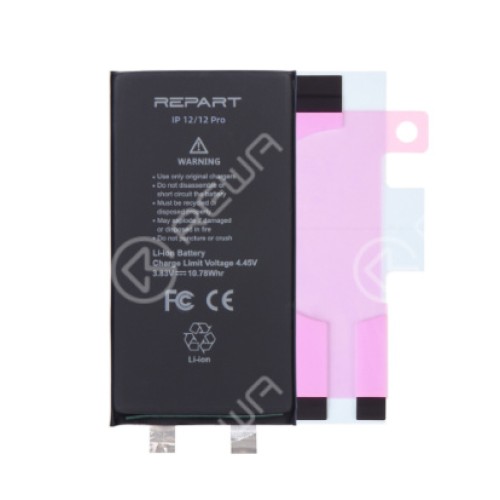
How do you separate a battery fault from a charging fault?
By where the heat is and what the charge level does.
A battery fault produces heat distributed across the middle or lower body of the device, and it usually comes with other symptoms: a charge level that drops sharply at the low end, early shutdowns under load, or a health figure that does not match the device’s age. A charging circuit fault produces heat concentrated at the connector end, and it often comes with slow charging or a charge that stops and restarts.
Those two patterns are different repairs. Treating a charging circuit fault as a battery job means fitting a battery the device did not need, and the heat returns on the first charge afterwards.
| What you observe | Most likely area | What to do next |
|---|---|---|
| Warm across the body, only on one charger | Charger or cable | Retest on a known-good charger before opening |
| Hot in the middle or lower body, every charger | Battery | Check condition and reporting, then quote a battery job |
| Hot at the connector end | Charging circuit or port | Follow the charging diagnostic sequence |
| Charges, then stops, then resumes | Thermal management or port | Check the port and the battery condition together |
| Charge level falls while plugged in | Load exceeding input, or a fault | Test with the device idle before diagnosing |
| Visible swelling or a lifting panel | Swollen battery | Remove from service and handle as a hazard |
Why does a swollen battery matter more than the heat?
Because it is a safety issue rather than a performance one.
A swollen cell has failed mechanically, and continuing to charge it adds energy to a component that is already compromised. The practical rules are simple: do not puncture it, do not force it back into the chassis to make a panel fit, and dispose of it through a proper take-back route rather than general waste. Where a panel has started to lift, the swelling is usually the reason, and our guide to why panels lift from the frame covers how to tell swelling from a failed bond.
Apple publishes the temperatures at which a device starts reducing charging speed and dimming the display, in If your iPhone or iPad gets too hot. That is useful to quote when a customer believes a device is faulty because it slows on a hot day, and it is equally useful as the reference point for when the behaviour is genuinely outside specification. What a battery reports about itself is covered in About genuine iPhone batteries.
When is the fault in the charging circuit rather than the battery?
When the heat sits at the port and the battery behaves normally.
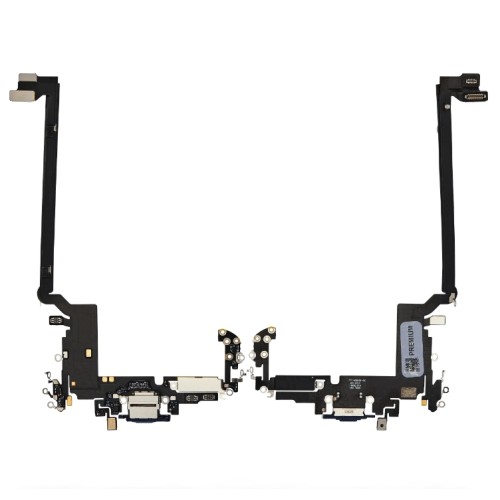
A device that charges slowly, that heats at the connector end, or that stops charging when the cable is moved is reporting a fault in the port, the flex or the charging circuit. The battery in that device may be perfectly serviceable, and replacing it will not change the symptom.
The diagnostic order in our guide to diagnosing a charging fault before replacing the port applies here. Cable, debris, power-off behaviour, load behaviour, then the part, and the heat pattern is one more input to the same sequence rather than a separate investigation.
What should you test before returning the device?
Charge it fully on a known-good charger and watch the temperature and the level.
Charge the device to full on a known-good charger and time it, then leave it on charge for a further fifteen minutes and check the temperature again. What you are looking for is stability: a device that reaches full charge without becoming uncomfortable, and a charge level that holds rather than oscillating.
Recording the charge time and the behaviour is what turns the repair into something you can defend. “It charges normally now” is an assertion; a recorded charge time with a temperature observation is evidence, and on a fault the customer experiences physically that distinction matters.
What should you record on the job sheet?
The charger used, where the heat was, and the charge behaviour.
Record which charger and cable the device was tested with, where the heat was concentrated, whether the charge level held or oscillated, and the battery condition reading. Where a battery was replaced, note the part and the charge behaviour afterwards.
For retail customers in the UK, the statutory rights you must honour sit on top of your own warranty and are set by the Consumer Rights Act 2015, while obligations around the safety of goods you place on the market sit with the Office for Product Safety and Standards. Battery handling and disposal in a workplace fall under the Health and Safety Executive.
What should you tell the customer about the heat?
What is normal, what is not, and what you measured.
Charging heat is the symptom customers are most likely to misread, in both directions. Some are alarmed by entirely normal warmth on a fast charger; others ignore a device that is genuinely running outside its range because they have no reference point. Giving them the reference point is part of the repair.
A workable explanation covers three things: warm on charge is expected, particularly on fast and wireless charging; the device slows charging and dims the display when it gets too warm, so those behaviours are protective rather than faults; and a device that becomes uncomfortable to hold, stops charging partway, or swells should be brought in rather than charged again.
Then state what you measured on their device. A recorded charge time and an observation of where the heat concentrated turns a vague conversation into a specific one, and it gives the customer something concrete to compare against if the behaviour changes.
The safety boundary belongs in the same conversation. A swollen battery is not a performance issue, and the customer should know that a device with a lifting panel or a distorted chassis should stop being charged. Saying that once, at handover, is more useful than any warranty term.
Should you hold batteries in stock?
Yes, because battery work is a same-day expectation.
Battery replacement is one of the few repairs a customer expects to have done while they wait, and a shop that has to order the part loses that job to one that does not. Unlike screens, battery demand is concentrated across a relatively small number of models, which makes a targeted stock position practical.
The workable approach is depth on the models that appear weekly and nothing beyond that. Batteries have a shelf life, and holding a wide range for models you see twice a year means ageing stock and capital tied up in parts that may never be fitted. Two or three generations deep covers most walk-in demand.
Charging port assemblies follow the same logic, with one difference: they are also the part that fixes a share of microphone faults, so the two demands overlap on the same shelf. A shop tracking its own repair mix will see that overlap within a few months of records.
What is the one habit that prevents a wrong battery part?
Test on a known-good charger and record where the heat sits.
That single observation separates the charger from the battery from the charging circuit in most cases, and it costs ten minutes. Recording it also gives you a baseline to compare against after the repair, so a device that still heats in the same place is identified as a different fault rather than as the same one coming back. On a symptom the customer experiences physically, that record is what makes the repair defensible.
FAQ
Is it normal for an iPhone to get warm while charging?
Warm is normal, particularly on fast charging and wireless charging, because energy is being converted and some of it becomes heat. What is not normal is a device that becomes uncomfortable to hold, that stops charging partway, or that dims the display while plugged in. Those are the signs the device itself is treating as a problem.
Why does my iPhone only get hot on one charger?
If the device heats up on one charger but not another, the charger or cable is the variable rather than the phone. Cheap chargers and damaged cables can deliver a higher current than the device expects or waste energy as heat in the cable itself. Test with a known-good charger before opening the device.
Can a swollen battery cause overheating?
A swollen cell is a safety concern rather than only a performance one, and it should be removed from service rather than charged repeatedly. Swelling usually accompanies heat and a falling charge level. Handle it as a hazard: do not puncture, do not force it back into the chassis, and dispose of it through a proper take-back route.
Does overheating damage an iPhone permanently?
Repeated exposure to high temperature shortens battery life and can affect other components over time, which is why the device reduces charging speed and dims the display when it gets too warm. Isolated episodes are usually recovered from; a device that overheats on every charge needs the cause found rather than managed.
Heat on charge is a diagnostic input rather than a verdict. Test the charger first, look at where the heat concentrates, watch what the charge level does, and check the battery’s condition before ordering anything. That sequence separates the four causes quickly, and it stops a battery being fitted to a device whose fault was in the cable on the customer’s desk.
Replacing batteries and port assemblies? Digi4u supplies batteries, charging port flexes and screen assemblies for iPhone models to UK repair shops, with trade pricing, same-day dispatch and up to 12 months warranty. Tell us the model and we will confirm stock.
