

Phone Screen Press Clamp Tools UK: Fixtures Shops Use After Glass Work
Need this part? We stock tested replacement parts with same-day UK dispatch and a 12-month warranty.
A phone screen press clamp UK technicians reach for after the adhesive has been applied is a bench fixture that holds the glass or cover in place while the bond cures. Unlike a separator or a suction‑cup opening tool, a press clamp applies even pressure across the whole surface so the adhesive sets without gaps or mis‑alignment.
What a press clamp is for after the adhesive is in
A press clamp holds the assembled screen while the adhesive cures.
It provides uniform pressure across the glass so the bond sets evenly and the device stays water‑tight.
After a technician has applied the chosen adhesive — whether it is a UV‑curable LOCA, a double‑sided tape, or a liquid sealant — the screen assembly must remain perfectly flat and under consistent load until the chemistry reaches full strength. A press clamp is designed for exactly that stage. The tool typically consists of two rigid plates with a compliant pad on each face; the plates are drawn together by a screw, cam or spring mechanism, delivering a repeatable clamping force. Because the pressure is distributed over the whole panel, the risk of trapped air bubbles, edge lift or uneven cure is reduced. In a busy shop the clamp also frees the technician’s hands for the next job, improving throughput. It is not a tool for prying a screen off a chassis, nor does it replace a separator machine that uses heat and wire to cut through cured adhesive. The press clamp’s role begins only after the adhesive is in place and the parts are aligned. When planning a repair, confirm the maximum opening width and pad material on the live listing so the fixture matches the device dimensions you service.
When an oversize clamp is a better fit than a phone‑only clamp
An oversize clamp accommodates tablets and large phones in one fixture.
It removes the need to swap clamps when the bench handles mixed device sizes.
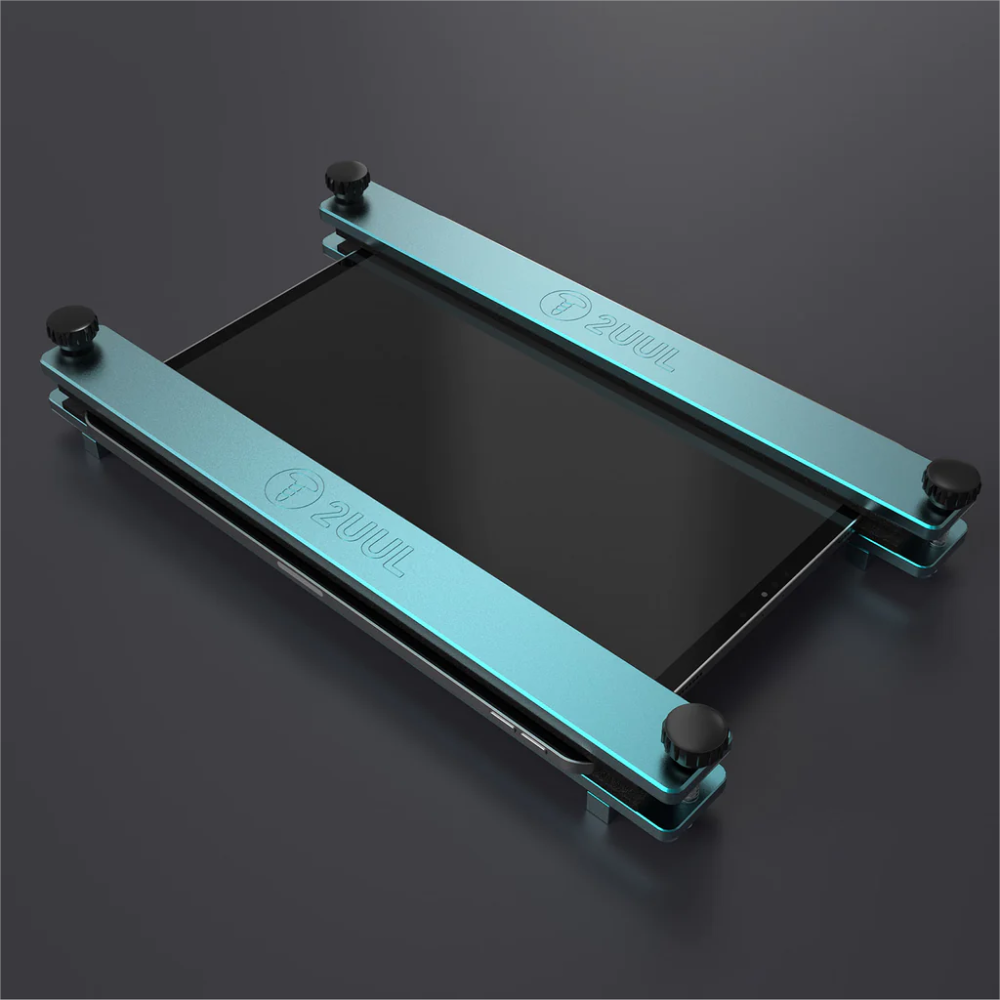
Many UK repair shops service a range of form factors from compact handsets to 12‑inch tablets. A phone‑only clamp typically has a maximum opening of around 180 mm, which covers most smartphones but leaves larger devices unsupported. An oversize model such as the 2UUL DA02 third‑generation press clamp extends the usable width to roughly 260 mm and the depth to a similar figure, allowing a single fixture to press both a standard phone screen and a tablet glass panel. The larger footprint also means the pressure pads can be positioned nearer the centre of a big panel, giving a more even load distribution. For a shop that runs a mixed workload, keeping one oversize clamp on the bench reduces change‑over time and the chance of mis‑placing the smaller fixture. The trade‑off is a slightly larger bench footprint and a higher initial cost, but the versatility often outweighs those factors when the daily job mix includes tablets, foldables or large‑format phablets. Before purchasing, verify the exact opening dimensions and pad composition on the product page to ensure the clamp covers the largest device you regularly repair.
How fixture packs such as iClamp are used on the bench
The iClamp set provides four identical fixtures for simultaneous jobs.
Technicians can press multiple screens at once, cutting cycle time on high‑volume days.
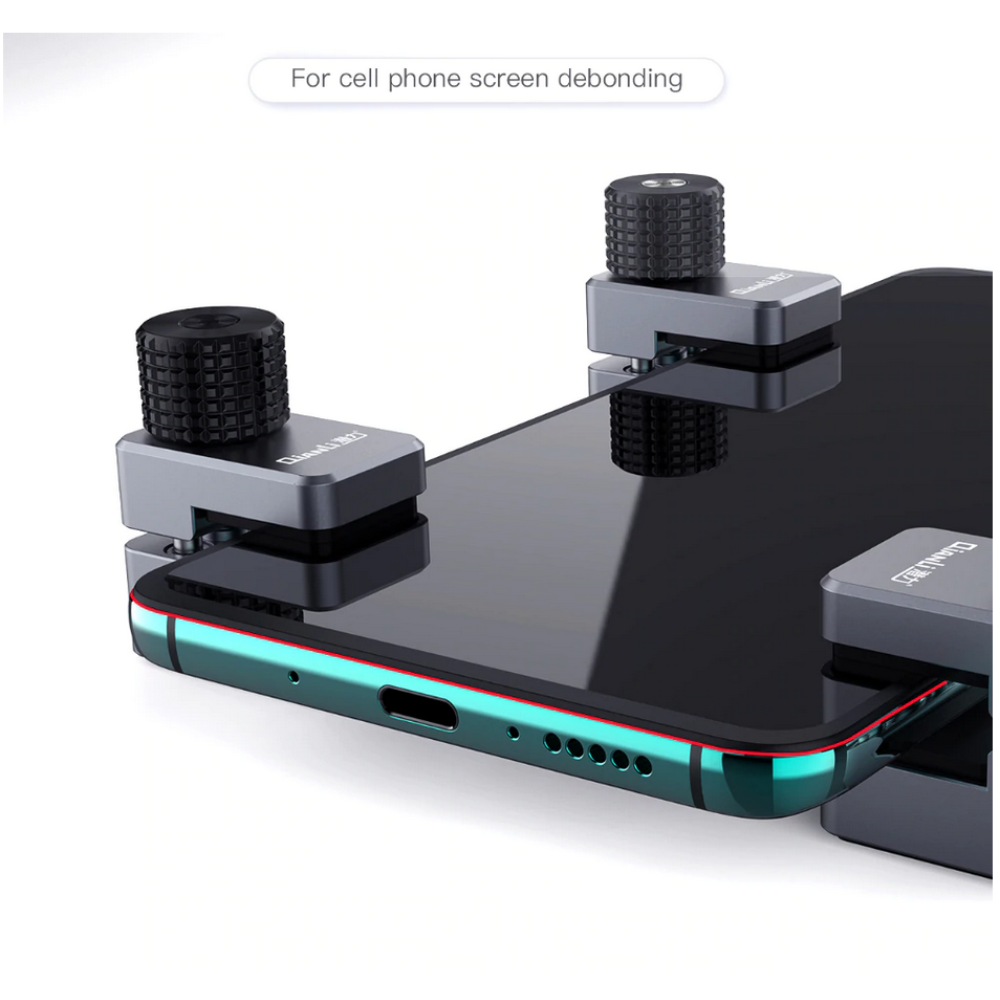
The Qianli iClamp universal fixture is sold as a four‑piece pack, each piece being a compact clamp with a spring‑loaded jaw and a soft silicone pad. Because the four units are identical, a technician can load up to four phone‑size assemblies side by side on a single workbench, apply the adhesive, place each assembly in its own clamp and then walk away while the adhesive cures. This parallel workflow is especially valuable when a shop runs batch repairs — for example, a fleet of identical handsets for a corporate client. The fixtures are small enough to sit on a standard anti‑static mat without crowding other tools, and the spring mechanism delivers a repeatable force without the need for a torque wrench. When the job mix shifts to larger devices, the same clamps can still be used on the outer edges of a tablet panel, though the pressure will be concentrated over a smaller area. Shops should confirm the current pack contents on the live Qianli tools page before assuming the quantity, as packaging can change between production runs. It is also good practice to label each fixture with a bin tag so that the correct clamp is returned to its slot after each job.
What a press clamp is not: separators and opening tools
A press clamp does not cut adhesive, apply heat or pry a screen from a chassis.
It belongs to the post‑bonding stage, while separators and opening kits belong to the pre‑bonding stage.
Understanding the distinction prevents buying the wrong tool for a given step. The table below summarises the primary function of each category.
| Tool category | Typical stage | Core action |
|---|---|---|
| Press clamp | Post‑bonding | Holds assembled screen under even pressure while adhesive cures |
| Separator machine | Pre‑bonding | Uses heat and a cutting wire to separate a cured screen from the frame |
| Opening toolkit (suction cups, pry picks, heated pads) | Pre‑bonding | Mechanically lifts or pries the screen away from the chassis |
Because the press clamp only applies clamping force, it cannot replace a separator when a screen must be removed, nor can it substitute a suction cup for the initial lift. Shops that conflate the categories risk damaging a device by applying pressure to a screen that has not yet been freed from the frame. Keep a clear checklist at the bench: removal tools first, adhesive application second, press clamp third.
What to check on the live tool listing before you order
Verify clamp dimensions, pad material and pack quantity on the product page.
Confirm the listing matches the device sizes you service and the number of fixtures you need.
Every live Digi4u tool page lists the maximum opening width, depth, pad composition (usually silicone or rubber) and whether the item is sold singly or in a multi‑pack. For the 2UUL DA02 the page states “oversize press clamp for phone / pad glass replacement” and shows the clamp in a single‑unit configuration. The Qianli iClamp page shows a four‑piece set, but the exact contents can be updated between batches, so the current description should be read each time you order. Also check the shipping classification: items that contain loose lithium cells ship by DPD only, while a bare clamp without batteries can travel via Royal Mail 48 Tracked. The delivery policy page explains the zone‑based rates and free‑shipping thresholds. Finally, note any warranty or return terms that appear on the listing; Digi4u does not publish a blanket warranty period, so the terms on the specific product page are the authoritative source. Record the key specifications in your shop’s intake sheet so that future orders can be cross‑checked quickly.
How to budget for clamps without inventing tool prices
Estimate cost by adding the current part price to your shop’s labour rate.
Use the live supplier listing for the part price and apply your own hourly rate for fitting time.
Because Digi4u does not publish a wholesale price list or MOQ, the only reliable figure is the retail price shown on the live product page at the moment of purchase. A shop owner should record that price, then calculate the labour component based on how long a technician needs to set up the clamp, load the assembly and release it after cure. Treat the clamp as a reusable bench tool and amortise its purchase cost over the expected service life, referencing the live listing terms for any warranty or replacement guidance. Do not rely on any “up to 12‑month warranty” phrasing you may see on a listing — treat the warranty terms as specific to that SKU and read them on the page. Multiply the per‑job direct cost by the expected monthly volume of press‑clamp jobs to obtain a budget line, and review the figure each quarter as live prices change.
Related opening, heat and adhesive paths
The press clamp sits at the end of a workflow that begins with screen removal, continues through adhesive selection and ends with final testing.
Shops often pair a press clamp with a separator machine for removal, a heating pad or heat gun for softening adhesive, and a specific LOCA or tape for the bond.
For a complete view of the removal stage, see the guide on choosing a phone screen separator machine and the companion separator machine guide. If your team prefers manual opening, the best phone repair opening toolkit for beginners outlines suction cups, pry picks and the QianLi peanut‑shape pry. Heat management is covered in the comparison of heating pad vs heat gun for screen removal. Finally, adhesive choice and waterproof sealing are discussed in the article on phone screen adhesive and waterproof seals UK. All of those resources are part of the Digi4u blog and use the same UK‑focused terminology your shop uses daily.
FAQ
What is the main purpose of a phone screen press clamp?
A press clamp holds a freshly bonded screen assembly under uniform pressure while the adhesive cures, ensuring a gap‑free, water‑tight seal without the technician needing to keep hands on the device. It is used only after the adhesive has been applied and the parts are aligned, and it does not perform any cutting, heating or prying functions.
Can an oversize press clamp replace a phone‑only clamp for all jobs?
An oversize clamp covers both phones and tablets, so it can replace a phone‑only clamp in a mixed‑device shop, but it occupies more bench space and may be over‑spec for very small handsets. Verify the maximum opening width on the live listing to confirm it fits the largest device you service, and consider keeping a smaller clamp for quick single‑phone jobs.
How many fixtures are included in the Qianli iClamp pack?
The live Qianli tools page lists the iClamp as a four‑piece set; however, pack contents can change between production runs, so verify the current description before ordering. When the pack arrives, count the fixtures and label each one in your bin system to avoid mis‑placement during high‑volume batch repairs.
Does a press clamp remove a screen from a phone?
No. A press clamp only applies clamping force after the screen is already aligned and bonded; screen removal requires a separator machine or manual opening tools such as suction cups and pry picks. Using a press clamp for removal would damage the device because it cannot cut or heat cured adhesive.
Where can I find the current price and shipping rules for a specific clamp?
The price, pack quantity, dimensions and shipping classification are shown on the individual product listing; the Digi4u delivery policy page explains zone‑based rates and free‑shipping thresholds. Check both pages each time you order, as prices and shipping options can be updated without notice.
Check Digi4u delivery policy for current rates and dispatch times.