


Phone No Power Diagnosis: Battery, Port or Board
Need this part? We stock tested replacement parts with same-day UK dispatch and a 12-month warranty.

A phone with no power is a battery, charging-port or board problem until measurements say otherwise. Charge with a known-good cable and adapter first, inspect the port for debris, measure whether the handset draws current, then decide whether to stage a battery, a charging-port flex, or a board-level referral — replacing the cell first without that order is guesswork that wastes parts and customer trust.
Last updated:
The official Digi4u walk-through below follows the same battery, port and board elimination order this page uses on the bench. If a replacement cell is already fitted and the phone still will not charge, switch to the after-replacement charging checklist rather than repeating the same intake tests here.
@digi4u Official Digi4u video: why a phone will not charge — battery, port or power IC.
Digi4u is a UK parts supplier in Cardiff for phone batteries, charging ports and related repair parts. OEM help pages from Samsung and Google still start with charge time, cable and restart checks; independent shops should honour that order before opening the frame.
What should you try before any teardown?
Manufacturer support paths for phones that will not power on still begin with the boring checks: leave the handset on a known-good charger for a meaningful interval, try another cable and wall socket, remove the case, and attempt a forced restart appropriate to the brand. Google’s Android help for devices that will not charge or turn on walks through power-button holds, cable and socket swaps, and only then deeper steps; Samsung’s Galaxy guidance likewise stresses sufficient charge before assuming a dead board. Shops that skip this external pass buy batteries for phones that only needed a working lead.
At intake, photograph every side, note bends, liquid indicators and prior repair marks, and ask when the phone last worked, whether it was dropped or wet, and whether data recovery outranks cosmetic speed. Do not promise that a no-power repair will preserve photos until the storage path is proven — explain that diagnosis comes first and that opening the device may reveal corrosion or earlier unauthorised work.
| Current-draw / behaviour | Likely branch | Parts to stage | Stop / refer |
|---|---|---|---|
| 0 draw, dirty port, cable fails on this phone only | Port / flex | Charging-port flex; clean tools | — |
| Boot-loop current, never completes boot | Software / baseband / board | Hold battery; do not sell “just a cell” | Refer if no OS recovery skill |
| Short / high draw, phone hot at plug-in | Board short or crushed cell | Stop charging; inspect for liquid/impact | Board specialist if short persists |
| Normal charge current, boots on bench pack | Battery | Matched battery after connector check | — |
| No draw after port clean, known-good lead | Battery disconnect or rail | Battery + port only after open inspection | Board if rails absent |
How do battery, port and board faults differ in practice?
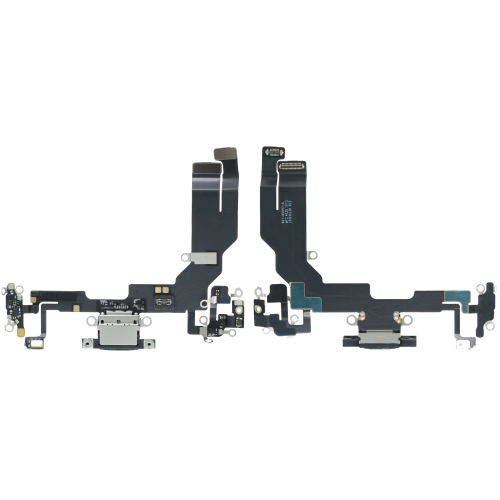
A flat or disconnected battery produces a silent handset that may revive on a bench power supply or after a known-good cell is fitted. A contaminated or broken charging port stops charge even when the cell still holds voltage, which is why debris cleaning and flex inspection belong before any “new battery” promise. A failed power rail or short can block both charging and boot; those phones may draw zero current, excessive current, or heat at the connector the moment power is applied.
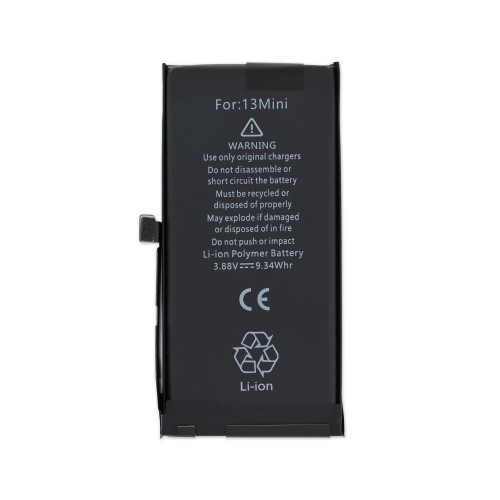
Use a known-good charger, cable and socket every time, then inspect the port under magnification for lint, bent pins or corrosion. Only after the external path is clean should you open for battery connector reseating, voltage checks and flex replacement. Digi4u’s iPhone battery hub and charging-port hub are the usual staging shelves once the branch is proven — not before.
How does liquid history change the parts order?
Liquid under the cell, green corrosion on the port, or triggered liquid indicators change the economics: a new battery alone is often wasted spend if the board is still wet or shorted. Inspect for residue before committing to a cell, quote board ultrasonic or specialist time honestly, and refuse “battery only” tickets when the customer will not fund inspection. Pair this article with Digi4u’s battery after water damage guidance when corrosion is visible under adhesive.
| Liquid finding | Safe next step | Unsafe promise |
|---|---|---|
| Port debris only, no board residue | Clean / port flex, then retest draw | “Guaranteed boot after clean” |
| Corrosion under battery adhesive | Inspect board rails; quote cell + labour separately | “New battery will fix it” |
| Phone heats instantly on charge | Stop power; board short diagnosis | Leave on charge overnight |
| Customer denies liquid but indicators tripped | Photograph indicators; rewrite quote | Ignore indicators to win the job |
How should you quote, decline and explain data recovery?
Quote diagnosis time first, then parts branches (battery, port, board referral) as optional lines the customer can approve after measurements. Idle heat after a partial repair belongs in a separate conversation — see phone overheating when idle — rather than being buried inside a no-power estimate. Standalone lithium batteries ship under Digi4u’s DPD-only rule on the delivery policy; do not promise Royal Mail for loose cells.
Decline when the phone is a board short the shop cannot support, when the customer refuses inspection fees after liquid evidence, or when data recovery requires donor-board skill you do not offer. Referring early is cheaper than fitting three batteries into a shorted rail and arguing about the invoice.
What is the one rule for phone no-power diagnosis?
Measure before you merchandize. Prove charger, cable, port and current draw, then stage a battery or port flex from a matched hub, and refer board work when rails or shorts say so. Keep liquid honesty on the ticket, and never sell a cell as a cure for corrosion you have not inspected. Digi4u stocks the common UK battery and port paths; board miracles are not in the catalogue.
When no-power triage points to a dirty or failed USB-C path on a Galaxy, match the lower flex carefully — Samsung charging port flex parts UK.
No-power triage often ends on the board; ESD discipline and safe cleaning come first — ESD and PCB cleaning tools for phone repair UK.
A no-power ticket still needs intake photos, liquid checks and approval before a board or battery is ordered; the shop process is in QC intake checklist for used phones before ordering parts.
FAQ
Why won’t my phone turn on even after charging?
The cable, adapter or port may still be at fault, the battery may be disconnected or exhausted beyond a quick top-up, or a board power rail may be down. Manufacturer guidance starts with known-good chargers and forced restarts; shops should measure current draw before ordering parts.
Should I replace the battery first on a dead phone?
Only after charger, cable and port checks, and preferably after a current-draw or bench-power test. Blind battery swaps waste parts when the port is corroded or the board is shorted.
Can a dirty charging port stop a phone from turning on?
Yes. Lint and bent pins can block charge so the cell never recovers enough to boot. Inspect and clean the port under light before opening the handset for a new battery.
What if the phone got wet before it died?
Treat liquid as a board risk. A new battery alone often fails if corrosion remains under the cell or on the charge path. Inspect, photograph indicators, and quote diagnosis separately — see Digi4u’s water-damage battery article.
Will fixing no-power recover my photos?
Not guaranteed. Storage can survive while power rails fail, but opening the device, board work or unsuccessful boots can still jeopardise data. Agree recovery priorities and limits before authorising invasive repair.
