


MacBook Keyboard Replacement: Models, Parts and Risk
Need this part? We stock tested replacement parts with same-day UK dispatch and a 12-month warranty.

A MacBook keyboard fault is rarely just one key. Liquid, dust and age tend to affect a region, and the repair decision is whether to replace a key, a top case or the whole assembly.
The part is chassis-specific, and the A-number is the only reliable match. Getting it wrong means a keyboard that does not fit, a backlight that does not connect or a top case with the wrong ports.
Which keyboard fits the MacBook?
The one matched to the A-number on the base.
MacBook keyboards are built into the top case on most modern models. The A-number identifies the chassis, and the keyboard, trackpad, battery and ports all follow from it.
Two machines that look identical from the outside can use different top cases. Confirm the A-number before ordering anything.
How do you confirm the model?
From the base or System Information.
The A-number is printed on the underside near the hinge and appears in macOS under System Information. Either source is reliable; a customer’s description is not.
Record it on the job sheet and match the part number against it. The method is the same one described in matching MacBook parts by model number.
Can you replace a single key?
Sometimes, if the mechanism is intact and the keycap is missing.
A single keycap can be replaced without opening the machine if the scissors mechanism underneath is undamaged. That is a cheap repair for a cosmetic problem.
If the mechanism is broken or the key does not register, the repair moves to the keyboard or the top case. A keycap alone will not fix an electrical fault.
When is a top case the better buy?
When the keyboard is bonded into the chassis.
On many MacBook Pro and Air models the keyboard is riveted or bonded into the top case. Replacing the keyboard alone means drilling or cutting, which is slow and risky.
A complete top case is more expensive but faster and more reliable. It also replaces the battery and trackpad if they are part of the same assembly.
| Fault | Likely part | Test |
|---|---|---|
| One key missing | Keycap | Check the scissors mechanism |
| One key not registering | Keyboard or top case | Test with an online keyboard tester |
| A region of keys dead | Keyboard flex or top case | Check for liquid residue |
| Backlight not working | Backlight flex or top case | Check the connector and settings |
| Keys sticking | Keyboard | Inspect for liquid or debris |
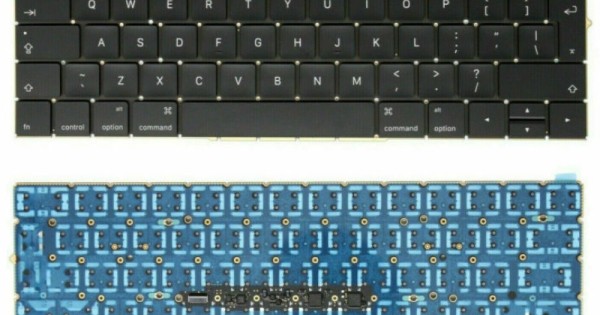
What does the replacement involve?
Opening the base, removing the battery and releasing the top case.
The bottom cover comes off first, then the battery is disconnected. The top case is held by screws around the perimeter and by the display hinge.
Label the screws by position. A long screw in a short hole can damage the chassis or the board, and the mistake is easy to make on a first attempt.
How do you avoid damaging the display?
Support the lid and disconnect the display flexes before lifting.
The display cables run through the hinge and are short. Lifting the top case without releasing them will tear a flex or damage the connector.
Keep the lid closed and supported while the case is separated. A second pair of hands helps on the larger models.
What should you test after fitting?
Every key, the backlight, the trackpad and the ports.
Use a keyboard tester to confirm every key registers, then check the backlight at each level. Test the trackpad and every port on the new top case.
Run a charge test as well. A top case that includes the battery or the charging port can introduce a new fault if a connector is not seated.
What if only a few keys are affected?
Consider a keyboard-only repair if the model allows it.
Some models have a keyboard that can be replaced separately with screws rather than rivets. That is cheaper than a top case and worth checking before quoting.
The labour is higher, so the decision is a balance between part cost and bench time.
How do you price the job?
Part, labour and the risk of the hinge and display.
A top case is an expensive part, and the job takes longer than a battery because of the hinge and the display flexes. Price the risk as well as the time.
If the keyboard alone can be replaced, the part is cheaper but the labour is higher. Quote the route that fits the model.
What do you tell the customer?
Which route is being taken and what it includes.
A top case replaces the keyboard, the trackpad and often the battery. That is worth explaining, because the customer is getting more than a keyboard.
A keyboard-only repair keeps the original case but takes longer. Both are legitimate; the customer should know which one they are paying for.
The most common mistake on a top case job is forgetting the display flexes. They are short, they run through the hinge and they are easy to tear when the case is lifted.
Disconnect them before the case is separated and support the lid. A torn display flex turns a keyboard repair into a screen job.
The second mistake is mixing the screws. There are several lengths around the top case and the battery, and a long screw in a short hole can damage the chassis.
Lay the screws on a printed diagram or in a tray with the positions marked. The extra minute saves a difficult repair.
A top case that includes the battery should be checked for charge before fitting. A new case with a flat cell will make the machine look dead on the first boot.
Test the trackpad as well as the keyboard. A top case carries both, and a connector that is not seated will show up as a dead pad.
Check the ports on the new case before closing. A top case with a damaged port is a supplier issue, and it is much easier to resolve before the machine is reassembled.
Record the A-number, the part number and the tests on the job sheet. Keyboard repairs are expensive, and the record is what supports the customer conversation if anything fails.
| Route | Best for | Trade-off |
|---|---|---|
| Keycap only | Missing cap, intact mechanism | Does not fix electrical faults |
| Keyboard only | Models with screwed keyboards | More labour, lower part cost |
| Top case | Riveted or bonded keyboards | Higher part cost, faster job |
| Full assembly | Keyboard, battery and ports together | Most expensive, least risk |
The route should be chosen before the machine is opened, because it decides what is ordered and how long the job takes.
A customer who is quoted for a top case and receives a keycap repair will notice, and the invoice will not explain it.
| Task | Time | Risk |
|---|---|---|
| Keycap only | 10 minutes | Low |
| Keyboard only | 3 to 4 hours | Medium |
| Top case swap | 2 to 3 hours | Medium |
| Display flex handling | 20 minutes | High |
| Screw mapping | 15 minutes | High if skipped |
| Full test | 20 minutes | Low |
The time estimates explain the price difference between the routes better than any description of the parts.
The display flex is the highest-risk step, because the cables are short and the lid is heavy.
Screw mapping is the step most often skipped and the one most likely to cause hidden damage.
Quote the route, not just the part. The customer is buying the time and the risk as well.
A top case job is also a chance to inspect the battery and the trackpad, because they are part of the same assembly on many models.
If the battery is swollen or the trackpad is worn, the top case replaces both. That is worth saying at the quote stage.
Check the display hinges and the lid alignment before closing. A top case that is not seated properly will make the lid sit unevenly.
Test the machine with the lid open and closed, and confirm that sleep and wake work. Those checks catch a hinge or sensor problem before collection.
A keyboard that works but has an uneven backlight is usually a flex that is not fully seated, not a failed top case.
Reseat the backlight connector before concluding the part is faulty.
That check takes minutes and can save an expensive return.
A keyboard that is slow to respond after a top case swap may be a software issue rather than a hardware one.
Reset the SMC and check the keyboard settings before opening the machine again.
That step is quick and avoids a second strip-down.
Record the result either way. The note is the difference between a repair and a guess on the next visit, and it matters later.
What is the one rule for MacBook keyboards?
Match the A-number and decide the route before opening.
The chassis decides the part, and the construction decides whether a keyboard or a top case is the practical repair. Both answers come before the first screw.
Around it sit the ordinary disciplines: label the screws, disconnect the display, test every key and check the ports. Screen work is described in MacBook screen replacement, battery work in MacBook battery replacement, consumer contracts under the Consumer Rights Act 2015, disposal under the Waste Electrical and Electronic Equipment Regulations 2013, product safety with the Office for Product Safety and Standards, bench safety under risk assessment at work, and customer records under ICO guidance for organisations.

Related MacBook glass stocking: MacBook screen replacement parts in the UK.
FAQ
Can I replace a single MacBook key?
Yes, if the keycap is missing and the scissors mechanism is intact. If the key does not register, the fault is electrical and needs a keyboard or top case.
Is a MacBook keyboard glued in?
On many models it is riveted or bonded into the top case. Replacing the keyboard alone means drilling or cutting, so a top case is often the practical repair.
How long does a MacBook keyboard replacement take?
Two to three hours for a top case, including disconnecting the display, transferring components and testing every key and port.
Will a new top case include the battery?
On some models, yes. Check the part description, because a top case can include the battery, trackpad and ports as one assembly.
Keyboards matched to the chassis. Digi4u supplies MacBook keyboards by A-number.
