


Pixel Fingerprint After Screen Replacement: Parts, Calibration Limits and Shop Scripts
Need this part? We stock tested replacement parts with same-day UK dispatch and a 12-month warranty.

A Pixel fingerprint not working after screen replacement is not automatically proof of a dead sensor. The fault can begin with the replacement OLED, its optical path, the transferred or supplied sensor, installation pressure, software state or calibration. A repair business therefore needs a controlled diagnostic path, a defensible parts decision and customer wording that separates a screen repair from a guaranteed biometric outcome.
This guide is for Android technicians handling post-repair fingerprint complaints. It concentrates on failure diagnosis and shop communication rather than repeating a screen-grade comparison. Model-specific purchasing considerations remain available in the Pixel 8 screen parts guide and Pixel 9 screen parts guide.
Why in-display fingerprints fail after some OLEDs
An in-display reader depends on the complete display-and-sensor path, so a working OLED can still produce unreliable fingerprint capture. The display may look acceptable to the eye while the fingerprint area transmits, reflects or aligns light differently from the original assembly.
On relevant Pixel generations, a technician should treat the screen, sensor position, adhesive geometry and software as one system. Differences in the panel stack, a tinted or obstructed sensor window, contamination, excessive adhesive, a shifted bracket or uneven seating can all reduce the quality of the image presented to an optical reader. A cracked original can also conceal a pre-existing sensor fault until the replacement job creates a clear test point.
The phrase “pixel in-display fingerprint after OLED” often leads teams straight to calibration. That is premature. First establish whether the replacement part is intended to preserve the model’s biometric arrangement, whether a sensor was supplied or transferred, and whether the window is clean and correctly positioned. Never assume that identical connector fit means identical biometric performance.
| Observation | Likely area to inspect | Useful next check |
|---|---|---|
| Fingerprint option remains, but enrolment fails | Optical path, alignment, contamination or calibration state | Remove temporary films, clean the area and retry under normal lighting |
| Reader responds intermittently | Panel seating, pressure, protector or partial obstruction | Compare before and after protector removal; inspect adhesive around the window |
| Fingerprint menu is absent | Connection, sensor recognition, software or hardware fault | Recheck connections and software state before condemning the panel |
| Original screen restores function | Replacement assembly compatibility or installation | Record the result and test a known-suitable second panel where commercially sensible |
Google’s official Pixel fingerprint troubleshooting is a sensible baseline for cleaning, re-enrolment and protector checks. It does not replace part-level diagnosis, but it helps prevent a workshop from treating a normal user-setting issue as evidence of defective repair hardware.
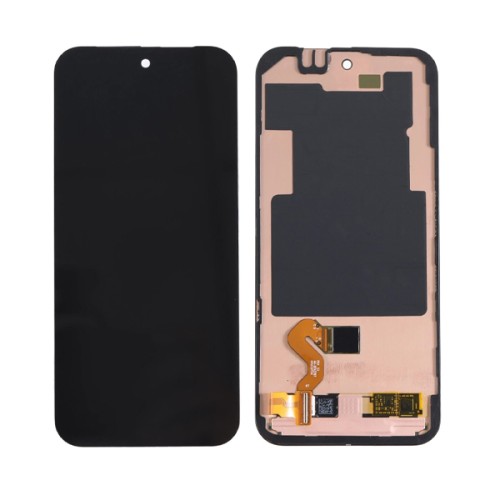
Frame kits and sensor windows that matter
A frame kit can reduce alignment work, but it does not remove the need to inspect the fingerprint area and confirm what the assembly includes. Product naming must be read carefully because “with frame”, “with fingerprint” and a visible sensor aperture describe different practical considerations.
Before installation, your team should compare the incoming assembly with the removed part under magnification. Check the position and clarity of the sensor window, the presence of protective films, the adhesive boundary, bracket depth and any foam or gasket that controls pressure. Confirm whether the job requires sensor transfer and document the condition of the original sensor and flex before disturbing either.
A dry connection test, where the repair method permits it, is more valuable than discovering an incompatibility after final bonding. Test display, touch, brightness response and fingerprint recognition without repeatedly flexing cables. If the assembly includes a reader, do not discard the original until the device has passed the agreed QC process and the customer has accepted the outcome.
Parts buyers can review the Digi4u Google Pixel parts range by model. Digi4u is a Cardiff-based UK supplier of replacement parts, tools and accessories serving individual customers and professional repair businesses; the product page, rather than an assumption based on a photograph, should define the supplied assembly.
Software calibration limits shops should not oversell
Calibration can be a required stage on some repairs, but it cannot make an unsuitable panel, damaged flex or obstructed sensor window mechanically correct. A shop should describe it as a prescribed software step or diagnostic attempt, not a guaranteed cure.
The available route can vary with the Pixel model, Android build, repair workflow and Google’s current tools. The team should consult the relevant official instructions at the time of repair, record what was attempted and avoid promising that a utility will restore every reader. Google’s Pixel Repair Diagnostics service and repair diagnostics guidance are more reliable reference points than an undated forum procedure.
A reset should not be the opening move. It creates data and consent implications without proving that the hardware path is sound. Back-up responsibility, lock credentials and any data-erasing action should be agreed before work begins. If calibration cannot start, fails repeatedly or completes without useful fingerprint capture, record the exact message and return to hardware isolation rather than cycling the same step.
This is especially important when a customer reports a “Pixel 8 fingerprint dead after display”. That description is an outcome, not a diagnosis. A credible job record distinguishes whether the menu disappeared, enrolment failed, stored prints stopped matching or the device never acknowledged a touch.
Customer pre-job consent language
Consent should state that screen function and biometric function are related but separately tested outcomes. It should also identify pre-existing damage, the proposed part type, the possibility of software calibration and the decision path if biometrics do not return.
A useful script is specific without promising a result:
“This Pixel uses a fingerprint reader that works through, or as part of, the display assembly. The screen repair may require sensor transfer and/or software calibration. We will test the reader before and after repair where the device condition allows. Calibration cannot correct every panel, sensor or board fault. If fingerprint unlock does not pass our checks, we will report the result and agree any further part or diagnostic work before proceeding.”
For a device arriving with no display, amend the record to state that pre-repair fingerprint operation could not be verified. Photograph impact areas and note whether the phone has been opened previously. If a screen protector is to be refitted, explain that thickness, bubbles or poor adhesion over the reader may affect recognition; Digi4u also has a focused guide to screen protector fingerprint checks.
The service record should separate required work from optional escalation. That supports clear customer decisions and aligns with the general expectation that products and services be described accurately. Repair businesses can consult the GOV.UK product safety guidance and the Chartered Trading Standards Institute consumer guidance for wider compliance context.

QC tests before declaring fingerprint dead
Fingerprint QC should progress from reversible checks to part substitution, with each result recorded against the exact device and panel. Declaring the reader dead before isolating protector, enrolment, alignment and connection variables risks an unnecessary board referral.
Begin with device identity and software state. Confirm the model, Android version, repair history and whether fingerprint settings are present. Remove shipping film and, with consent, any protector that crosses the active area. Clean and dry the display, then test a freshly enrolled finger rather than relying only on old templates captured through another panel.
A repeatable workshop sequence
- Record the customer’s precise symptom and whether biometric operation was verifiable before repair.
- Confirm touch response across the display, especially over the fingerprint target, and check for ghost input.
- Inspect the sensor window, films, dust, adhesive intrusion, bracket location and flex seating.
- Restart the phone and follow current official troubleshooting and calibration guidance where applicable.
- Delete and re-enrol a print only with customer consent, then test several normal unlock attempts.
- Compare with the original display if it remains safe to connect, or use a known-suitable second panel.
- Log pass, intermittent or fail results and retain any error wording in the job notes.
Do not let one successful enrolment substitute for QC. Check screen-off wake behaviour, repeated unlocks, normal thumb placement and operation after the display has been fully seated. Conversely, do not chase perfection by pressing unusually hard; the completed repair should work under reasonable customer use.
When a second panel is cheaper than board work
A controlled second-panel test is usually the stronger next step when the original panel or a known-suitable comparison part changes the fingerprint result. Board work becomes more credible only after the screen path, sensor, connections and supported software steps have been isolated.
The decision should be based on total diagnostic exposure, not the purchase cost alone. A second panel can answer a binary compatibility question quickly and may remain usable for another matching repair if handled within the supplier’s terms. Board investigation may be justified where the sensor is not detected across multiple suitable assemblies, there is connector or liquid damage, or the same failure existed before the screen broke.
| Evidence | Preferred direction | Reason |
|---|---|---|
| Original screen recognises fingerprints; replacement does not | Reinspect or substitute the replacement assembly | The comparison points to the panel path or its installation |
| Two suitable panels show the same missing sensor state | Inspect connection and consider specialist board diagnosis | Repeated behaviour weakens the single-panel explanation |
| Reader works before bonding but fails after seating | Review pressure, adhesive and alignment | The assembly state changes the result |
| Fingerprint failed before impact repair | Quote diagnosis separately | The screen job should not silently absorb a pre-existing fault |
When deciding when to replace the Pixel screen again, include the risk of repeated opening, consumables, device condition and customer-approved spend. The answer is not automatically “fit another OLED”; it is to choose the lowest-risk test that can materially change the diagnosis. If no safe comparison is available, stop and explain the uncertainty rather than converting an assumption into unpaid board work.
Pixel 8 and Pixel 9 parts guides
This article addresses a post-repair failure mode; the linked buying guides cover selection questions before the bench job begins. Using both resources helps purchasing and technicians share the same model, assembly and expected-function language.
For Pixel 8-family sourcing, consult the Pixel 8 screen parts guide. For newer model distinctions, use the Pixel 9 screen parts guide. Teams covering several generations can start with Digi4u’s broader Google Pixel screen parts overview.
Conclusion
A Pixel fingerprint fault after an OLED swap is best handled as a system diagnosis. Confirm the assembly specification, inspect the sensor window and transfer work, use current official software guidance, then compare parts before escalating towards the board. The commercial advantage comes from repeatable evidence and accurate consent, not from promising that calibration will rescue every combination.
Review model-specific assemblies in the Digi4u Google Pixel range before planning the repair workflow.
FAQ
How do I make a Pixel fingerprint reader work again after a screen replacement?
Start with reversible checks: confirm the correct model and assembly, remove temporary films or an obstructive protector, clean the reader area and inspect the sensor window, adhesive and flex connections. Restart the phone, follow Google’s current troubleshooting or calibration route where applicable, and re-enrol a print with consent. If the original or a known-suitable second panel works, investigate the replacement screen path before assuming a board fault.
Can Pixel fingerprint calibration fix any replacement OLED?
No. Calibration may be a required software stage for a supported model and repair workflow, but it cannot correct an incompatible display stack, damaged sensor, contaminated window, poor alignment or faulty connection. Shops should present calibration as a documented step, not a guaranteed result. If it fails, record the exact behaviour and isolate the hardware with inspection and controlled part comparison.
When should a shop try a second Pixel screen?
A second suitable panel is useful when the replacement screen alone produces the fault, when the original restores fingerprint operation, or when function changes before and after final seating. It can isolate panel compatibility and installation variables before specialist board work. If multiple suitable assemblies show the same missing-reader state, inspect the connection and consider a separate board diagnosis with the customer’s approval.
