


iPad Model Numbers Explained: Match A-Numbers to Replacement Parts
Need this part? We stock tested replacement parts with same-day UK dispatch and a 12-month warranty.

An iPad’s A-number is a reliable starting point for identifying the exact model, but it must still be matched to the correct replacement-part configuration.
Where can you find an iPad A-number?
Check the back casing where legible, or use Settings and compare the model identifier through Apple’s iPad identification guide. Record the code before ordering.
To identify an iPad by A-number, use Apple Support: identify an iPad model.
How do A-numbers map to iPad families and generations?
An iPad model identification does not tell you whether a listing is a display assembly, digitiser, Home-button flex, battery or charging part. Confirm what is included.
For the supported repair route, see Apple Self Service Repair.
Why can two similar-looking iPads need different parts?
Some iPads have different configurations even when the exterior appears similar. Match the exact A-number to the listing and do not select solely by screen size or year.
When checking Parts and Service History, review Apple Support: Parts and Service History.
Digitiser, LCD or complete assembly: what is required?
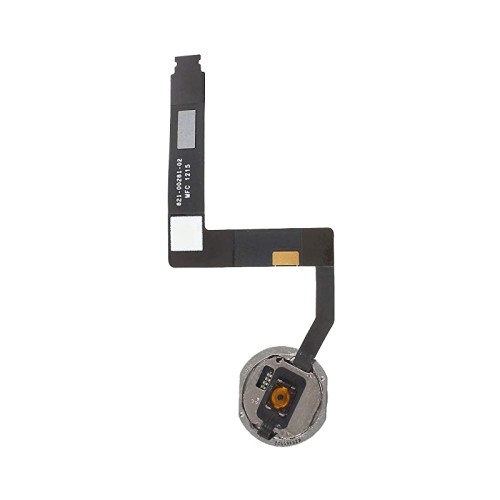
For example, a Home-button flex can restore button click but may not restore fingerprint functionality when that depends on the original paired component. State this clearly before repair.
For iPad repair options, see Apple Support: iPad repair and service.
Which original components may need to be transferred?
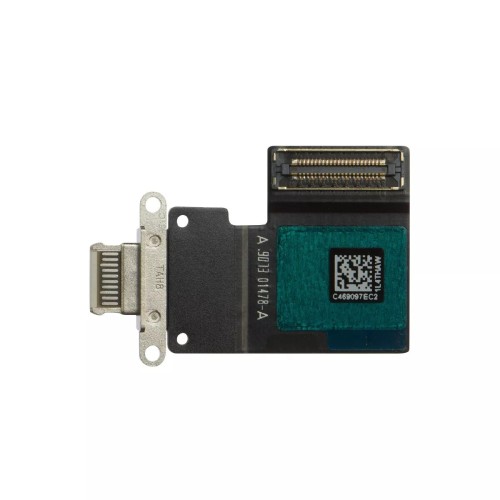
Check connector shape, camera cut-outs, frame colour, brackets and flex positions against the removed part. Product images support the check but are not enough by themselves.
For a device-specific repair reference, see iFixit: iPad repair references.
What happens to Touch ID when a button is replaced?
Look for model-code compatibility, included parts, required transfers and return conditions. Ask before buying if the listing does not state the exact A-number.
Which checks belong before adhesive and closure?
Connect and test the repaired function in the appropriate sequence, then check related features such as display, touch, charging or button operation before sealing.
What should be confirmed on the product listing?
Start with Digi4u Apple parts, use the confirmed A-number, and review the individual SKU rather than a broad model-family label.
Why A-number matching reduces returns
A-numbers narrow the iPad generation and configuration far more reliably than a customer’s description such as “10-inch iPad”. They should appear on the repair record and purchase check. This is especially valuable when models share a similar chassis, colour or screen-size description but use a different digitiser or flex arrangement.
Plan component transfers before ordering
An iPad repair can require retaining brackets, cameras, button assemblies or other small parts from the original device. Confirm whether the listing includes them and whether the repair affects a paired function. The time and risk of that transfer belong in the repair quote, not as a surprise after opening.
Match table
| Starting clue | Use it for | Do not use it alone for |
|---|---|---|
| A-number | Exact model identification | Assuming all parts are included |
| Screen size | Initial orientation | Connector-level part selection |
| Product image | Supporting comparison | Final compatibility approval |
A-number confirmation should happen before disassembly
If an iPad can still be read through Settings, note the A-number and capacity or connectivity variation before opening. Once parts are separated, an initial identifier can be harder to verify and the customer may remember only a broad name. This early check is especially valuable for iPads with similar front design but non-interchangeable display or button assemblies.
Touch ID requires careful scope
The original Touch ID relationship should be explained before any button or display transfer work. A generic replacement component may restore a mechanical click while not restoring fingerprint authentication. This is not a detail to bury in a product description: it is a repair-outcome limitation that can change the customer’s decision.
Quote the complete iPad repair
Include the selected assembly, transfer work, adhesive or seals, diagnostic test and any known functional limitation. A quote based only on an image-labelled “iPad screen” creates the wrong comparison and can force the technician to improvise after the device is opened.
Completion standard
An iPad repair is complete only when the ordered assembly, transferred components and expected function have all been checked against the original repair scope. Keep the A-number and fitted SKU in the customer record. That gives future work a reliable starting point and makes it possible to explain clearly why a component was chosen, what was tested and what limitation was disclosed.
For “iPad Model Numbers Explained: Match A-Numbers to Replacement Parts”, the repair record should link the confirmed device identifier, selected SKU and result of the first controlled check. That record gives a later technician a defined baseline, supports a supplier query when appropriate and prevents a broad conclusion from being drawn from one symptom. It also makes the customer conversation precise: the shop can distinguish what was verified during this repair from what requires a separate diagnosis.
Frequently asked questions
What iPad do I have by model number?
Find the A-number on the device or in Settings, then match it using Apple’s current identification guide.
Where can I find spare parts for my iPad?
Search by the confirmed A-number and review whether the listing is a digitiser, LCD, complete assembly, battery or flex.
Is it cheaper to repair or replace an iPad?
Compare the correct part, labour, device condition and remaining value; the answer varies by model and fault.
For iPad Model Numbers Explained: Match A-Numbers to Replacement Parts, confirm the exact device and fitted SKU with Digi4u before ordering.
