


How to Handle a Swollen Phone Battery: Causes, Risks, and Repair Tips
Need this part? We stock tested replacement parts with same-day UK dispatch and a 12-month warranty.
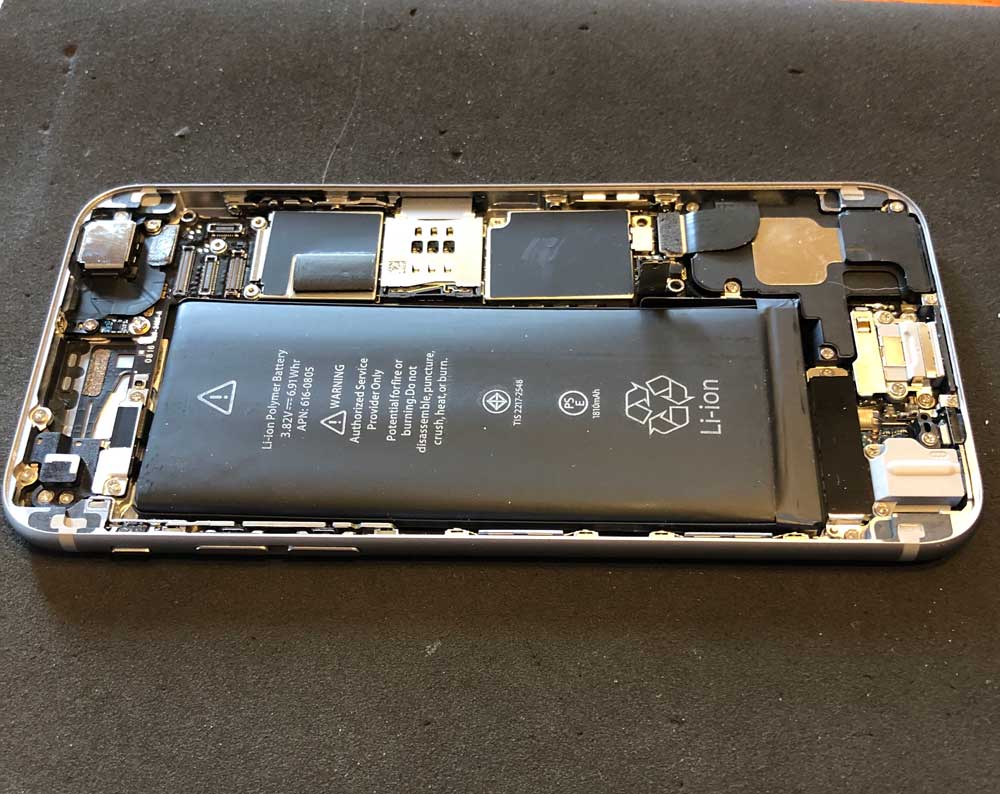
Posted on by digi4u
As a mobile repair professional, one of the most common and potentially dangerous issues we encounter is battery swelling or even explosions. This issue has become increasingly prevalent in smartphones due to the heavy reliance on lithium-ion batteries, which power the majority of modern devices. In this blog, we’ll take a deep dive into the causes behind battery swelling and explosions, how to identify them, and the steps you can take to either repair or safely replace a damaged battery. We also encourage DIY repair when it’s safe, but caution is key.
What Causes a Phone Battery to Swell or Explode? Understanding why a battery swells or explodes is crucial to preventing and addressing this issue. Here are the main causes:
- Overcharging: Overcharging is one of the most common causes of battery swelling. When a lithium-ion battery is charged beyond its capacity, it leads to an increase in temperature and internal pressure, which can cause the battery to swell. Overcharging can also be a result of faulty charging circuits or using an incompatible charger, which may not regulate the voltage properly.
- Physical Damage: Dropping or physically damaging the phone can cause internal damage to the battery. Even minor damage to the battery casing can lead to chemical reactions inside the cell, producing gas and leading to swelling. In severe cases, this internal reaction can result in an explosion.
- Heat Exposure: Heat is another major factor that can cause battery swelling. Extended exposure to high temperatures, such as leaving your phone in direct sunlight or using it while charging, can cause the battery to overheat. This heat can break down the internal components of the battery, causing it to expand and, in extreme cases, explode.
- Manufacturing Defects: Sometimes, battery swelling or explosions occur due to factory defects. While this is rare, poorly manufactured or subpar quality batteries may have internal faults such as weak seals or poor chemical composition, which increases the risk of swelling or even combustion.
- Old or Degraded Batteries: As batteries age, their chemical composition breaks down. This degradation can lead to an increase in internal resistance, causing overheating and swelling. Over time, all batteries lose capacity, and their ability to handle high voltages and temperatures diminishes.
How to Diagnose a Swollen or Faulty Battery: Here are some signs you can look for to determine if your phone’s battery might be swollen or damaged:
- Physical Distortion: If the phone’s screen appears to be popping off or bulging, or the back cover has become loose, the battery may be swollen.
- Performance Issues: A significant drop in battery life or sudden shutdowns, even when the battery level isn’t low, can be indicative of an internal battery issue.
- Excessive Heat: If your phone gets excessively hot during normal use or charging, there may be an issue with the battery.
- Visible Leaks or Smell: A foul odor or visible leaks near the battery area is a major red flag and indicates that the battery is potentially dangerous.
How to Safely Handle a Swollen Battery: If you suspect your phone’s battery has swelled, here are the recommended steps:
- Turn Off the Phone: If the phone is still operational, turn it off immediately to prevent any further damage or risk of explosion.
- Avoid Charging: Don’t attempt to charge a swollen battery, as this can exacerbate the problem.
- Don’t Puncture the Battery: Never try to poke or press on the swollen battery. This can cause leakage or trigger an explosion.
- Remove the Back Cover: If you’re comfortable and have the proper tools, you can carefully remove the back cover of the phone to check the condition of the battery. If you notice that the battery has swollen, it’s best to replace it as soon as possible.
- Seek Professional Help for Dangerous Cases: If you discover that the battery is severely damaged or swollen, we recommend sending the phone to a professional repair shop. Attempting a repair without proper knowledge and tools can be dangerous.
DIY Battery Replacement: A Safe Approach: If you are comfortable with DIY repairs and the battery is only mildly damaged or no longer functioning properly (but not swollen), it’s possible to replace it yourself. We support DIY repairs in these cases, as long as the following conditions are met:
- No Puncture or Swelling: If the battery is normal and hasn’t swollen or leaked, replacing it can usually be done without any issues. Ensure you have the proper tools, such as a plastic prying tool and a suction cup, to avoid damaging the phone or puncturing the battery.
- Use High-Quality Parts: Always use high-quality, OEM, or certified replacement parts. Low-quality batteries can pose serious risks and may fail prematurely.
- Be Cautious: If at any point you feel unsure or uncomfortable, don’t hesitate to seek professional help. Battery replacement is straightforward for experienced technicians, but even small mistakes can result in safety hazards.
When to Visit a Professional Repair Shop: If you open the back cover and find a battery that is swollen or damaged beyond simple replacement, we highly recommend sending it to a professional repair shop. Swollen batteries can be hazardous, and attempting to handle them improperly may lead to serious injury or damage to the phone. Our experienced technicians can safely remove and replace the battery, ensuring that your phone is restored to full functionality without putting your safety at risk.
Conclusion: Swollen or exploding batteries are a serious issue that can cause significant damage to both your phone and personal safety. While DIY repairs can be an excellent way to save money, it’s important to know your limits and understand when it’s best to seek professional help. By following safety guidelines and performing repairs carefully, you can avoid most of the risks associated with battery failure. Always prioritize safety—both your own and your device’s—when dealing with battery issues.
At www.digi4u.co.uk, we support safe DIY repairs, but we also advise that when the battery shows signs of swelling or physical damage, it’s always better to visit a professional technician.



