


Swollen Phone Battery: Causes, Risks & Safe Handling
Need this part? We stock tested replacement parts with same-day UK dispatch and a 12-month warranty.

A swollen phone battery signals an internal failure that releases gas, pushing the screen or back cover outward and creating a genuine fire hazard. Immediate action — stop charging, power off, and seek professional removal — protects both the user and anyone nearby and prevents further damage to the device.
Last updated:
Causes of a swollen phone battery
Battery swelling is the visible result of gas building up inside a sealed lithium-ion cell. The gas forms when the electrolyte breaks down, a process accelerated by several distinct triggers. Understanding each cause helps owners and technicians reduce the likelihood of a repeat incident.
| Cause | Why it swells | Prevention tip |
|---|---|---|
| Overcharging or prolonged high-voltage charging | Excess voltage drives electrolyte breakdown, producing gas inside the sealed pouch. | Use only genuine or branded chargers; avoid leaving devices plugged in overnight. |
| Exposure to high temperature | Heat speeds up chemical reactions inside the cell, increasing gas generation. | Keep phones out of direct sunlight, hot cars, and away from heating appliances. |
| Physical damage or drops | Impact can breach the separator, creating internal short circuits that generate heat and gas. | Use a protective case and handle devices carefully; inspect for dents after a fall. |
| Deep discharge (cell left at 0 % for extended periods) | Voltage drops below the safe threshold, which can damage the cell’s internal chemistry. | Top up stored phones periodically; avoid leaving them completely flat for long periods. |
| Age and natural degradation | Repeated charge cycles gradually degrade the electrolyte, making gas release more likely. | Replace the battery when health readings fall or runtime drops noticeably. |
| Non-genuine or low-quality chargers | Poor regulation can deliver voltage spikes that stress the cell. | Purchase chargers from reputable suppliers; verify CE/UKCA marking. |
These factors often combine — a phone left charging on a sunny windowsill with a cheap adapter is a classic high-risk scenario. The London Fire Brigade advises avoiding charging at very high or low temperatures, not covering chargers, and using genuine or branded chargers to minimise fire risk (London Fire Brigade guidance).
Risks and warning signs
A swollen cell is under pressure; puncturing, bending, or heating it can trigger a thermal runaway that leads to fire or explosion. The University of Reading Health & Safety guidance stresses that even if the device still powers on, the battery must be replaced because continued use or charging can be dangerous.
| Sign | Risk level | What to do now (owner) |
|---|---|---|
| Slight screen or back lift | Low | Stop charging immediately; power off; place device on a non-flammable surface; arrange professional removal promptly. |
| Phone rocks on a flat surface | Medium | Stop charging; power off; move away from heat sources and combustibles; do not press on the display; book a technician same day. |
| Case will not close flush | Medium | Stop charging; power off; keep device upright on a fire-retardant mat; contact a repair shop promptly. |
| Device feels warm when idle | High | Stop charging; power off; move to a well-ventilated area away from flammable materials; seek immediate professional help. |
| Hissing, sweet or solvent smell | High | Stop charging; power off; evacuate the immediate area; do not touch the device; call 999 if smoke appears. |
| Visible smoke or rapidly increasing heat | Critical | Move away, keep clear, call 999; do not attempt to move or extinguish the device yourself. |
Early detection is vital. A sweet or solvent odour often indicates leaking electrolyte, a precursor to a more violent event. Never attempt to “deflate” the battery by puncturing it — this is a direct fire hazard.
Safe handling for owners
- Stop charging immediately. Unplug the charger and, if possible, remove the cable from the wall socket.
- Power off the device. Hold the power button until the phone shuts down completely.
- Isolate the phone. Place it on a non-flammable surface such as a ceramic tile or a metal tray, away from curtains, paper, and other combustibles.
- Do not press, bend, or puncture the bulge. Mechanical stress can rupture the cell.
- Photograph the swelling. A clear image helps the technician assess the severity before the device arrives.
- Contact a qualified technician. If the phone is under warranty or insurance, notify the provider before any disassembly.
- Arrange safe transport. If you must move the phone, keep it upright in a rigid box with padding; avoid stacking other items on top.
These steps mirror the London Fire Brigade’s recommendation to stop charging, turn off the device, and avoid tampering with the equipment. For further detail on safe handling of damaged cells, see the dedicated guide for technicians (technician handling guide).
Bench protocol for repair shops
Professional workshops must follow a strict, repeatable procedure to protect staff, customers, and premises. The following protocol reflects current UK best practice and the University of Reading’s safety advice.
- Assessment before opening. Verify the device is powered off, photograph the swelling, and note any odour, heat, or sound.
- Do not deliberately discharge or charge a swollen cell. Both actions increase internal pressure and the risk of thermal runaway.
- Use only plastic pry tools. Metal tools can puncture the cell or create a short circuit.
- Release adhesive with isopropyl alcohol or manufacturer pull tabs. Avoid heating a swollen cell where possible; patience with isopropyl is safer than force, and never lever the cell out.
- Disconnect the battery connector first. This eliminates any residual current path.
- Tape the battery terminals immediately. Use non-conductive Kapton or electrical tape to prevent accidental shorting.
- Interim storage. Place the removed cell in a lithium-ion fire/smoke containment bag if available; otherwise, a non-flammable container stored in a cool, dry area away from other batteries and combustibles.
- Log the incident. Record model, serial number, swelling severity, and actions taken for traceability and compliance.
- Disposal via a registered route. Hand the cell to a licensed WEEE collector; never place it in general waste or recycling bins (NLWA guidance).
Adhering to this protocol ensures a trained bench remains a safe bench. For a deeper dive into disposal responsibilities, consult the UK disposal guide (UK battery disposal guide).
Replacing the swollen battery
Replacement follows the standard battery-swap workflow: open the device, disconnect the battery first, then lift the old cell using its pull tabs or gentle heat. Never force a swollen cell; the adhesive may be stronger than expected, and excessive force can rupture the pouch.
iPhone models
The step-by-step iPhone battery replacement guide covers the full bench process for common models (iPhone battery replacement guide). Digi4u stocks tested replacement cells for the current iPhone range; you can browse the catalogue here (iPhone batteries).

Android models
The same principles apply to Android devices. For example, the Samsung Galaxy A52 series uses a 4500 mAh cell that can be swapped with the same careful technique. Digi4u carries a compatible replacement for that series.
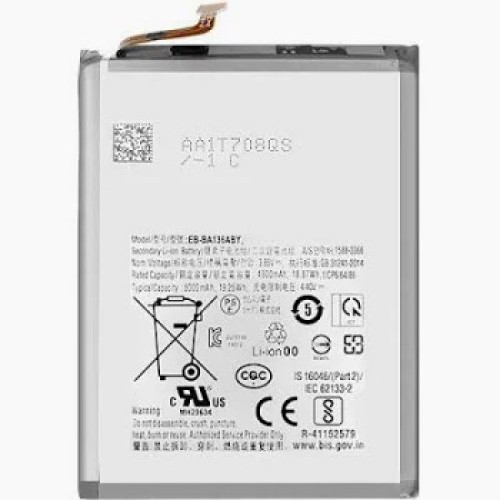
After installation, run a full charge cycle and verify battery health via the device’s diagnostics. The post-repair test should confirm capacity, voltage stability, and thermal behaviour under load.
For broader repair advice, including screen-lift issues caused by swelling, see the companion article on repair tips (repair tips).
Owner vs technician script
Clear, calm communication reduces anxiety and ensures the customer follows safety advice. Use the following framework at the counter.
| Situation | What to say (owner-facing) | What to do (technician) |
|---|---|---|
| Customer notices a bulge | “The battery has reached the end of its life and is producing gas. It’s safe to handle gently, but you must stop charging it right now.” | Power off the device, photograph the swelling, place on a fire-retardant mat. |
| Customer asks if they can keep using it | “Continuing to use or charge a swollen cell can cause a fire. The only safe fix is a replacement.” | Explain the bench protocol; do not attempt to discharge or charge the cell. |
| Customer worries about cost | “We’ll give you a fixed price for the replacement before any work starts. The old battery will be disposed of responsibly as part of the service.” | Quote from the current price list; log the disposal route. |
| Customer asks about warranty | “If the phone is still under manufacturer warranty, contact them first — opening the device may affect coverage.” | Check warranty status before breaking seals; document the conversation. |
This script keeps the interaction professional, informs the owner of the risk, and aligns the technician’s actions with the safety protocol.
Disposal in the UK
Rechargeable lithium-ion batteries must never enter household rubbish or recycling bins. The North London Waste Authority (NLWA) advises taking them to a designated battery collection point or a reuse and recycling centre. Repair shops should maintain a dedicated, clearly labelled bin for swollen cells, tape terminals, and arrange collection with a registered WEEE carrier. Digi4u’s delivery policy notes that replacement lithium batteries ship via DPD only, as Royal Mail does not carry standalone lithium cells (delivery policy). For a complete overview of UK disposal rules, refer to the disposal guide (UK battery disposal guide).
Frequently asked questions
Is a swollen phone battery dangerous?
Yes. A swollen cell is under internal pressure and can ignite or explode if punctured, bent, overheated, or charged. Even a device that still powers on poses a fire risk, so the battery must be replaced immediately and handled only by a trained technician.
Can I keep using or charging a phone with a swollen battery?
No. Continuing to charge or use a swollen battery increases the likelihood of thermal runaway. Stop charging at once, power off the device, and arrange professional removal. Even if the phone still works, the battery must be replaced.
What causes a phone battery to swell?
Swelling results from gas generated by electrolyte breakdown. Common triggers include overcharging, exposure to high temperature, physical damage, deep discharge, natural ageing, and use of non-genuine chargers. Each factor accelerates the chemical reactions that produce gas inside the sealed cell.
Is it normal for an iPhone battery to expand?
No. Any noticeable expansion — lifted screen, bulging back, or a phone that rocks on a flat surface — indicates a fault. Treat it as a safety issue that needs prompt replacement by a trained technician; it is not a normal ageing characteristic.
How do I dispose of a swollen phone battery in the UK?
Take the battery to a local battery collection point, a household waste recycling centre, or hand it to a registered WEEE collector. Do not place it in general waste or recycling bins. Repair shops should store swollen cells in a fire-containment bag or a non-flammable container until collected by a licensed carrier.
