


MagSafe Not Working: Charger, Alignment or Coil
Need this part? We stock tested replacement parts with same-day UK dispatch and a 12-month warranty.

When MagSafe is not working on an iPhone, rule out the charger, USB-C power source, case and alignment before you open the phone. Apple’s own MagSafe Charger setup guidance calls for a recommended 30W or greater USB-C adapter (or a suitable USB-C computer port), a clear flat surface, and correct magnetic snap; only after those checks fail should a shop move on to magnet-array, wireless-coil or board diagnosis.
Last updated:
Digi4u supplies iPhone back covers, charging-port flexes and related parts from Cardiff for UK repair shops and DIY.
What should you eliminate before opening the iPhone?
Start outside the handset. Connect the MagSafe puck to a known-good USB-C lead and a 30W-class USB-C power adapter (or a verified USB-C laptop port), place the charger face-up on a clear desk away from loose metal, and snap a known-good MagSafe-capable iPhone onto it. Apple’s public MagSafe Charger instructions emphasise adapter wattage, a clear surface and correct placement; if a second phone charges and the customer’s phone does not, you have narrowed the fault toward the handset or its case rather than the wall wart.
Remove every case and metal plate, clean the back glass and charger face, and retry centred alignment while watching for the charging glyph. Thick wallets, off-centre rings and metal plates are still the most common false “coil failure” tickets. Restart the iPhone and check for charge with a wired cable as well — Apple’s “won’t charge” support path still starts with cable, port debris and accessory checks before deeper hardware work.
| External check | Pass means | Fail means |
|---|---|---|
| Known puck + ≥30W USB-C adapter charges a second iPhone | Wall power and puck OK | Replace adapter/cable/puck first |
| Customer phone charges wired | Battery/port path alive | Follow no-power / port diagnosis |
| Charges bare, fails in case | Case/ring issue | Stop; do not quote coil yet |
| Bare phone snaps but never charges | Magnets present; suspect coil/board | Open for coil / antenna path inspection |
| Only charges off-centre | Alignment / magnet array shift | Common after back-glass jobs |
Why does MagSafe fail after a back-glass or housing repair?
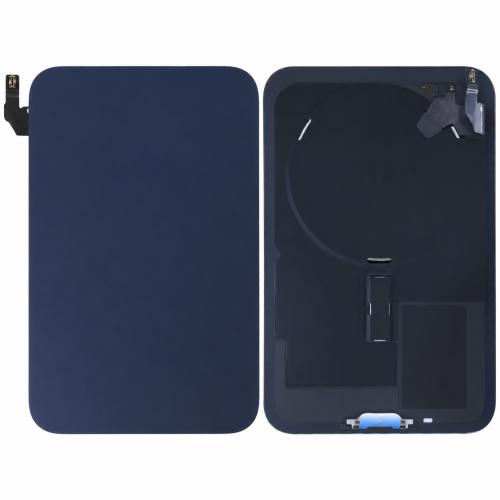
Back-glass and housing jobs disturb the magnet ring and the wireless-charge coil flex more often than a virgin phone ever will. If the charger still snaps firmly but charge never starts, the magnets are roughly present and the coil, flex seating or charge-control path is the suspect. If the puck no longer self-centres, the magnet array was shifted, thinned or left out during reassembly — a parts problem you can see with a careful visual check before you blame the logic board.
| Observation | Likely part path | Shop action |
|---|---|---|
| Strong snap, no charge glyph | Wireless coil / flex / charge IC path | Inspect coil flex; avoid guessing battery alone |
| Weak or off-centre snap | Magnet array misaligned or incomplete | Refit array; check back-glass spacer stack |
| Works only without glass adhesive thickness | Spacing / aftermarket glass stack | Re-evaluate glass grade and magnet height |
| Wired charge OK, wireless dead, magnets OK | Coil or board wireless section | Quote coil first; escalate board if coil fails |
| No wired or wireless charge | Port, battery or power rail | Leave MagSafe; run no-power flow |
How do you separate coil faults from board faults?
Treat board-level wireless failure as the last branch, not the first quote. After external checks and a visual magnet/coil inspection, a known-good coil flex that still will not handshake points toward charge-control or board damage — especially on phones with liquid history or prior heat-gun back-glass work. Explain to the customer that MagSafe coil parts are cheaper to stage than a full board repair, and that a failed coil test is the gate before any board estimate.
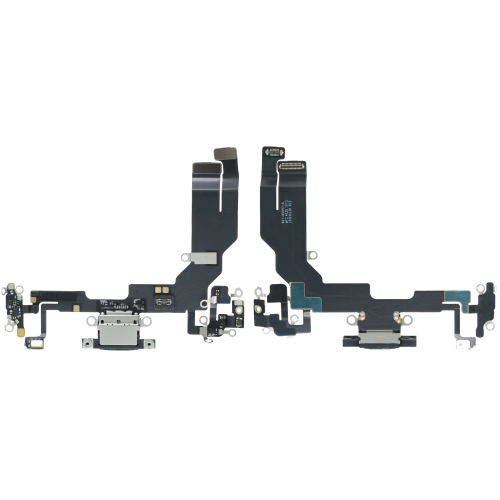
If the phone is also unreliable on USB-C wired charge, stop calling it a MagSafe job. Digi4u’s iPhone charging-port hub and the no-power diagnosis article cover that fork. For housing-related MagSafe complaints after glass work, keep iPhone back glass and housing parts in the same ticket conversation so magnet-array height is not ignored.
What should you tell the customer and when should you decline?
Describe MagSafe as three cooperating parts — power source and puck, magnet array, and coil — and show them the bare-phone test so they see a thick case fail before you open anything. Price coil or magnet work separately from board work, and do not promise Qi2 accessory behaviour identical to Apple’s MagSafe Charger without testing the exact accessory they use daily.
Decline or re-quote when the back glass is shattered into the coil area and the customer only wants “a polish and a new case”, when liquid indicators are triggered and they refuse board inspection time, or when they insist MagSafe must work through an untested metal plate wallet. Those jobs burn bench time and create charge-safety arguments you cannot win at the counter.
What is the one rule for MagSafe not working?
Prove the charger and case first, then decide magnet versus coil, and only then talk about the board. Use Apple’s MagSafe Charger setup expectations (adequate USB-C power, clear surface, correct snap) as the external bar, document back-glass history, and stage housing or port parts from Digi4u’s live hubs when the handset side fails those checks. Related reading: phone no power diagnosis and back glass housing parts.
FAQ
Why is my MagSafe charger not working with my iPhone?
Most failures are external: under-powered USB-C adapters, faulty puck cables, thick or metal cases, or poor alignment. Apple recommends a 30W or greater USB-C adapter for MagSafe Charger setup. Test a second phone on the same puck, then test your iPhone bare, before assuming a coil fault.
Can a phone case stop MagSafe from charging?
Yes. Cases that are too thick, off-centre MagSafe rings, or metal plates can block or misalign the field. Always diagnose with the case removed, then re-test the customer’s case as a separate step.
Does MagSafe need a special power adapter?
Apple’s MagSafe Charger instructions recommend connecting the USB-C end to a 30W or greater Apple USB-C power adapter or a compatible third-party USB-C adapter, or to a USB-C port on a computer. A weak adapter can look like a broken MagSafe system.
Can back glass replacement break MagSafe?
Yes. Housing and back-glass jobs can shift the magnet array or stress the wireless coil flex. Off-centre snap usually points to magnets; firm snap with no charge points to coil or charge-path faults.
When is MagSafe failure a logic-board problem?
Only after the puck, adapter, case, magnets and coil path have been eliminated. Board wireless sections are the expensive last branch — quote them separately after a failed known-good coil test, especially on liquid-damaged phones.
