


Samsung Galaxy S22 Battery Replacement: Model by Model
Need this part? We stock tested replacement parts with same-day UK dispatch and a 12-month warranty.

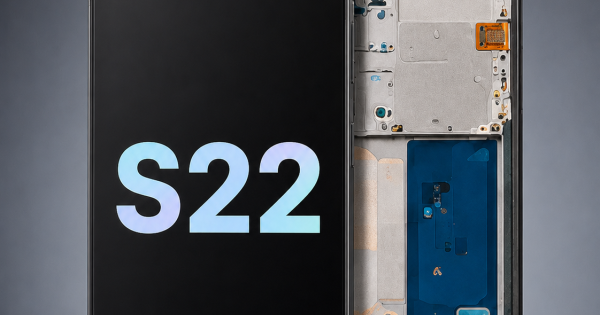
The Galaxy S22 range looks like one product family and behaves like three. The standard S22, the S22 Plus and the S22 Ultra use different batteries, different screens and different charging assemblies, and the differences are not interchangeable.
Battery replacement is now a common S22 job. The work is similar across the three models, but the part choice is not, and that is where most mistakes happen.
Which S22 models use which battery?
Three models, three separate cells.
The S22, S22 Plus and S22 Ultra each have their own battery part number, capacity and connector. The Plus is larger than the standard model, and the Ultra is larger again with a different internal layout.
Do not assume a family battery exists. A supplier listing “S22 battery” may mean one specific model, and the listing should be checked against the part number rather than the marketing name.
The three cells also differ in physical size, so a wrong part is usually obvious before it is connected. If it does not sit flat in the chassis, stop and check the model rather than forcing it into place.
A supplier’s catalogue usually lists the battery under the model code rather than the marketing name, so searching for “S22” returns three different lines. That is the simplest confirmation that the family really does split into three parts.
It is also why a shop should not order from memory when a customer is waiting at the counter.
How do you confirm the model?
By the SM- code in Settings, About phone.
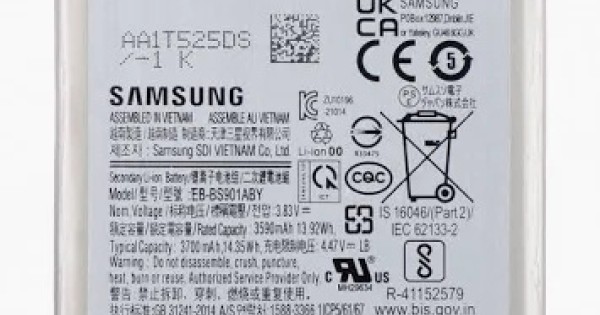
The S22 family uses SM-S901, SM-S906 and SM-S908 codes for the three sizes, with regional suffixes. The code is the only reliable identifier once a device has been refurbished or reboxed.
Write it on the job sheet before ordering. The matching logic is the same one described in matching Samsung parts by model code, and it applies to the battery, the screen and the port.
The suffix matters as well. Regional variants can use a different part even when the first six characters match, and the supplier’s catalogue is usually indexed by the full code rather than the family name.
What capacity should the replacement have?
The rating for that specific model, not the family average.
Each S22 variant has its own capacity, and the replacement should match the original. A cell that is electrically close but physically different will not fit the chassis, and a cell that fits but under-delivers will produce the same runtime complaint.
Check the connector and the mounting tabs on arrival. A battery that matches on the label but not in the hand is a return waiting to happen.
Weigh the part if the specification is unclear. A cell that is materially lighter than the original is usually a lower-capacity unit in a similar wrapper, and it will not deliver the runtime the customer is paying for.
Why do S22 batteries fail?
Cycles, heat and fast charging.
The S22 range supports fast charging, and a device charged at high current every day spends more time at elevated temperature than one charged slowly. Heat is the variable that ages a lithium cell fastest.
Gaming and navigation add to it. A phone that is charged while running a demanding app is being asked to accept current and deliver it at the same time, and the cell pays for that in capacity.
A phone kept in a case that traps heat ages faster than one used without. That history explains why two S22s from the same year can report very different behaviour on the same day.
How do you test before replacing?
Read what the device reports, then load it.
Samsung reports battery information through the device care settings, though the detail varies by model and software. The figure gives context, not a verdict, in the same way as the numbers described in matching a Samsung cell to the model.
Then run a demanding task with the screen bright and the radios on. A shutdown or a sudden drop is the behaviour that justifies the repair, and it is also the evidence for the customer conversation.
What does the replacement involve?
Opening the back, then releasing the cell adhesive.
The S22 is a glued-back design, so the job starts with heat around the perimeter and a pick. Once the back is off, the battery connector is accessible and the cell is held by adhesive strips.
Work slowly around the pouch. The cell is thin, and a crease or a puncture turns a routine replacement into a safety incident rather than a warranty claim.
Take the back off in one piece and keep the old adhesive away from the new cell. A stray strip under the battery holds it off the chassis and puts stress on the connector every time the device is charged.
What damages the connector?
Levering the socket instead of the plug.
The connector sits close to the board and the surrounding components. A tool inserted under the socket can lift it from the board, which converts a battery job into a microsoldering job.
Use a plastic tool under the plug and support the board while lifting. The failure modes are described in battery connector damage.
Disconnect the battery before any other flex. Working on a live board risks a short, and a short on a Samsung board can take out more than the part being replaced.
How do you reseal the back?
With a new gasket and even pressure.
The original adhesive should be removed from both surfaces before a new gasket is fitted. Reusing the old adhesive leaves gaps, and the back will lift at the first warm day or the first drop.
Apply even pressure around the perimeter and check the edges before the device is returned. A back that is not seated properly is a water-resistance failure as well as a cosmetic one.
Give the adhesive time to set before the customer uses the device. A back that is pressed once and handed over will lift at the first warm day, and the return costs more than the extra ten minutes would have.
How do you calibrate after fitting?
Full charge, full discharge, then a normal day.
A full cycle lets the device relearn the cell’s range. It does not change the capacity, but it aligns what the device reports with what the cell can deliver.
Ask the customer to judge the repair by a normal day of use rather than by a number in a menu. That is the test the device was bought for, and it is the one that matters if a question arises later.
How should you store S22 batteries?
Cool, dry, labelled and away from metal.
A lithium pouch should sit at room temperature in its packaging, with the connector protected. Heat, moisture and loose screws in the same drawer are the three things that damage a cell before it is fitted.
Label by part number and date received. That lets the oldest stock go first and gives the supplier something to trace if a batch fails early.
Quarantine any cell that has been dropped, swollen or stored in a cold workshop. The handling rules for a damaged pouch are different, and it should never go into a customer’s device.
What should you tell the customer?
That behaviour matters more than the reported figure.
Samsung devices do not always expose a battery health percentage in the same way as an iPhone, and a replacement may not produce a new number on screen. The device should stop shutting down and hold a day’s charge, and that is the promise to make.
Explain the difference before the work. A customer who expects a figure to change will treat the old number as proof the battery was not replaced, even when it was.
Give them a simple test as well: a normal day of use without a shutdown. It is more meaningful than any menu figure and gives the shop a clear answer if the device returns.
Write the old and new behaviour on the job sheet. If the customer comes back with the same complaint, the shop can compare what changed rather than starting the diagnosis again from nothing.
When is the fault not the battery?
When the device charges slowly or runs hot while charging.
Those symptoms can come from the port, the cable, the charger or the charging circuit. Replacing the cell in that situation costs a part and changes nothing, and the customer comes back with the same complaint.
Test the charging path first: a different cable and charger, a check of the port for debris, and a look at the current draw. That sequence separates the two faults before any part is ordered.
What is the one rule for S22 batteries?
Match the SM- code and the part number before you fit.
Two fields, both recorded on the job sheet. The model code decides which of the three cells is correct, and the part number confirms it on arrival.
Around it sit the ordinary disciplines: test before replacing, disconnect by the plug, reseal with a new gasket and record what was fitted. Samsung publishes model support at Samsung UK support, replaced cells are waste under the Waste Electrical and Electronic Equipment Regulations 2013, handling comes under risk assessment at work, product safety sits with the Office for Product Safety and Standards, and retail customers keep their rights under the Consumer Rights Act 2015.
FAQ
Are the S22, S22 Plus and S22 Ultra batteries interchangeable?
No. Each model uses its own cell with a different capacity, connector and physical size. Match the SM- code before ordering.
How long does an S22 battery replacement take?
Around forty-five minutes to an hour for an experienced technician, including opening the glued back, releasing the adhesive and resealing with a new gasket.
Does an S22 battery replacement reset battery health?
Not necessarily. Samsung does not always expose health in the same way as an iPhone, so the repair should be judged by runtime and shutdown behaviour rather than a percentage.
Why does my S22 still charge slowly after a new battery?
The fault may be in the port, cable, charger or charging circuit rather than the cell. Test the charging path before ordering another battery.
Galaxy cells by model code, not by series. Digi4u supplies Samsung batteries with the model and capacity confirmed before dispatch.
