


MacBook Air M1 Battery Replacement: Matching the A2337 Chassis
Need this part? We stock tested replacement parts with same-day UK dispatch and a 12-month warranty.

The MacBook Air M1 is now old enough for battery replacement to be a normal workshop job. The machine is still capable, the replacement is economical, and the work is well within reach of a shop that already repairs phones and tablets.
What makes it different is the chassis. The battery is bonded into a thin aluminium body, the trackpad and speakers sit close to it, and the A-number decides which cell is correct. Those three facts shape the whole job.
Which MacBook Air M1 battery do you need?
The cell for the A2337 chassis, not the Intel Air.
The M1 Air is identified as A2337, and it uses a different battery from the Intel A2179 and A1932 machines that share the same 13-inch shape. The capacity, the connector and the mounting differ.
Match the A-number on the underside of the machine before ordering. The marketing name “MacBook Air 13” covers several generations, and the part that fits one will not fit the next.
The A2337 also covers both the 2020 M1 model and later revisions of the same chassis, so the A-number alone is not quite enough. Note the year as well, because the battery connector changed on some later builds.
How do you confirm the A-number?
From the base or the system report.
The A-number is printed on the underside near the hinge, and the same identifier appears in macOS under System Information. Either source is reliable; a customer’s description is not.
Record it on the job sheet. The full matching method for screens, batteries and trackpads is set out in matching MacBook parts by model number, and the same check applies to every part on the machine.
If the label is worn, macOS still reports the model identifier under System Information. That is enough to confirm the chassis, and it avoids relying on a customer’s memory of when the machine was bought.
What capacity and voltage should you expect?
The original rating for the M1 Air, not a generic figure.
The replacement should match the original nominal voltage and capacity, and the connector should be the same shape. A cell that claims a much higher capacity in the same shell is usually quoting a peak figure rather than a usable one.
Check the label and the mounting tabs on arrival. A battery that matches electrically but not mechanically will not sit flat, and a cell that is under stress will fail early.
Compare the connector width and pin count against the old cell before the new one goes in. A connector that is close but not identical can be forced into place, and the damage shows up as an intermittent charge fault weeks later.
Why do M1 Air batteries fail?
Cycles, heat and constant charging.
A laptop used on mains power most of the day spends long periods at full charge, which is harder on the cell than a phone that is charged and unplugged. The Air also runs warm under sustained load, and heat accelerates the ageing process.
The result is a machine that reports a service condition, shuts down unexpectedly or runs for a fraction of its original time. Those symptoms are the ones that justify a replacement.
A machine that has been used mainly on a desk, plugged in, often shows a low cycle count with a poor runtime. The cell has aged by calendar time and heat rather than by cycles, which is why the cycle count alone can mislead.
How do you read battery condition on macOS?
Cycle count and condition, together.
macOS reports the cycle count and a condition status in System Information under Power. The condition is a summary rather than a measurement, so it should be read alongside the cycle count and the customer’s experience.
A machine with a high cycle count and a service warning is a straightforward replacement. One with a low count and poor runtime may have a different fault, and that possibility should be tested before the battery is ordered.
What does the replacement involve?
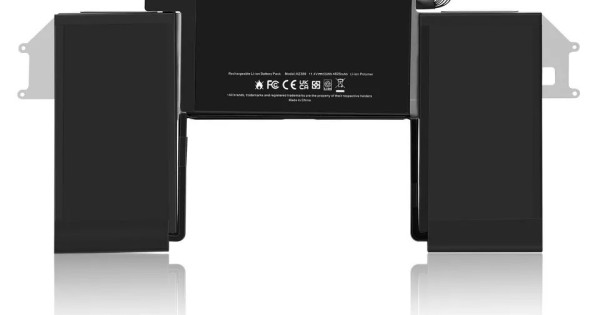
Opening the base, then releasing the cell adhesive.
The bottom cover is held by screws, including two shorter ones near the hinge that must go back in the same positions. Once inside, the battery connector is disconnected before anything else is touched.
The cell is bonded to the chassis with strong adhesive strips. They are released with solvent and a plastic card, working slowly across the length of the battery rather than levering at one end.
Take the screws out in a tray and lay them out in the order they came out. The Air uses several lengths, and a long screw in a short hole can damage the chassis or the board underneath.
What tools and consumables are needed?
The right driver, solvent, a plastic card and new adhesive.
The base screws are a small pentalobe or torx depending on the build, and the internal screws are a different size again. Using the wrong driver rounds the heads and turns a simple job into a difficult one.
Isopropyl alcohol and a plastic card release the adhesive without bending the cell. New adhesive strips are needed to refit the battery, and the correct tape is part of the job rather than an optional extra.
A suction cup helps lift the base without bending it. The cover is thin aluminium, and prying it from one corner leaves a visible bend that never sits flat again.
How do you avoid damaging the trackpad and speakers?
Keep the solvent and the card away from the edges.
The trackpad sits directly below the front edge of the battery, and the speakers run along the sides. Solvent that reaches either can damage the membrane or the driver, and the fault appears after the machine is reassembled.
Work in the centre of the battery and use just enough solvent to release the adhesive. A flooded chassis is much harder to recover than a slow, controlled release.
What should you test after fitting?
Charging, runtime, trackpad, speakers and sleep.
Confirm that the machine charges, that the battery is recognised, that the trackpad clicks and tracks, and that both speakers work. Then close the lid and confirm the machine sleeps and wakes normally.
Run a short discharge test as well. A cell that reports correctly but collapses under load will show up in ten minutes of video playback, and it is better to find that on the bench than in the customer’s bag.
Check the base for a clean fit before returning the machine. A cover that is not fully seated presses on the battery or the trackpad, and the customer notices the click before they notice anything else.
Photograph the inside of the machine before the new cell goes in. It gives the shop a record of the adhesive pattern and the cable routing, which is useful if the same machine comes back for another job.
What about calibration and battery health?
One full cycle, then normal use.
A full charge and a full discharge lets the system relearn the cell’s range. It does not change the battery’s actual capacity, but it aligns what the machine reports with what the cell can do.
Tell the customer that the condition indicator may take a few cycles to settle. A machine that shows a service status immediately after a correct replacement usually needs a cycle or two before the figure updates.
How should you store MacBook batteries?
Flat, cool and in the original packaging.
A MacBook cell is large and flat, and it warps if it is stored on edge or under weight. Keep it in its box on a shelf rather than in a drawer with tools, where a stray screwdriver can pierce the pouch.
Label the box with the A-number and the date received. That lets the oldest stock go first and makes a batch problem traceable if a replacement fails early.
Quarantine anything that has been dropped or has started to swell. A swollen cell is a fire risk rather than a warranty item, and it should never be fitted to a customer’s machine.
When should you decline the job?
When the chassis is bent or liquid has reached the board.
A bent Air will not seat a new battery flat, and the adhesive will lift. Liquid damage changes the job entirely, because the battery may be the least of the faults and the board may fail after the replacement.
Both are reasons to quote differently or refer the machine. The decision framework is the same one described in when to decline a repair.
What is the one rule for MacBook Air batteries?
Match A2337 and release the adhesive slowly.
The A-number protects the part choice, and patience protects the chassis. Most failed Air battery jobs are not electrical failures; they are bent cells, damaged trackpads or rounded screws caused by rushing the removal.
Around it sit the ordinary disciplines: disconnect the battery first, use the right driver, keep solvent away from the edges and test the trackpad and speakers before closing. Apple publishes service information at Mac laptop repair, replaced cells are waste under the Waste Electrical and Electronic Equipment Regulations 2013, storage and handling come under risk assessment at work, product safety sits with the Office for Product Safety and Standards, and retail customers keep their rights under the Consumer Rights Act 2015.

FAQ
Which battery fits the MacBook Air M1?
The cell designed for the A2337 chassis. It is not the same part as the Intel A2179 or A1932 batteries, so confirm the A-number on the base before ordering.
How long does a MacBook Air M1 battery replacement take?
Around one to two hours for an experienced technician, including opening the base, releasing the adhesive, fitting the new cell and testing the trackpad and speakers.
Does the battery need calibration after replacement?
One full charge and discharge helps the system relearn the cell’s range. The condition indicator may take a few cycles to settle even when the replacement is correct.
Can I replace the battery without removing the logic board?
Yes. The battery is accessible once the base is removed, but the adhesive is strong and the trackpad and speakers sit close enough that the solvent has to be controlled carefully.
MacBook cells matched to the chassis. Digi4u supplies MacBook Air batteries by A-number, with the model checked before dispatch.
