


Nintendo Switch Screen Replacement Parts UK: OLED, Lite and Original Fit Notes
Need this part? We stock tested replacement parts with same-day UK dispatch and a 12-month warranty.

When sourcing nintendo switch screen replacement parts uk for a hybrid phone‑and‑console repair shop, the first decision is which panel family matches the unit on the bench. This guide breaks down the three Nintendo Switch display families, the assembly options, the tools that protect the chassis, and the quality‑control steps that keep return rates low.
Original / Lite / OLED panel differences
The original Switch (model HAC‑001) uses a 6.2‑inch LCD with a 1280 × 720 resolution and a 30‑pin FPC connector. The Switch Lite (model HDH‑000) integrates the touch layer into a 5.5‑inch LCD, also 1280 × 720, but the flex routing and mounting brackets differ. The OLED model (HEG‑001) steps up to a 7‑inch 1280 × 720 OLED panel with a distinct 40‑pin connector and a thinner bezel. Each family requires a specific frame, adhesive pattern and connector orientation; mixing parts leads to mis‑aligned digitizers or no‑signal faults.
| Model | Screen size | Technology | Resolution | Connector pins | Touch integration |
|---|---|---|---|---|---|
| Original (HAC‑001) | 6.2 in | LCD | 1280 × 720 | 30 | Separate digitizer |
| Lite (HDH‑000) | 5.5 in | LCD | 1280 × 720 | 30 | In‑cell touch |
| OLED (HEG‑001) | 7 in | OLED | 1280 × 720 | 40 | Separate digitizer |

What is the difference between a digitizer and a full LCD assembly?
A digitizer‑only part supplies the touch sensor and flex, leaving the existing LCD in place. A full LCD assembly includes the panel, backlight, digitizer and often the metal frame, reducing re‑work time but increasing cost. For the original Switch and OLED models the digitizer is a separate layer, so a full assembly is usually preferred for speed. The Lite’s in‑cell touch means the digitizer cannot be swapped independently; a complete LCD‑touch module is the only viable route.
Choosing a full assembly also simplifies adhesive management because the frame arrives pre‑taped. Shops that stock both options can offer a lower‑cost digitizer swap for customers who only need touch restoration, while keeping full assemblies for warranty‑grade repairs.
Which heat and opening tools avoid shell damage?
Controlled heat is essential to soften the adhesive without warping the polycarbonate shell. A 2 mm‑wide hot‑air nozzle set to 80 °C, applied for 30–45 seconds per edge, works well for all three models. Pair this with a thin, flexible stainless‑steel opening pick (0.15 mm) and a suction cup for the original and OLED units. The Lite’s tighter bezel benefits from a plastic opening tool to avoid scratching the painted rail.
Investing in a temperature‑controlled hot‑air station and a set of precision picks from the Tools hub reduces the risk of cracked corners and bent rails. Always verify the tool temperature on a scrap piece before working on a customer device.
What Joy‑Con rail checks should you perform while the unit is open?
With the rear case removed, inspect the left and right rail connectors for bent pins, corrosion or debris. Verify that the rail flex cables seat fully and that the locking tabs click. A quick continuity test with a multimeter on the rail’s power and data lines catches intermittent faults before re‑assembly. Also confirm the rail’s mechanical slide moves freely; a stiff rail often indicates a mis‑aligned bracket that will cause Joy‑Con disconnects later.
Documenting rail condition on the repair ticket helps the shop track recurring issues and decide whether to stock replacement rail assemblies alongside screen parts.
How do you QC touch and dock output after a screen swap?
Power the console and run the built‑in touch calibration (Settings → Controllers and Sensors → Calibrate Touch Screen). Swipe across the full surface, paying attention to the edges where adhesive bleed can cause dead zones. Next, dock the unit and confirm 1080p output on an external display; the OLED model should also display HDR metadata if the TV supports it. Run a short gameplay session (e.g., a few minutes of a platformer) to stress the digitizer under real‑world pressure.
Log the results in your QC checklist. Any drift, ghost touches or dock handshake failures should trigger a re‑work before the device leaves the bench.
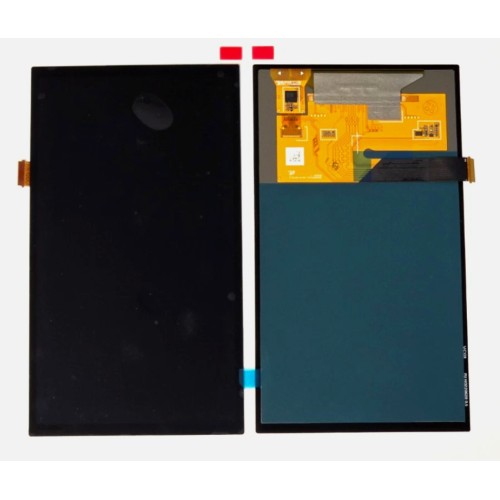
UK stock depth for Switch screens
Digi4u maintains a rotating inventory of original‑model LCDs, Lite LCD‑touch modules and OLED HEG‑001 panels. Stock levels are updated daily on the Nintendo Switch category page, allowing shops to plan bulk orders around peak periods such as holiday launches. Because the supplier ships from Cardiff, same‑day dispatch is available for orders placed before 4 PM Monday‑Friday, with Royal Mail 48 Tracked or DPD options depending on the item’s battery classification. For the latest delivery thresholds and zone details, refer to the delivery policy.
Related Joy‑Con stick parts
While the focus here is screens, many hybrid shops also replace Joy‑Con analog sticks during a screen job. Digi4u lists stick modules compatible with both original and OLED Joy‑Cons; the Lite uses a non‑detachable stick. Keeping a small stock of stick modules alongside screen assemblies reduces the number of separate purchase orders and shortens turnaround for full‑unit refurbishments.
Matching screen grade to repair tier
Digi4u lists three screen grades for each Switch family: original pulled panels harvested from donor units, refurbished prime assemblies that have been re‑laminated with fresh adhesive and tested, and new‑old‑stock LCDs where available. Pulled panels suit budget‑conscious repairs where the customer accepts minor cosmetic wear; they arrive with the original factory adhesive residue and require thorough cleaning before re‑bonding. Refurbished prime units ship with pre‑cut 3M 9448A tape on the frame, cutting bench time by roughly fifteen minutes per job and delivering a finish that matches OEM tolerances for bezel gap and touch sensitivity. New‑old‑stock LCDs, when listed, carry the longest shelf‑life guarantee and are ideal for warranty‑grade work or insurance‑approved repairs. Selecting the right grade at point of order prevents re‑work disputes and keeps labour margins predictable.
Each product page states the grade in the title and the condition notes, so technicians can filter the category view by “Pulled”, “Refurbished Prime” or “New” without opening every listing. Keeping a small buffer of each grade for the original and OLED models lets a shop quote good‑better‑best options on the same call.
Stock planning for seasonal demand
Switch screen demand spikes predictably: late November through December for holiday gifting, March to April for spring‑break travel repairs, and a secondary lift in August ahead of the back‑to‑school window. Ordering two to three weeks before each peak ensures the Cardiff warehouse can fulfil bulk lines before the 4 PM same‑day cut‑off. Because OLED panels (HEG‑001) are classified as lithium‑containing assemblies, they ship via DPD; original and Lite LCDs travel Royal Mail 48 Tracked. Splitting a mixed order across the two carriers is automatic at checkout, so the shop receives the fastest eligible service for each line without extra admin.
Setting a re‑order alert on the category page — or subscribing to the Nintendo blog fit‑note posts — gives early warning when a grade drops below five units. That visibility lets a repair manager place a top‑up order on a quiet Tuesday rather than scrambling on a Friday afternoon when the courier cut‑off has passed.
Conclusion
Accurate model identification, the right screen grade, and a disciplined QC routine are the three levers that keep a hybrid repair shop profitable on Nintendo Switch work. Digi4u’s Cardiff stock means UK technicians can order today, receive tomorrow, and return a console to the customer with a documented pass on touch calibration and dock output. Bookmark the Nintendo Switch category, set a re‑order reminder for the next seasonal peak, and keep a mixed buffer of pulled, refurbished prime and new‑old‑stock panels so every quote — from budget fix to warranty‑grade refurb — lands with confidence.
When a screen job already has the Switch open, the stocking side of analogue sticks, rails and related kits is covered in Joy-Con drift parts UK for repair shops.
FAQ
Which screen part fits the original Nintendo Switch HAC‑001?
The original Switch uses a 6.2‑inch 30‑pin LCD with a separate digitizer. Digi4u lists this as “Original Pulled LCD Touch Screen” and it matches the HAC‑001 connector and frame.
Can I use a Lite LCD on an OLED model?
No. The Lite panel is 5.5 inches with a 30‑pin flex and in‑cell touch, while the OLED model requires a 7‑inch 40‑pin OLED panel with a separate digitizer. The connectors and mounting points are incompatible.
What adhesive is recommended for re‑sealing the Switch after a screen swap?
A thin, double‑sided 3M 9448A tape (0.05 mm) applied to the frame perimeter provides a reliable seal without adding bulk. Pre‑cut kits for each model are available on the Digi4u Tools section.
Does Digi4u offer same‑day dispatch for Switch screen orders?
Orders placed before 4 PM on a working day are dispatched the same day via Royal Mail 48 Tracked or DPD, depending on the item’s battery status. Weekend orders ship the next working day.
Where can I find the latest Switch screen stock list?
The up‑to‑date catalogue is on the Nintendo Switch category page. The blog also posts fit‑note updates at the Nintendo blog.
