


iPhone X Series Screen Replacement Guide: Step-by-Step Instructions from XR to XS Max
Need this part? We stock tested replacement parts with same-day UK dispatch and a 12-month warranty.
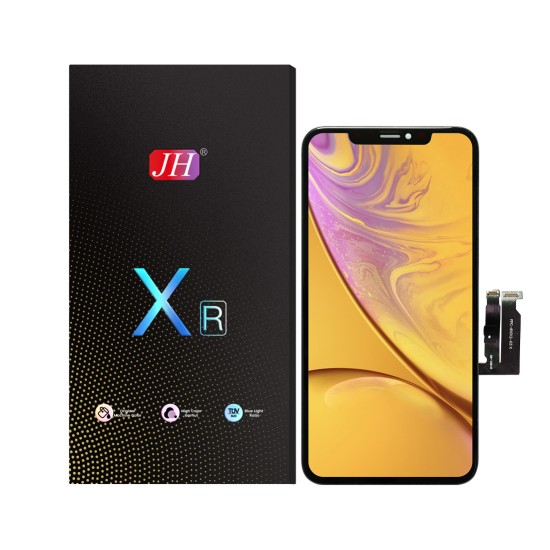
The iPhone X series covers three different screens, and the first thing to establish is which one is on the bench: the XR uses an LCD, while the XS and XS Max use OLED panels. The disassembly is nearly identical, but the parts are not — current UK trade prices run from £12.99 for an iPhone XR HD+ LCD to £38.99 for an iPhone XS soft OLED, and fitting the wrong one is an expensive way to learn the difference. Face ID is the other constraint: the TrueDepth assembly transfers with the display, and damaging its flex is the one mistake no replacement panel can fix.
(Last modified date: October 3, 2026)
Which screen does your iPhone X-series model need?
Three models, two display technologies, and prices that vary by more than 3×.
| Model | Display type | Part on Digi4u | Price |
|---|---|---|---|
| iPhone XR | LCD (in-cell, FHD) | JH Value COF FHD LCD | £16.99 |
| iPhone XR | LCD (HD+) | JH Essential HD+ LCD | £12.99 |
| iPhone XS | OLED (hard) | LCT MP+ Hard OLED | £25.99 |
| iPhone XS | OLED (soft) | LCT MP+ Soft OLED | £38.99 |
| iPhone XS Max | LCD (in-cell) | MP+ Essential FHD LCD | £19.99 |
| iPhone XS Max | OLED (hard / soft) | Hard OLED £29.99 / soft OLED £34.99 | from £29.99 |
Two practical notes from that table. First, the XR takes an LCD and always will — an “OLED upgrade” for an XR is not a thing. Second, on the XS and XS Max the difference between hard and soft OLED is flexibility and how the panel handles the curve at the edges, which is why the soft version costs more and is the safer choice on a device that has been opened before.
What tools does the job need?
Six items, and the heat source is the one that decides the outcome.
- Pentalobe screwdriver (0.8 mm) for the two screws beside the Lightning port.
- Y000 tri-point driver for the connector bracket.
- Suction cup to start the lift without levering the glass.
- Plastic pry tools and a spudger — never metal, which scratches the frame and can short the board.
- Heat mat or controlled heat gun to soften the perimeter adhesive.
- Precision tweezers for the flex connectors and the small screws.
Power the phone off and discharge static before the first screw comes out. A magnetic mat is worth the few pounds here: the X-series uses different screw lengths, and a long screw in a short hole damages the logic board.
How do you replace the screen, step by step?
Eight steps, with the order fixed because the battery comes before the display.
- Remove the two pentalobe screws either side of the Lightning connector.
- Warm the perimeter until the adhesive releases under gentle pressure rather than force.
- Start the lift at the bottom edge with the suction cup, then slide a plastic pry tool into the gap.
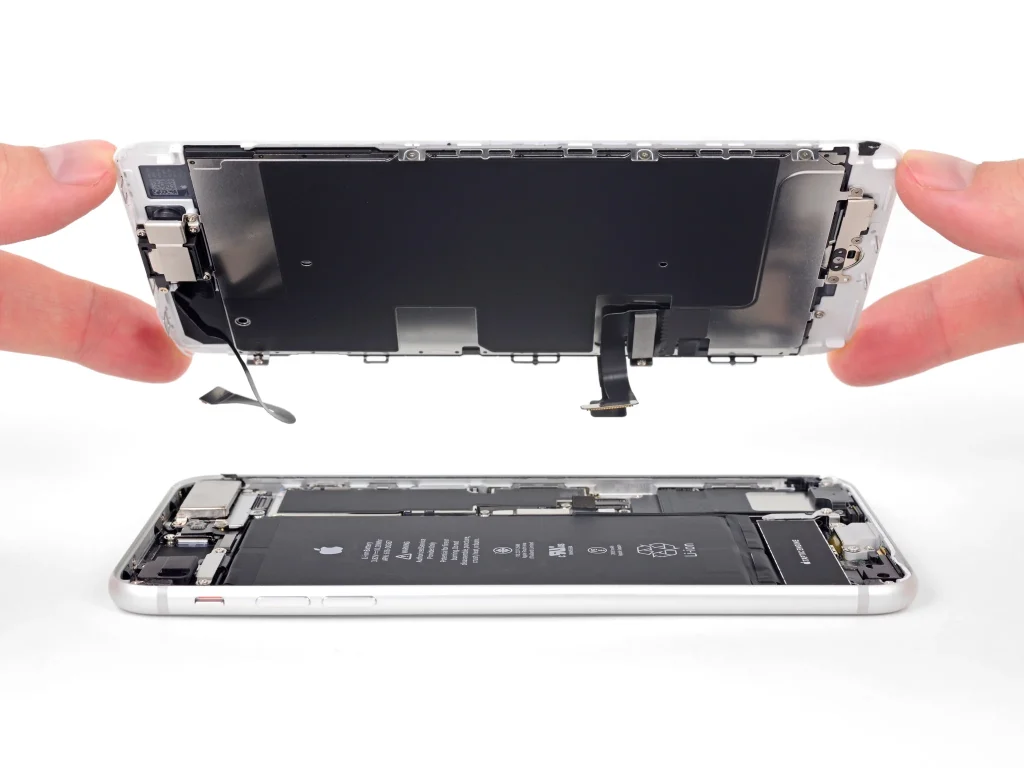
- Open the display like a book, hinging from the left, and keep the right-hand side supported: the display and Face ID flexes are there.
- Remove the connector bracket and disconnect the battery first, then the display flexes.
- Fit the new assembly, seating the flexes squarely rather than forcing the connectors.
- Reconnect and test brightness, touch across the whole panel including the margins, and Face ID — before any adhesive goes down.
- Clean the frame and reseal. Fit fresh adhesive gasket, close from the top edge down, refit the pentalobe screws, and re-test touch.
Most first attempts take 45–90 minutes. Anything much faster usually means a connector was forced rather than seated.
What can still go wrong after a successful repair?
Three limits that no panel grade removes.
Face ID. The TrueDepth assembly is paired to the device. If its flex is damaged while the display is lifted, Face ID stops working and no replacement panel restores it.
Water and dust resistance. Fresh adhesive improves the seal; it does not restore the factory rating. Treat an opened iPhone as splash-resistant at best and say so rather than promising the original rating.
Warranty. Opening the device ends any remaining Apple warranty or AppleCare cover, which is the real cost of a DIY repair on a handset still under cover.
What should you check before sealing the phone?
Five checks, about two minutes, all with the panel still loose: touch across a grid including the margins, brightness at both extremes, the proximity and ambient sensors, both cameras, and the Face ID enrolment screen. A fault found now is a part claim; the same fault found tomorrow is an argument. The full routine is in testing a replacement screen before sealing it, and the IC-transfer route for devices that have already been repaired is covered in solving the non-genuine display warning.
What should you ask the supplier?
- The panel type on the invoice — LCD for the XR, OLED for the XS and XS Max — and the grade (hard or soft OLED).
- Whether the assembly is IC-removable, which changes the job on a device that has been repaired before.
- The batch reference from the box, so a faulty panel can be traced to a run.
- Written DOA terms: what counts as dead on arrival, who pays carriage, and how long the window is open.
- Whether a sample can be ordered on the same terms as a bulk order.
What water resistance does each X-series model actually have?
The X-series is not one rating, and the difference only becomes visible at the point the phone is resealed. Apple publishes IP67 for the iPhone X and the iPhone XR and IP68 for the XS and the XS Max, so a shop that quotes “waterproof again” after a repair is quoting something Apple never claimed in the first place.
| Model | Apple’s published rating | Depth and duration |
|---|---|---|
| iPhone X | IP67 under IEC standard 60529 | Published as a class, with no depth figure on the spec page |
| iPhone XR | IP67 under IEC standard 60529 | 1 metre up to 30 minutes |
| iPhone XS | IP68 under IEC standard 60529 | 2 metres up to 30 minutes |
| iPhone XS Max | IP68 under IEC standard 60529 | 2 metres up to 30 minutes |
All four pages carry the same qualification, and it is the sentence worth reading before any repair is promised: splash, water and dust resistance are not permanent conditions, resistance might decrease as a result of normal wear, and liquid damage is not covered under warranty. A new adhesive gasket replaces a worn one; it does not re-certify the chassis.
That is also where the XR differs from its siblings in a way that affects the parts bill. The XR uses a 6.1-inch Liquid Retina HD LCD at 1792×828 and 326 ppi with a 1400:1 typical contrast ratio, while the iPhone X uses a 5.8-inch Super Retina HD OLED at 2436×1125, 458 ppi and a 1,000,000:1 typical contrast ratio. The XR assembly is cheaper because it is a different panel, not because it is a worse example of the same panel — which is why an “OLED upgrade” for an XR does not exist.
What to ask for before the panel is ordered
Four of the six questions below can be answered from the listing, and the other two are the ones that decide whether a warranty claim is a conversation or an argument. Treat them as the documents a buyer can request, because that is what they are.
- The grade name, in the supplier’s own words. “LCD” is not a grade; “JH Value COF FHD LCD” and “LCT MP+ Soft OLED” are, and they are what appears on the invoice.
- The batch or lot reference. If a run of panels turns out to be faulty, the lot number is what identifies the rest of it.
- The dead-on-arrival window and who pays carriage. A panel that arrives cracked is a supplier problem; a panel cracked during fitting is yours.
- The warranty period and its exclusions. Physical damage and liquid ingress are normally excluded, so say so to the customer at the counter rather than at the collection point.
- Whether the assembly is IC-removable. On an XS or XS Max that has been repaired before, this is the difference between a clear display and a paired-part message.
- Whether the frame is straight. A bent frame cannot be sealed, so the adhesive is wasted and the phone will lift at a corner.
For the customer’s own paperwork, the Consumer Rights Act 2015 expects goods to be of satisfactory quality and fit for purpose, and a repair is a service performed with reasonable care and skill. Naming the panel grade and the warranty on the invoice is what makes that enforceable — see the returns and DOA terms for how claims are handled in practice.
A costing model for an XR or XS screen job
This is a model, not a measured result. Substitute your own bench rate and retail price; the arithmetic is the point.
Take an iPhone XR: the value COF FHD LCD assembly is £16.99 and a HD+ assembly is £12.99. Adhesive, wipes and a screen protector add roughly £2. A competent technician takes 35–50 minutes including testing, and at a £40-per-hour bench rate that is £23–£33 of labour.
Cost of goods: £19–£35. If the job is invoiced at £70, the gross margin before card fees and rent is £35–£51; at £90 it is £55–£71. On an XS with a soft OLED at £38.99 the parts cost roughly doubles and the same arithmetic needs a higher price or a longer job.
The comparison the customer is silently making is not another repair shop — it is Apple’s own Self Service Repair programme, which sells genuine parts, rents professional tools and publishes repair manuals. Knowing that is useful: it means the quote has to be defended on turnaround and risk, not only on price.
References
- Apple: iPhone X technical specifications — IP67 under IEC standard 60529.
- Apple: iPhone XR technical specifications — IP67, 1 metre up to 30 minutes, and the 1792×828 LCD.
- Apple: iPhone XS technical specifications — IP68, 2 metres up to 30 minutes.
- Apple: iPhone XS Max technical specifications — IP68, 2 metres up to 30 minutes.
- Apple: Self Service Repair — genuine parts, tool rental and repair manuals behind the cost comparison.
- Apple Support: identify your iPhone model — the model numbers behind the XR, XS and XS Max.
- Consumer Rights Act 2015 — the rights that apply when a repair or a part is supplied to a consumer.
- Waste Electrical and Electronic Equipment Regulations 2013 — what happens to the panel that comes off the phone.
FAQ
Can I replace an iPhone X-series screen myself?
Yes, with the right tools and a panel matched to the model. The two parts that punish a first attempt are the Face ID flex on the right-hand side and the adhesive, so warm the perimeter properly and never force a connector.
What is the difference between an LCD and an OLED replacement screen?
An LCD is cheaper and slightly thicker; an OLED has higher contrast and a true black level and is closer to Apple’s original on the XS and XS Max. The XR only ever took an LCD, so the choice is about grade rather than technology on that model.
Do I need to replace the waterproof adhesive?
Yes, and it is worth saying what it does: fresh adhesive gives the phone a good chance of surviving a splash, but it does not restore the factory IP rating. Clean the old adhesive out of the frame channel first, or the new panel will sit proud and lift.
Where can I buy iPhone XR LCD and iPhone XS Max displays in the UK?
Digi4u lists XR LCD assemblies from £12.99 and XS/XS Max OLED assemblies from £25.99, in the iPhone X series range, with UK stock and trade terms for repair shops.
What grade of OLED should I fit to an XS Max?
Soft OLED where the budget allows, because it handles the curved edges of a device that has been opened before more gracefully than a hard panel. Hard OLED at £29.99 against soft at £34.99 is the current spread, and a value LCD assembly at £19.99 exists for handsets being kept as spares.
Match the panel to the model, then to the grade. Digi4u stocks iPhone XR, XS and XS Max screen assemblies by grade, with the adhesives and tools the job needs.



