


How to Choose the Right iPhone Replacement Screen | OLED vs LCD Guide
Need this part? We stock tested replacement parts with same-day UK dispatch and a 12-month warranty.
Posted on by digi4u
When repairing an iPhone, one of the most important decisions is selecting the right replacement screen. With various options available—ranging from premium OLED displays to different tiers of LCD screens—the quality, durability, and even battery life of your device can change significantly. Understanding these differences helps you pick the best iPhone replacement LCD or OLED display based on your budget and expectations.
Two Main Types of iPhone Screens: OLED vs LCD
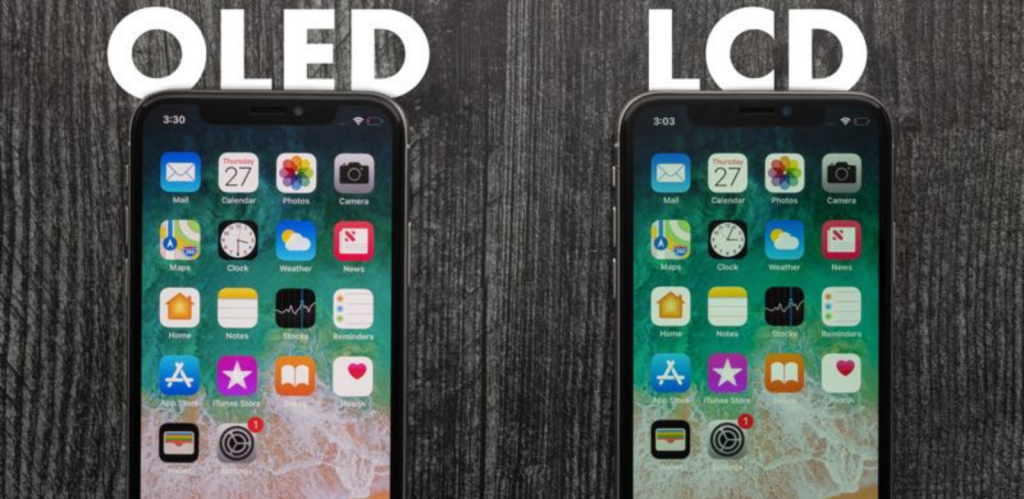
Modern iPhones typically use OLED screens in Pro & Pro Max models, while many standard models use LCD screens. These two technologies work differently and offer different visual experiences.
1. Professional Explanation of How LCD and OLED Screens Work
How LCD (Liquid Crystal Display) Works
LCD screens do not produce light by themselves. Instead, they rely on an LED backlight panel that shines through multiple internal layers. The liquid crystal molecules twist or untwist to control how much light passes through, creating different colours and brightness levels.
LCD Layer Structure (Top → Bottom):
- Protective cover glass
- Polarizer film
- Liquid crystal layer
- TFT transistor grid (controls each pixel)
- RGB colour filter
- LED backlight panel
- Rear polarizer
How the Image Is Formed:
- The TFT grid applies voltage to liquid crystal molecules.
- Crystals change alignment, allowing varying amounts of light through the RGB filter.
- The backlight is always on, and the crystals only control the light flow.
Key Characteristics of LCD:
- Requires a backlight, so blacks appear dark grey—not true black
- Thicker due to multiple optical layers
- More durable with a rigid structure
- Uses more battery compared to OLED
- Colours and contrast are weaker than OLED
How OLED (Organic Light-Emitting Diode) Works
OLED is fundamentally different from LCD. Every pixel in an OLED display is made from an organic compound that emits light when an electric current passes through it. This means each pixel is a tiny light source.
OLED Structure:
- Cover glass
- Encapsulation layer
- Organic emissive layer
- Thin-film transistor (TFT) control layer
- Flexible or rigid substrate
How the Image Is Formed:
- Each pixel contains red, green, and blue organic subpixels.
- When electricity flows, they emit coloured light directly, without needing a backlight.
- Pixels can turn completely off, producing true black.
Key Characteristics of OLED:
- Perfect black and extremely high contrast
- Thinner and lighter than LCD
- Brighter and more vibrant colours
- Lower power consumption (black pixels = off)
- Flexible panel options (Soft OLED)
- Can suffer from burn-in over long-term use
2. Professional Summary: Why OLED Displays Look Better Than LCD
| Feature | OLED | LCD |
| Black Level | True black (pixel off) | Dark grey (backlight visible) |
| Contrast | Extremely high | Limited |
| Thickness | Very thin | Thicker |
| Power Efficiency | Superior | Backlight consumes more power |
| Viewing Angles | Excellent | Moderate |
| Durability | More fragile | More robust |
| Burn-in Risk | Possible | None |
OLED provides deeper blacks, higher brightness, wider colour range, and a thinner display structure.
LCD offers better durability and lower cost, but cannot match OLED’s image quality.
3. Simple and Accurate Ways to Identify LCD vs OLED
These quick tests work on any iPhone screen.
1. Pure Black Test (Brightness at Minimum)
1. Set brightness to 0%
2. Display a pure black image
OLED:
- Looks completely black
- No light leakage
- Appears as if the screen is off
LCD:
- Appears dark grey
- Backlight glow is visible
2. Viewing Angle Test
Tilt the phone at a 45°–60° angle.
OLED:
- Colours stay consistent
- Blacks remain black
LCD:
- Colours wash out
- Blacks turn grey
3. White Screen Test (Full Brightness)
Display a pure white screen at 100% brightness.
OLED: brighter and cleaner white LCD: slightly warm tone, lower brightness
4. Thickness Check (For Technicians)
- OLED modules are thinner
- LCD modules are thicker due to the backlight layer
4. Professional LCD Testing Procedure (For Repairs and Quality Control)
4.1 Step 1: Visual Inspection
Check for:
- Dead pixels
- Bright spots
- Scratches or dust under glass
- Uneven colour distribution
4.2 Step 2: Touch Sensitivity Test
Use any drawing or touch-test app:
- Draw continuous lines across the entire screen
- Test edges and corners for dead zones
4.3 Step 3: Backlight Uniformity Test
Display the following colours:
- Pure white
- Red
- Green
- Blue
Check for:
- Shadow areas
- Colour inconsistency
- Light leakage
4.4 Step 4: Low-Brightness Flicker Test
Set brightness to 10–30%.
LCD screens may show flickering or uneven brightness at low levels.
4.5 Step 5: Compare Against an OEM Screen
This helps verify:
- Colour temperature
- Sharpness
- Brightness
- Backlight quality
5. Which Screen Should You Choose? A Professional Tiered Recommendation Based on Budget and Display Performance
Choosing the right iPhone replacement screen requires understanding how different technologies, resolutions, touch integrations, and packaging processes affect image quality and durability. Below is a clear, ladder-style recommendation system designed to guide customers—from high-budget users to value-focused buyers—based on the technical parameters that truly influence display quality.
Tier 1 – Premium Category: Soft OLED (Best Overall Quality)
Recommended for users who want the closest experience to an original Apple display.
Key Advantages:
- Self-emissive pixels → perfect black, infinite contrast
- Highest flexibility → better durability against drops (flexible substrate)
- Thinnest display type → excellent brightness and colour accuracy
- Best for Pro and Pro Max models
Technical Indicators:
- Packaging: COF / COP (most advanced)
- Touch integration: In-Cell
- Resolution: FHD+ / OEM-level subpixel structure
- Colour: Wide colour gamut (P3), deep contrast
This tier delivers the best performance, best visibility in sunlight, and the closest match to original OLED screens.
Tier 2 – Mid-Premium Category: Hard OLED (High Quality at Lower Cost)
Recommended for users who want OLED performance but at a more affordable price.
Key Advantages:
- OLED brightness and contrast without the cost of Soft OLED
- Rigid substrate = lower manufacturing cost
- Still offers deep blacks and vivid colours
- More durable than Soft OLED in daily use
Technical Indicators:
- Packaging: COG or COF
- Touch integration: In-Cell
- Resolution: FHD / FHD+
- Structure: Slightly thicker than Soft OLED
Hard OLED is excellent for customers who want strong performance but do not need premium-level bending flexibility.
Tier 3 – High-Grade LCD (Best Display Quality Within LCD Technology)
Recommended for users who want high value and stable performance without paying for OLED.
This category includes high-spec LCD modules such as:
- LTPS LCD (Low-Temperature Poly-Silicon)
- FHD / FHD+ resolution panel
- In-Cell or On-Cell touch technology
Why High-Grade LCD Stands Out:
- Sharper images thanks to LTPS pixel structure
- Higher brightness compared to low-end LCD
- Better colour uniformity
- No burn-in risk
- Lower power consumption than older a-Si LCD
Technical Indicators:
- Packaging: COF (higher-end LCD) or COG
- Resolution: FHD+ > FHD > HD+ (from highest to lower)
- Touch integration: In-Cell (best), On-Cell (good)
- Pixel structure: LTPS (high-end), a-Si (low-end)
This tier is the best-value choice for users who want excellent LCD performance but do not require OLED’s premium qualities.
Tier 4 – Standard LCD (Entry-Level Category)
Recommended for users with a tight budget or older iPhone models.
Typical Features:
- a-Si material
- HD+ resolution
- Thicker backlight structure
- Lower contrast and colour accuracy compared to LTPS LCD
Technical Indicators:
- Packaging: COG / FOG
- Resolution: HD+
- Touch integration: On-Cell / OGS
Standard LCD is best used for older iPhones (6/7/8/XR/11 series), where cost-efficiency is the main priority.
6. What Determines a “Better” Screen? Key Technical Parameters Explained
Resolution
- FHD+ (Best)
- FHD
- HD+
- HD (Lowest clarity)
Pixel Technology
- LTPS (High-end) → better clarity and lower power consumption
- a-Si (Entry-level) → lower cost, lower performance
Packaging Method
- COP / COF → highest performance, smaller bezels
- COG → mid-level, used mostly in LCD
- FOG → lower cost LCD solutions
Touch Integration
- In-Cell (Best) → thinnest, most responsive
- On-Cell (Good) → adds one extra layer
- OGS (Older) → thickest among modern solutions
Display Technology
- OLED (self-emitting) → best contrast and colour
- LCD (backlight) → durable and cost-effective
7. Where to Buy iPhone Replacement Screens in the UK
Digi4u offers a full range of iPhone replacement screens with UK stock and fast dispatch:
Products include:
- Soft/Hard OLED replacement screens
- In-cell LCD screens
- Batteries, charging ports, cameras
- Flex cables, speakers, housings
- Professional repair tools
8. FAQ – iPhone Replacement Screen (OLED vs LCD)
Q1: Is OLED always better than LCD for iPhone screen replacement?
A1: Not always. OLED offers deeper blacks, higher contrast and a thinner display, so it’s ideal for users who care most about visual quality and want something very close to the original screen on Pro/Pro Max models. However, high-grade LCD panels with FHD or FHD+ resolution and In-Cell touch can still provide excellent everyday performance at a lower cost. The “best” option depends on your budget and expectations, not just the technology label.
Q2: What is the best iPhone replacement LCD if I don’t want to pay for OLED?
A2: If you prefer not to pay for a premium OLED screen, the best iPhone replacement LCD is usually a high-grade LTPS In-Cell LCD with at least FHD resolution. This type of panel offers sharper images, good brightness, stable colour and responsive touch. It’s a strong balance between price and performance, especially for non-Pro models and refurbishment projects.
Q3: How can I quickly tell if a screen is OLED or LCD?
A3: A simple way is to set the brightness to minimum and display a pure black image:
- On an OLED screen, the black area will look completely black, with no visible glow.
- On an LCD screen, the black will appear dark grey, and you’ll see backlight glow, especially around the edges. You can also tilt the phone: OLED keeps rich colours at an angle, while LCD tends to wash out.
Q4: Does resolution really matter when choosing a replacement screen?
A4: Yes. Resolution directly affects sharpness and text clarity. In general:
- FHD+ gives the best detail and is recommended for newer models.
- FHD is still very sharp and suitable for most users.
- HD+ is more of an entry-level option. If you’re using your iPhone for reading, social media, photos and video, choosing at least FHD is a good idea.
Q5: What technical parameters should I look at besides OLED vs LCD?
A5: For a serious iPhone display comparison, you should also look at:
- Pixel technology: LTPS is better than a-Si (sharper, more efficient).
- Touch integration: In-Cell is thinner and more responsive than older structures.
- Packaging method: COF / COP is more advanced than COG / FOG and usually allows slimmer bezels.
- Brightness and contrast: higher numbers mean better outdoor visibility and richer images. These factors together determine whether a screen feels “premium” or “just usable”.
Q6: Is it worth paying extra for Soft OLED instead of Hard OLED?
A6: Soft OLED uses a flexible substrate and tends to offer slightly better durability against bending and impact, as well as closer behaviour to original Apple panels. Hard OLED is built on a rigid base and is more affordable, while still delivering strong OLED-level colour and contrast. If you want top-tier quality and have the budget, Soft OLED is the best choice. If you want to save while staying on OLED, Hard OLED is an excellent option.
Q7: Which screen type is most suitable for older iPhone models?
A7: For older devices like iPhone 6, 6s, 7, 8, or XR/11, a well-specified LCD with good resolution and stable backlight is usually sufficient. Investing in Soft OLED for an older handset is often not cost-effective unless you specifically want a premium visual upgrade. A high-grade LCD is usually the best balance of cost and usability in these cases.
Q8: Can a lower-quality screen affect battery life or eye comfort?
A8: Yes. Lower-quality screens often use less efficient backlights, which can draw more power at higher brightness levels. They may also suffer from uneven brightness or flicker at low brightness, which can cause eye strain over time. Higher-grade OLED or LTPS LCD panels typically offer better power efficiency, smoother dimming and more comfortable viewing.
9. Conclusion: Choose Based on Budget, Usage, and Expectations
Now that you understand the differences between each screen type, you can choose the replacement that fits your needs. If you want the best visual quality, choose Soft OLED. If you prefer strong performance at a lower price, Hard OLED is a great option. And if you want the most cost-effective balance of clarity and reliability, a high-grade In-Cell LCD will serve you well. With these options in mind, you can confidently pick the screen that matches your budget and expectations.



