


How to Open iPhone Safely Without Damaging the Screen
Need this part? We stock tested replacement parts with same-day UK dispatch and a 12-month warranty.
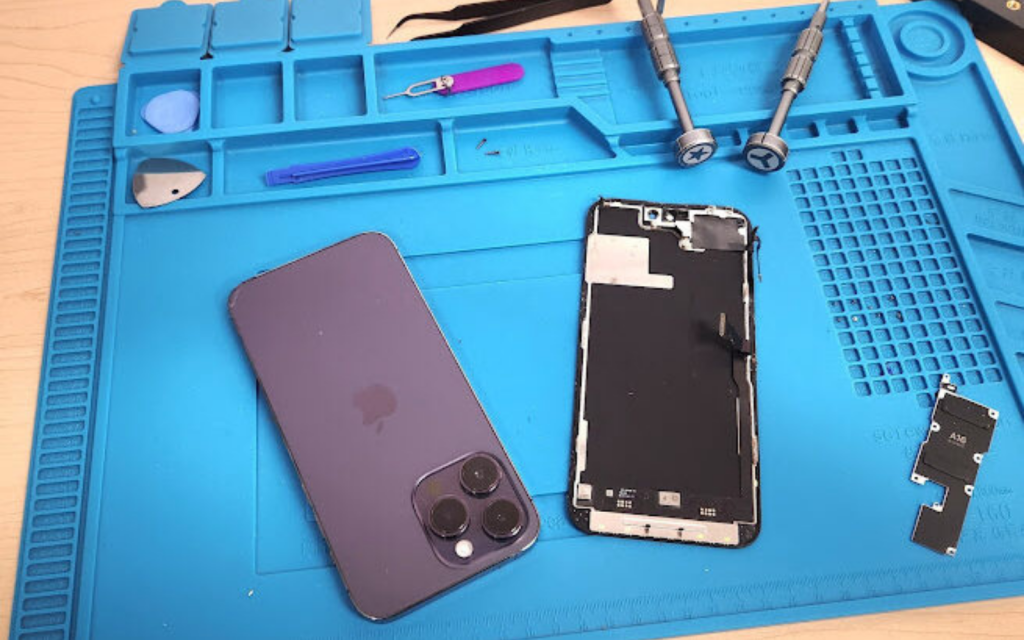
Open an iPhone from the bottom edge, with the battery disconnected before any connector is touched, and the display will survive. Everything else is detail: two pentalobe screws, a suction cup or a thin pry card to break the adhesive, and a controlled heat cycle if the seal is stiff. The cost of getting the order wrong is not the tool — it is the panel, and on the current models a replacement screen assembly starts at £24.99 in Digi4u’s own catalogue. This guide lists the five tools, the sequence, and the four mistakes that account for most cracked panels.
(Last modified date: October 2, 2026)
Opening an iPhone for a repair or an upgrade is intimidating the first time, and the phone gives you no margin for forcing anything. The display is a bonded assembly, the flex cables behind it do not stretch, and the battery connector sits under a bracket that has to come off before anything else. Knowing the sequence, and knowing when to stop, is what separates a repair from a second repair.
What do you need to open an iPhone safely?
Five tools, and only the last one is optional.
1. Pentalobe screwdriver. The two screws either side of the charging port are pentalobe, not Phillips, and a Phillips driver will strip them. Digi4u’s screwdriver range includes pentalobe bits, and a 6-in-1 set such as the MECHANIC Mortar Mini iShell Max at £34.99 covers the Y000 tri-point screws inside as well.
2. Suction cup or manual opener. Used at the bottom edge to start the lift without levering against glass. The REFOX opener range starts at £4.99.
3. Plastic pry tools and a spudger. Thin plastic only — metal scratches frames and can short a board. The opening tools category starts at £25.00 for a full set, and a teardown card is the single most useful piece in it.
4. Precision tweezers. For screws and flex connectors; the tweezers category starts at £7.99.
5. Heat pad or heat gun (optional). Softens the display adhesive so it releases without force. The CPB CP320 workstation heat mat is £59.99, and it is the difference between a clean lift and a panel that cracks on the last millimetre.
How do you open an iPhone, step by step?
- Power the phone off completely. Hold the side button and a volume button, then slide to power off. Opening a live phone risks shorting the board.
- Remove the two pentalobe screws either side of the charging port and keep them somewhere they cannot roll.
- Start the lift at the bottom edge. Warm the edges first if the adhesive is stiff, place the suction cup or opener near the bottom, and pull gently while sliding a thin pry card into the seam. Stop as soon as the gap opens: the flex cables are still attached.
- Work around the perimeter slowly. Slide the card along the sides to release the adhesive rather than lifting the panel from one corner. Never lever the display with metal.
- Disconnect the battery before anything else. Remove the bracket screws, lift the battery connector with a spudger, and only then disconnect the display flexes. This single step prevents most of the damage that makes an iPhone repair expensive.
On a device that has been opened before, expect the adhesive to be uneven and the frame to be slightly distorted. Work in shorter passes and add heat rather than force; a phone that has already been repaired is where most second repairs begin.
What are the most common mistakes?
Four, and each has a specific cost attached to it.
| Mistake | What it damages | What it costs |
|---|---|---|
| Using metal to pry the display | Frame and glass edges | Cosmetic damage that cannot be undone |
| Pulling the suction cup hard from one corner | The panel itself, or a flex under the top edge | A replacement assembly from £24.99 |
| Forgetting to disconnect the battery first | The backlight circuit or the board | The most expensive failure on the list |
| Skipping the heat cycle | Bends the panel because the adhesive never released | A replacement assembly plus the original repair |
Two more habits prevent quieter failures. Keep the screws in a magnetic mat in the order they came out, because on these models a long screw in a short hole damages the board. And work in a clean, well-lit place: a dust speck under the glass becomes a permanent speck in the display.
When should you not open the phone?
Three cases where opening it yourself is the wrong move, regardless of how good the tools are.
- A swollen battery. A lithium-ion cell that has expanded is a fire risk and can be punctured by the display during removal. Do not press on it and do not pry near it.
- A water-damaged phone. Water damage spreads while the device is open, and the diagnosis matters more than the disassembly. Corrosion continues after the phone dries.
- A handset still under Apple’s warranty or AppleCare. Opening the device ends that cover. Where the phone is still in cover, the repair belongs with Apple rather than on your bench.
Where water is involved specifically, the sequence is different from a straightforward screen job and starts with drying and diagnosis rather than with a pry tool.

What does one slip actually cost?
Work it out against the tools, and the tools stop looking expensive.
A full set of the five tools comes to about £107.97 if every item is bought separately at the prices above, or around £72.98 if you start with the screwdrivers, the opener and the tweezers and leave the heat mat and pry set until the first bonded screen. Now compare one cracked panel: a replacement screen assembly for an iPhone 14 starts at £54.99 and a value assembly for the iPhone 15 Pro at £24.99, before the second strip-down to fit it.
That is a model with stated assumptions, not a quotation. The reason to write it down is that the first slip usually costs more than the heat mat, and a bench that owns the tools stops treating heat as optional.
What should you do if the screen cracks while you are opening it?
Stop, and do not power the phone on. The rest of the job can still be done well, but only if the next ten minutes are handled properly.
- Put the phone down and leave it open. Do not close a panel with a broken edge into the frame; loose glass is abrasive and will scratch the frame that is currently undamaged.
- Photograph everything before you touch it. Photographs of the crack, the flex cables and the connectors are what support a DOA claim if the panel was faulty, and what separate a handling fault from a part fault.
- Check the flexes, not just the glass. A cracked panel often takes a display flex with it, which changes the parts list: a flex that has torn at the connector is not repairable on the bench.
- Decide what the job costs before ordering. A replacement assembly for the model in front of you, plus the labour of the second strip-down — and if the phone was in for a battery, the original job has not been done yet.
- If the display was already faulty, say so. A cracked screen that arrives cracked is a different conversation from a screen that cracked on the bench, and the difference is the customer’s expectation rather than the physics.
One failure mode is worth naming because it is the most expensive: a display that cracks along the bottom edge usually means the pry card was worked under the flex rather than under the glass. Where the panel refuses to release, the answer is more heat and a slower pass, never more force.
How do you reseal the phone after the repair?
The seal is the part of the job most people rush, and it is the part that decides whether dust appears under the glass a fortnight later.
- Strip the old adhesive completely. Warm it, lift it with a plastic tool, and clean the channel with isopropyl alcohol and a lint-free cloth. New adhesive over old residue never sits flat.
- Fit the correct gasket for the model. Pre-cut display adhesive is cut to the model, not the generation, and a gasket that does not follow the frame line is a gap.
- Screen and clean the glass first. Once the panel is down, anything under it stays there — and the dust that matters is the speck you can only see at a low angle.
- Close from the top edge downwards, seating the display against the frame line rather than pressing the middle.
- Clamp or weight the phone evenly for the cure time the adhesive manufacturer states, then re-test touch, brightness and the sensors before the phone goes back to the customer.
Two expectations go with the seal. Water and dust resistance is not restored to the factory rating, and it should be described honestly rather than assumed. And an opened phone keeps its screws in the right holes: on these models a long screw in a short hole damages the board, which is why the magnetic mat matters more than the mat’s price suggests.
How do you test the phone before you close it?
Five checks, about two minutes, all of them before the adhesive goes down.
- Touch across the whole panel, including the margins and around the camera cutout, drawn as a grid rather than a diagonal sweep.
- Brightness at both ends of the range, watching for flicker, a step change or a band.
- Both cameras and the flash, because a front camera that is not seated is invisible until the customer makes a video call.
- Face ID where the device has it — the quickest way to prove the TrueDepth assembly survived the lift.
- Charging, on the original cable, with the phone standing on the bench.
The routine is deliberate rather than thorough: it exists so that a fault is found while the panel is still loose. It is set out step by step in testing a replacement screen before sealing it, and the same logic applies to any repair that ends with adhesive.
What should the toolkit cost, and what do you buy first?
Buy in the order the job demands, not in the order the shop suggests.
| Tool | Price | Buy it |
|---|---|---|
| MECHANIC Mortar Mini iShell Max 6-in-1 screwdriver set | £34.99 | First — nothing opens without it |
| REFOX opener range | from £4.99 | First — the cheapest tool that prevents the most damage |
| Precision tweezers | from £7.99 | First — connectors and screws are impossible without them |
| Plastic pry tools and teardown cards | from £25.00 | Before the first bonded screen |
| CPB CP320 workstation heat mat | £59.99 | Before the first bonded screen — the tool that prevents the crack |
Bought in that order, the first three items cost about £47.97 and cover a battery, a charging port or a camera on most handsets. The heat mat is the item people skip, and it is the one whose absence shows up as a cracked panel — which costs more than the mat on the first occurrence.
References
- Digi4u: CPB CP320 workstation heat mat — £59.99.
- Digi4u: MECHANIC Mortar Mini iShell Max 6-in-1 screwdriver set — £34.99.
- Consumer Rights Act 2015 — the position on a retail repair or a part supplied to a consumer.
FAQ
Can I open any iPhone model safely using these steps?
The sequence is the same across the range, but the internals are not: the bracket layout, the screw lengths and the flex routing differ between generations, and the 12 to 17 models in particular are not interchangeable. Follow the steps here and then the model-specific guide before you disconnect anything.
How do you get the back off an iPhone?
You do not. On these models the screen comes off the front; the rear glass is bonded to the chassis and is removed with heat or a laser as a separate job. Anyone trying to open the phone from the back is working on the wrong side of it.
Do I need professional tools to open my iPhone safely?
You need the right tools rather than expensive ones: a pentalobe driver, thin plastic pry tools, tweezers and something to warm the adhesive. What you should not use is a metal blade, a kitchen knife or a household screwdriver that does not fit the screw.
Can opening my iPhone void the warranty?
Yes. Opening the device ends any remaining Apple warranty or AppleCare cover. That is a real cost on a handset that is still inside its cover, and it should be weighed before the screen comes off.
How do I stop dust getting inside the phone?
Work in a clean, still room, keep the open device face-down where possible, and cover exposed areas with a soft cloth while you handle parts. A dust speck that lands on the display before the seal is closed is permanent.
Buy the tools before you buy the second panel. Digi4u stocks the screwdrivers, openers, pry tools, tweezers and heat mats a safe iPhone opening needs.



