


Checking Flex Cable Versions Before a Screen Swap
Need this part? We stock tested replacement parts with same-day UK dispatch and a 12-month warranty.

A screen that fits and does not work is one of the more frustrating returns in this trade, because nothing about the fitting looks wrong. The panel seats, the screws go in, the device powers on, and one function is missing.
Almost all of those cases come down to a flex cable version. Two panels can look identical from the front and differ at the connector, the routing or the sensors they carry, and the difference is visible in about thirty seconds if you know what to compare.
What is a flex cable version, and why does it matter?
It is what separates two panels that fit one frame.
A flex cable carries the signals between the display assembly and the logic board, and it varies between revisions of the same model: the connector width and pin count, the length and routing of the cable, the position of the ear speaker cut-out, and whether sensors are built into the flex.
Where a panel with the wrong revision is fitted, the connector may still seat and the display may still work, which is exactly what makes the fault confusing. The missing function only shows up on the test, and by then the adhesive may already be down.
Which parts share a flex with the screen?
Touch, the sensors, the earpiece, often the camera.
The display flex carries touch and image, and on many models it also carries the ambient light and proximity sensors. The front camera and Face ID assembly usually has its own flex, as does the ear speaker, and on some models those routes pass through or under the display assembly.
That sharing is why a wrong revision presents in so many different ways. A missing ambient sensor, a silent earpiece or a failed Face ID can all be a flex version problem rather than a faulty part, and the fault-finding order for those symptoms is set out in working out which speaker has failed.
How do you compare a new flex with the old one?
Lay them side by side and compare four things.
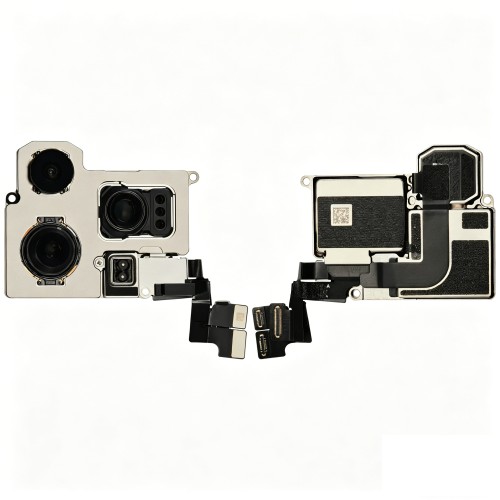
Connector width and pin count first, because that is the hard constraint. Then overall length and routing, including the position of any fold or step. Then the shape and position of the ear speaker cut-out and any bracket. Finally, whether each flex carries the same sensors and components.
Doing this before the panel is fitted takes half a minute and catches almost every version error. Doing it afterwards means lifting a bonded panel, which is the same mistake in a more expensive form.
Why do two identical-looking panels differ?
Because the model was revised without changing its name.
Manufacturers revise a device mid-life, and the changes are usually invisible from the outside. A production run may use a different sensor supplier, a different connector or a revised bracket, and the parts are not interchangeable even though the marketing name, the size and the colour are identical.
The revision is captured in the model code and sometimes in a number printed on the flex itself. That is why ordering against the code and checking the printed revision is more reliable than ordering against a photograph of the front of the device.
When can a different version be made to work?
When the difference is a bracket rather than a signal.
Occasionally the only difference is a mounting bracket or a metal shield, and transferring that component from the old assembly makes the new one usable. That is a legitimate technique provided the connector and the sensors match exactly.
What is never legitimate is adapting a connector. Bending a flex to reach a socket, forcing a connector that is a size out, or trimming a keying tab will produce a device that works on the bench and fails within weeks. Where the connector does not match, the answer is a different part rather than a technique.
What breaks if the version is wrong?
Whatever that flex happens to carry.
If the connector matches but the sensors do not, the fault is an ambient light or proximity failure that drains the battery or blanks the call screen oddly. If the routing is wrong the cable can be pinched, which shows as an intermittent touch fault. If the earpiece cut-out is in the wrong place, the speaker sounds wrong or not at all.
The most expensive outcome is a torn flex, which happens when a cable that does not quite fit is persuaded into place. That converts a panel replacement into a panel plus a camera or speaker order, and it is the single strongest argument for the comparison step.
How do you record flex versions at intake?
Photograph the connector side before removing the panel.
One photograph, taken with the device open and the old panel still connected, records the connector, the routing and the components that came with the original assembly. It is the reference for the comparison and the evidence if the new part turns out to be wrong.
Where a number is printed on the flex, note it on the job sheet. Not every flex carries one, but where it does it is the most reliable version identifier available to a repair shop, and it settles an argument with a supplier in one message.
It is also worth photographing the panel once it is out. A picture of the flex connector, taken flat on the bench before the old assembly is set aside, is the reference for the comparison and the record of what the device arrived with.
Which models are most sensitive to this?
The ones that were revised most often.
Generations with several sub-variants and a long production life are the ones where revisions accumulate, and the ranges that span a component shortage are the ones where suppliers changed. Those are the models where a shop should compare rather than assume.
The same principle runs through the rest of the catalogue. Camera modules have their own revisions and their own fittings, and the difference between replacing a lens and replacing a module is the first decision in any camera repair, as described in choosing between a camera lens and a module.
The practical response is to keep a reference assembly for the families a shop repairs most. A known-good panel of the correct revision makes the comparison trivial, because the new part can be laid against a reference as well as against the customer’s own original.
What should you do when the version cannot be matched?
Stop and ask, rather than fitting and hoping.
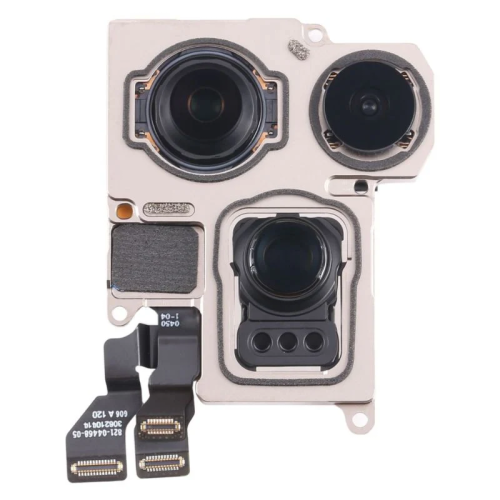
A supplier who knows their stock can tell you which revision a listing is, and a shop that describes the original flex accurately will usually get the right part on the second attempt. Sending a photograph of both connectors is the fastest way to resolve it.
Where the correct revision cannot be sourced, the honest options are a different grade of the same assembly or no repair. A device returned to the customer with a function missing because the part was nearly right is a return that costs more than the job was worth.
How does this change what you stock?
It makes the stock record a revision record.
A stock line should note the revision where one exists, not just the model, because two assemblies for the same model can be different products. Where a shop holds depth on a high-volume model, it should hold the revision that the local devices actually use.
That habit also improves the returns conversation. When a part comes back, the record shows which revision was fitted and whether the fault is a version mismatch or a genuine failure, which is the difference between a claim and a cost. The same discipline underpins the process described in building a parts returns process.
What should be tested before sealing?
Touch, display, sensors, earpiece and camera.
Every function that the flex you just fitted carries. Touch across the margins, the display through its brightness range, the ambient and proximity sensors, the earpiece on a real call and the front camera on a real image. Where Face ID is involved, enrol and unlock before the adhesive goes down.
That routine is the same one described in testing a replacement screen before sealing it, extended to cover the components the flex carries. On any model with a revision history, it is the step that separates a finished repair from a comeback.
What is the one habit that prevents version errors?
Compare the connectors before you fit anything.
Thirty seconds, side by side, old panel and new. If the connector matches, the routing matches and the components match, the part is right. If any of those differ, the answer is a conversation with the supplier rather than a technique on the bench.
The supporting habits are cheap: confirm the model code, photograph the original flex, note the revision in the stock record and test every function before sealing. Apple documents what a device reports about the components it can identify at iPhone parts and service history, and the difference between genuine and aftermarket displays is set out at about genuine iPhone displays. Retail customers keep their rights on the finished work under the Consumer Rights Act 2015, replaced parts are waste under the Waste Electrical and Electronic Equipment Regulations 2013, and parts placed on the market fall to the Office for Product Safety and Standards.
FAQ
Why does a replacement screen fit but not work?
Usually because the flex cable is a different revision. Two panels can fit the same frame and carry different connectors, routing or sensors, so the display works while the ambient sensor, earpiece or camera does not.
How do I compare flex cable versions?
Lay the old and new panels side by side and compare four things: connector width and pin count, cable length and routing, the position of the ear speaker cut-out and brackets, and whether each flex carries the same sensors.
Can I adapt a flex cable that does not quite fit?
No. Transferring a bracket from the old assembly is legitimate where the connector and sensors match exactly, but bending a flex, forcing a connector or trimming a keying tab produces a device that fails within weeks.
Which phones are most affected by flex cable revisions?
Models with several sub-variants and a long production life, particularly generations produced during component shortages. Those are the devices where a shop should compare the original flex with the new one rather than assume it matches.
Match the flex, not just the panel. Digi4u lists assemblies and flexes by model and revision, with the grade stated on every line.
{
“@context”: “https://schema.org”,
“@type”: “FAQPage”,
“mainEntity”: [
{“@type”: “Question”, “name”: “Why does a replacement screen fit but not work?”,
“acceptedAnswer”: {“@type”: “Answer”, “text”: “Usually because the flex cable is a different revision. Two panels can fit the same frame and carry different connectors, routing or sensors, so the display works while the ambient sensor, earpiece or camera does not.”}},
{“@type”: “Question”, “name”: “How do I compare flex cable versions?”,
“acceptedAnswer”: {“@type”: “Answer”, “text”: “Lay the old and new panels side by side and compare four things: connector width and pin count, cable length and routing, the position of the ear speaker cut-out and brackets, and whether each flex carries the same sensors.”}},
{“@type”: “Question”, “name”: “Can I adapt a flex cable that does not quite fit?”,
“acceptedAnswer”: {“@type”: “Answer”, “text”: “No. Transferring a bracket from the old assembly is legitimate where the connector and sensors match exactly, but bending a flex, forcing a connector or trimming a keying tab produces a device that fails within weeks.”}},
{“@type”: “Question”, “name”: “Which phones are most affected by flex cable revisions?”,
“acceptedAnswer”: {“@type”: “Answer”, “text”: “Models with several sub-variants and a long production life, particularly generations produced during component shortages. Those are the devices where a shop should compare the original flex with the new one rather than assume it matches.”}}
]
}
