


60W, 100W or 240W USB-C Cable: Which Rating Do You Need?
Need this part? We stock tested replacement parts with same-day UK dispatch and a 12-month warranty.

Choose a USB-C cable whose power rating meets or exceeds the highest power your device and charger can negotiate together. A 60W cable is enough when the system never needs more than 3A at the relevant USB PD voltages; equipment that draws above that needs a verified 5A cable, while charging above 100W under USB PD Extended Power Range needs a 240W-class EPR cable.
Last updated:
The number printed on the cable is a ceiling, not the power your phone or laptop will automatically receive. Digi4u stocks USB-C charging cables and related accessories for UK retail and repair buyers — this refresh keeps the original buying logic and adds a clearer 3A / 5A / EPR decision matrix plus a phone-vs-laptop checklist so “60W vs 100W vs 240W” searches can decide without guesswork.
What do 60W, 100W and 240W mean?
Under USB Power Delivery, cable current and voltage capability limit what charger and device may negotiate. USB-IF documents USB PD as a negotiated system over USB Type-C, and the PD 3.1 update extends delivery up to 240W on suitable full-featured USB-C cables (previously USB PD was commonly limited to 100W at 20V on 5A cables).
| Cable label (retail) | Typical electrical context | Cable identification | When it is enough | What it does not prove |
|---|---|---|---|---|
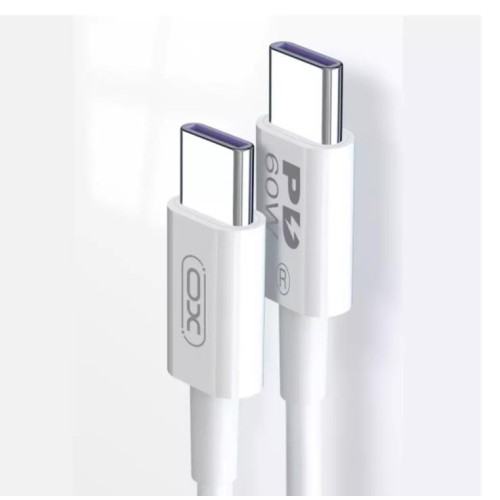
| 60W | Up to about 20V × 3A in Standard Power Range use | Many basic 3A cables; not all need an E-Marker | Phones, tablets and low-draw accessories that stay within 3A | Fast data, video, or a proprietary phone “100W” protocol |
| 100W | Up to 20V × 5A (earlier PD ceiling / SPR 5A class) | Electronically marked 5A cable | Most USB-C laptops that charge within 100W | USB PD EPR above 100W (140W / 180W / 240W) |
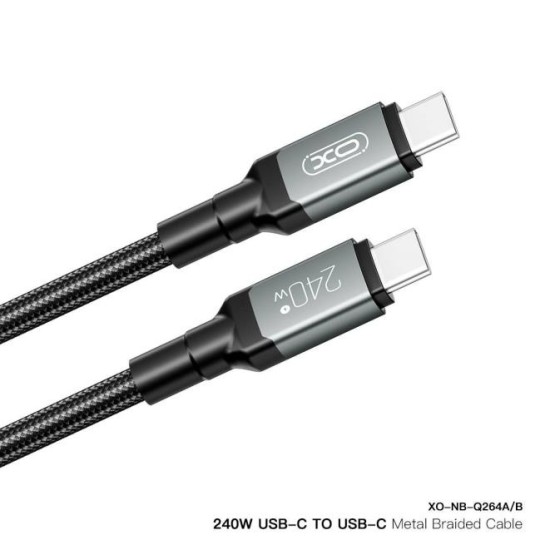
| 240W | Up to 48V × 5A under PD 3.1 Extended Power Range | EPR-capable electronically marked cable | EPR chargers/laptops, or one cable covering high-power plus lower PD loads | That every port will request 140W+, or any particular data/video mode |
Decision matrix: 3A vs 5A vs EPR
| Your real task | Minimum sensible cable class | Watch-outs |
|---|---|---|
| Phone / tablet USB-C PD charging within ~20–60W | Quality 60W / 3A cable (unless the OEM requires 5A for that model) | Proprietary fast-charge logos are not the same as USB PD wattage |
| 65W–100W USB-C laptop (or a 65W brick) | Verified 5A cable (100W label or suitable 240W EPR cable) | A 60W cable can silently cap a 65W laptop below full input |
| 140W / 180W / 240W USB PD EPR charging | Explicit 240W EPR cable + matching EPR charger and device | A legacy 100W/5A cable is not automatically EPR-capable |
| One cable for mixed phone + laptop kit bag | Often a trusted 5A / 100W or 240W cable with the data spec you need | Still check length, bend life and connector strain for daily carry |
Match the cable to the complete charging chain
- Read the device’s supported USB-C charging input (not battery mAh and not the charger’s wall input).
- Read the charger output table for the exact USB-C port you will use. Multiport chargers often share power.
- Select a cable rated for at least that negotiated power, with 5A / E-Marker evidence when you need more than 60W.
- Check data speed and video as separate line items if the cable will drive a dock, SSD or display.
Example: a laptop that accepts 65W cannot take a full 65W through a cable limited to 60W / 3A. A 240W cable on a 30W phone charger does not force extra power into the phone.
Phone vs laptop checklist
- Phone: confirm whether the model’s fast charge is USB PD or a proprietary protocol; many phones are fine on a good 60W cable, but some OEM setups expect a 5A electronically marked cable even below 60W — check the manufacturer note.
- Laptop 65W–100W: prefer a verified 5A cable; keep a known-good 100W cable if it already works, or buy a certified 240W EPR cable if you also need headroom for newer high-power bricks.
- Laptop 140W+: require an EPR-capable 240W cable and an EPR-capable charger/device pair.
Does a higher wattage cable transfer data faster?
No. Power, data rate and display capability are negotiated and specified separately. A 240W charging cable may only offer basic USB 2.0 data, while another lower-wattage cable may support higher Gbps rates. If the job is storage, docking or video, demand an explicit data/video specification rather than reading it into the wattage badge.
Use the smallest rating that covers the real task
Buy for the highest legitimate load in your kit, not for marketing headroom you will never negotiate. Choose 60W when every device stays within 3A. Choose a verified 5A cable when a supported device needs more. Prefer a properly specified 240W cable when charger and laptop use Extended Power Range, or when one cable must cover several confirmed higher-power devices.
Do you need a higher rating for a phone?
Often no. Many phones never negotiate near 60W on USB PD. The exceptions are proprietary fast-charge ecosystems and a minority of devices that require 5A cable identification. If the phone charges slowly only with one cable but quickly with the OEM cable, suspect current rating / E-Marker / damaged conductors before blaming the charger.
Power, data and video are three separate decisions
Write them as three ticks on the purchase note: (1) power class, (2) data rate, (3) video/Alternate Mode. Missing one tick is how a “240W” cable disappoints on a dock.
Choose a cable length you can use safely
Longer cables add resistance and strain. Prefer the shortest length that reaches the outlet without tension at the connector. For repair counters and demo benches, short 60W/100W leads reduce snag damage; for laptop desks, a quality 1–2 m 5A cable is usually enough.
When the cable is probably not the only problem
- Port debris or a worn receptacle on the phone/laptop
- A multiport charger sharing power across devices
- A wall brick that only offers high wattage on one labelled port
- A damaged cable with intermittent VBUS or CC pins
Make the purchase decision
For most UK phone and tablet kits, a durable 60W USB-C cable covers daily charging. For USB-C laptops at 65W and above, step up to a verified 5A cable. For EPR 140W+ platforms, buy an explicit 240W EPR cable. Digi4u’s USB-C cable range includes 60W and higher-power options for shop stock and end-user replacement.
Orders follow the live delivery policy: same-day dispatch aim before 4:00 PM Monday–Friday for mainland UK methods shown on that page.
Cable ratings should match the charger tier you shelf — GaN and USB-C charger stock for UK phone repair shops.
FAQ
Will a 240W cable damage a 60W phone?
No. USB Power Delivery negotiates power between charger, cable and device. A higher-rated cable is a ceiling, not a forced output. The phone and charger still decide the actual wattage.
Can a 100W cable charge a 140W laptop at full speed?
Usually not for full Extended Power Range operation. Charging above 100W under USB PD 3.1 EPR needs a cable that supports that EPR profile (commonly marketed as 240W), plus a charger and laptop that both support the required mode.
Why do I still see 100W on product listings if USB-IF logos emphasise 60W and 240W?
100W (20V × 5A) was the earlier USB PD ceiling and remains a useful retail label for verified 5A cables. Many shops still stock and sell 100W-labelled cables for Standard Power Range laptop charging.
Does a higher wattage cable transfer data faster?
Not by itself. Power rating, data rate and video capability are separate specifications. Read the listing for Gbps / USB4 / DisplayPort support instead of inferring speed from wattage.
What cable do I need for a 65W USB-C laptop?
At 20V, 65W needs more than 3A, so a plain 60W / 3A cable can bottleneck the charge. Use a verified 5A cable (100W-class or a suitable 240W EPR cable) matched to the charger and laptop.
