


Samsung Galaxy S20 FE Battery Replacement Guide
Need this part? We stock tested replacement parts with same-day UK dispatch and a 12-month warranty.

Replacing the 4,500 mAh cell in a Galaxy S20 FE is a straightforward back-opening job, but you must match the exact model (SM-G780F or SM-G781B) and the EB-BG781ABY part number before ordering. This guide covers specifications, failure signs, tools, a step-by-step procedure, post-repair checks and UK ordering details.
Last updated:
Battery specifications
The Galaxy S20 FE ships with a 4,500 mAh typical (4,370 mAh rated) lithium-ion cell, part number EB-BG781ABY (service part GH82-25231A). Both the 4G variant (SM-G780F) and the 5G variant (SM-G781B) use the same cell. The handset features a flat 6.5-inch Super AMOLED display, a plastic rear cover, an aluminium frame and an IP68 rating from the factory. The under-display optical fingerprint sensor, 25 W wired (USB-PD 3.0), 15 W wireless (Qi) and 4.5 W reverse wireless charging are all retained after a battery swap. The device launched in 2020 and receives a maximum of Android 13 / One UI 5.1.
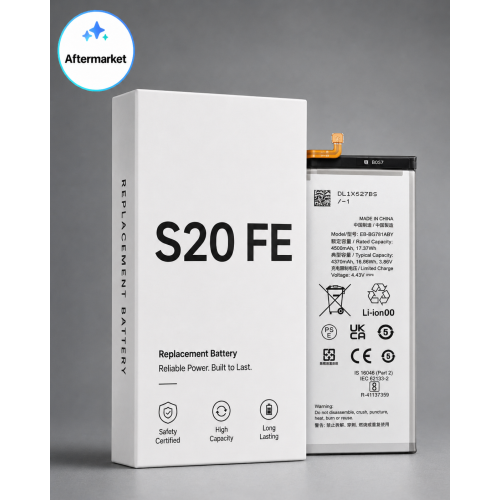
Confirm the variant and part number before ordering
Locate the model number in Settings → About phone (SM-G780F for 4G, SM-G781B for 5G). The battery part code is printed on the original cell’s label; it must read EB-BG781ABY. Digi4u’s product page lists this cell for the S20 FE and for Galaxy A52-family models only when the code on the old cell matches. Use the table below to verify compatibility.
| Model name | Model number | Network | Battery part | Notes |
|---|---|---|---|---|
| Galaxy S20 FE 4G | SM-G780F | 4G | EB-BG781ABY | UK/EU stock |
| Galaxy S20 FE 5G | SM-G781B | 5G | EB-BG781ABY | UK/EU stock |
| Galaxy A52 / A52 5G / A52s | SM-A525F / SM-A526B / SM-A528B | 4G/5G | Check the label | Cross-fit only if the old cell reads EB-BG781ABY |
For a broader range of Samsung components, see the Samsung parts catalogue.
Signs the battery needs replacing
- Battery health in Samsung Members reports Weak or Bad (Samsung Members → Support → Phone diagnostics → Battery status).
- Unexpected shutdowns above 20 % charge.
- Rapid drain under normal use.
- Physical swelling: a lifting plastic rear cover or a bulging display. A swollen cell must be handled with care and replaced immediately.
For the official Samsung method, refer to Samsung’s battery-status guide.
Replacement differences
The S20 FE opens from the back with a plastic rear cover, not glass. This requires less heat than a glass back but the plastic can warp if overheated. The wireless-charging/NFC coil sits directly under the cover, so work around it carefully and never pry against it. The fingerprint sensor is under the display, so test it after re-assembly. A fresh adhesive reseal restores much of the seal but cannot guarantee the original IP68 rating.
Tools required
- Small Phillips precision drivers
- Suction cup and plastic opening picks
- Tweezers (ESD-safe)
- Heat source (heating pad or heat gun on a low setting)
- Isopropyl alcohol (99 %) and adhesive pull-tabs or a thin plastic card
- Pre-cut replacement adhesive for the rear cover
- Magnetic project mat for screws
All of the above are available on the repair tools page.
Step-by-step replacement
- Power off the phone and remove the SIM tray.
- Apply gentle, even heat to the rear cover to soften the adhesive. Caution: excessive heat will warp the plastic back.
- Attach the suction cup, create a gap and slide a pick around the perimeter to release the adhesive.
- Lift the rear cover slowly and check that no flex is still attached before removing it fully.
- Remove the midframe screws (keep them organised on the magnetic mat).
- Disconnect the battery connector first.
- Release the battery using any pull-tabs present; if they tear or are absent, apply a little isopropyl alcohol and ease the cell out with a plastic card.
- Place the new EB-BG781ABY cell, reconnect the battery connector last.
- Re-fit the midframe and its screws, reconnect anything released earlier, and seat the rear cover.
- Apply fresh pre-cut adhesive around the cover edges, press evenly and clamp for the time stated by the adhesive maker.
- Before final sealing, power on and run the post-repair tests (see next section).
Post-repair testing
With the device still open, verify the following:
- Battery health in Samsung Members now reads Normal.
- Charge to 100 % using a 25 W USB-PD charger; confirm the charging rate matches expectations.
- Test wireless charging on a Qi pad (15 W) and reverse wireless power sharing.
- Check the under-display fingerprint sensor, both cameras, speakers, microphones and display uniformity.
- Leave the phone on standby overnight; it should lose only a small amount of charge.
If the health reading does not update, re-seat the battery connector and repeat the check. For more on interpreting Android battery reports, see Android battery health reporting.
After the swap – what to expect
During the first few charge cycles the reported capacity may fluctuate as the fuel gauge learns the new cell. Avoid repeated deep-discharge “calibration” cycles; they stress the battery and do not improve accuracy. Normal use with a 25 W PD charger and occasional wireless top-ups will stabilise the reading within a week. For tips on extending the new cell’s lifespan, read 12 practical battery-life tips.
Charging and panel notes
The S20 FE supports up to 25 W wired (USB-PD 3.0), 15 W wireless (Qi) and 4.5 W reverse wireless charging. After a replacement, always test with a genuine 25 W PD adapter; a low-output charger can mask a healthy cell. The flat panel is the key difference from the curved Galaxy S20 series, keeping the battery area accessible and the repair sequence short. Both the 4G (SM-G780F) and 5G (SM-G781B) models share the same 4,500 mAh cell, but confirming the variant protects the order.
Ordering S20 FE batteries in the UK
Digi4u ships standalone lithium-ion cells via DPD only (Royal Mail does not carry them). Orders placed before 4 pm Monday-Friday are dispatched the same day. For full details on shipping options, cut-off times and any restrictions, consult the delivery policy. The S20 FE battery is also listed under the Galaxy S20 series parts section for quick navigation.
Frequently asked questions
Is the S20 FE battery the same as the standard Galaxy S20?
No. The Galaxy S20 FE uses its own 4,500 mAh cell (EB-BG781ABY) which is not interchangeable with the curved-screen S20 models that employ a different part number and form factor.
Can the Samsung S20 FE battery be replaced at home?
Yes, the phone opens from the back with a plastic cover, making it one of the easier Samsung battery jobs. You need basic phone-opening tools, a heat source, fresh adhesive and patience; follow the step-by-step guide above and test before resealing.
How do I check S20 FE battery health?
Open Samsung Members, go to Support → Phone diagnostics → Battery status. The app reports Normal, Weak or Bad. This reading is the most reliable indicator of whether a replacement is required.
Will my S20 FE still be waterproof after a battery replacement?
Re-applying fresh adhesive restores much of the seal, but the repair cannot guarantee the original IP68 rating. Treat the device as water-resistant only; avoid submersion after a battery swap.
Is it worth replacing the battery in a Galaxy S20 FE?
If the handset is otherwise functional, a new cell restores full day-long runtime and fast-charging performance. The device’s last major OS update is Android 13 / One UI 5.1, so it will not receive further feature upgrades, but a battery change can extend its useful life as an everyday or secondary phone.
