


Why Does Your iPhone Keep Showing a Liquid Detection Warning While Charging?
Need this part? We stock tested replacement parts with same-day UK dispatch and a 12-month warranty.
Posted on by digi4u
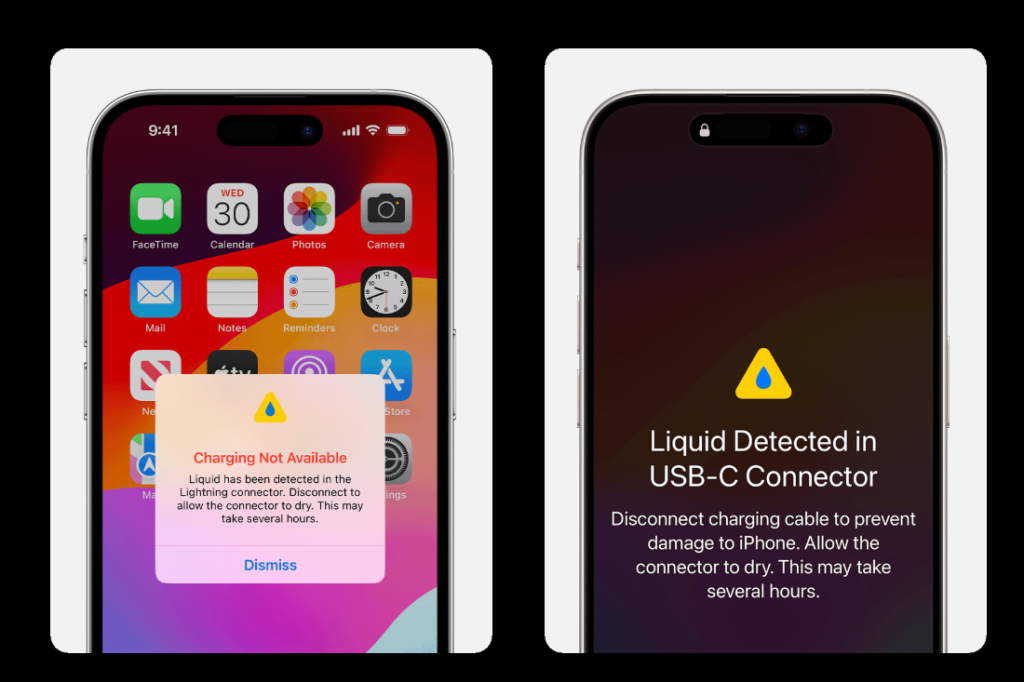
If your iPhone repeatedly displays a Liquid Detected in Lightning Connector or Charging Not Available warning, it can be frustrating—especially when the phone appears completely dry. Many users assume water damage is the only cause, but from a professional mobile repair perspective, that is not always true. In many cases, the warning can be triggered by moisture, dirt, corrosion, damaged charging parts, or even sensor errors inside the charging circuit.
Understanding why this happens can help prevent further damage and avoid unnecessary repairs.
What Is the iPhone Liquid Detection Warning?
Apple introduced liquid detection systems to reduce the risk of short circuits or corrosion when charging. If the iPhone detects abnormal conductivity inside the charging port, it may temporarily disable charging and show a warning.
This protection is useful because electricity combined with moisture can damage:
- Charging port pins
- Tristar / Hydra charging IC
- Battery charging circuit
- Logic board power lines
- Internal connector flex cables
In short, the warning is not the problem itself—it is the phone trying to protect itself.
Common Reasons Why the Warning Keeps Appearing
Real Moisture Inside the Charging Port
This is the most common reason. Even a tiny amount of water, condensation, sweat, steam, or humidity inside the port can trigger the sensor.
Examples include:
- Using phone in bathroom during hot shower
- Rain exposure
- Sweat during workouts
- High humidity environments
- Carrying phone in damp pockets or bags
Even if the outside looks dry, moisture can remain deep inside the connector.
Dirt and Metal Debris in the Port
Repair technicians often find compacted lint, pocket dust, or microscopic metal particles inside charging ports.
These materials can bridge connector pins and simulate moisture conductivity, causing the liquid warning repeatedly.
Especially common in phones carried daily in jeans pockets or work environments.
Corrosion from Previous Water Damage
Sometimes the phone was exposed to liquid weeks or months earlier. Although it seemed fine afterward, corrosion slowly forms on connector contacts.
Corrosion changes electrical resistance, which may cause false liquid detection alerts later.
Signs include:
- Charging works intermittently
- Cable only charges at certain angles
- Green or white residue inside port
- Repeated warning despite dry environment
Damaged Charging Port Flex Assembly
The charging port itself contains data and charging lines. If the dock flex cable becomes worn, bent, oxidized, or partially shorted, the iPhone may misread it as moisture.
This is common after:
- Heavy cable use
- Cheap chargers
- Frequent plugging/unplugging
- Previous low-quality repairs
- Drops impacting the bottom frame
Faulty Cable or Charger
Sometimes the issue is not the phone at all.
Low-quality Lightning cables, damaged USB-C cables, unstable chargers, or moisture inside the cable tip can trigger the warning.
Always test with a known genuine or certified cable before assuming the phone needs repair.
Charging IC or Logic Board Fault
If the warning continues after port replacement and cleaning, technicians may suspect board-level issues such as:
- Tristar / Hydra IC fault
- Charging line short circuit
- Sensor line abnormality
- Power management damage
These repairs require microsoldering diagnosis and should be handled professionally.
What You Should Do First (Safe User Steps)
Stop Charging Immediately
Do not force charging repeatedly. This can worsen corrosion or short-circuit damage.
Disconnect Cable
Remove charger and inspect both cable and port.
Dry the Phone Naturally
Place the phone upright in a dry, ventilated area.
Good methods:
- Room airflow
- Cool fan
- Silica gel packs nearby
Avoid:
- Hair dryer with heat
- Oven
- Rice method (not ideal)
- High-pressure air blasting moisture deeper inside
Try Wireless Charging
If supported, wireless charging can be a temporary solution while the port dries.
Test Another Cable
Use an original or MFi-certified cable.
When the Warning Keeps Returning Daily
If the warning appears repeatedly with no water exposure, this usually indicates a hardware issue rather than moisture.
From a repair shop perspective, the next steps are:
Port Inspection and Cleaning
A technician checks for:
- Dust buildup
- Bent pins
- Corrosion
- Damaged internal contacts
Professional cleaning often solves many cases.
Charging Port Replacement
If the dock flex is faulty, replacing the charging port assembly is usually more cost-effective than deeper repair.
Power Circuit Diagnosis
If the new port does not solve it, motherboard testing may be required.
Important Advice for DIY Users
You may gently inspect the port with light, but avoid inserting metal tools, needles, or aggressive picks.
Common DIY mistakes that cause bigger damage:
- Scratching pins
- Breaking connector tabs
- Using liquid cleaners directly inside port
- Forcing wet cable insertion
A damaged port can become much more expensive than a simple cleaning.
How to Prevent It in Future
- Keep charging port clean
- Avoid charging immediately after rain or gym use
- Use quality cables
- Do not store phone in humid bathroom areas
- Let phone cool and dry before charging
- Replace loose or damaged cables early
Final Repair Technician Opinion
If the liquid warning happens once after real moisture exposure, it is usually temporary.
If it happens regularly with no moisture present, the most common real causes are:
- Dirty charging port
- Corroded connector
- Faulty charging flex
- Bad cable
- Charging IC issue
The earlier you diagnose it, the lower the repair cost usually is. Ignoring repeated warnings can eventually lead to no charging, battery drain, or board damage.
Need Repair Parts or Professional Replacement Components?
For repair shops and technicians, using reliable charging port flexes, batteries, and screen parts is essential for preventing repeat charging issues. High-quality replacement components reduce callbacks and improve long-term device reliability.



