



A cracked iPad Air 1 digitizer is not one repair, it is two, and which one you are quoting decides whether the job makes money. The panel is a bonded glass-and-touch assembly held to an aluminium frame with a full perimeter of adhesive, so the glass has to be separated before anything can be replaced. The A1474, A1475 and A1476 version numbers in the listing are Apple’s model numbers for the iPad Air — Wi-Fi, Wi-Fi and cellular, and the TD-LTE variant released in early 2014 — and the first thing to establish is which of the three is on the bench, because the cellular versions carry a nano-SIM tray and a different rear assembly.
(Last modified date: October 2, 2026)
Which iPad Air is on the bench?
Three model numbers, one generation, and a twelve-year-old device at the end of it.
Apple’s own model identification page sets out the iPad Air as a late 2013 and early 2014 product, offered in 16 GB, 32 GB, 64 GB and 128 GB capacities with either a black or a white front bezel. That last detail matters more than it sounds: the digitizer is a visible part, so the bezel colour has to match the frame the customer already owns.
| Model number | Connectivity | What it changes on the job |
|---|---|---|
| A1474 | iPad Air Wi-Fi | No SIM tray; the rear case is closed. |
| A1475 | iPad Air Wi-Fi + Cellular | Nano-SIM tray in the right-hand side of the frame. |
| A1476 | iPad Air Wi-Fi + Cellular (TD-LTE) | Released early 2014; same frame as the A1475, different radio. |
Capacities across all three run 16 GB, 32 GB, 64 GB and 128 GB, and the generation was sold with a black or white front bezel. Check the model number on the back cover and the bezel colour before the part is ordered, not after the adhesive is warm.
What actually fails on an iPad Air 1 digitizer?
Usually the glass, sometimes the touch layer, and occasionally neither.
There are three failure pictures that reach a bench. The first is impact damage: a star crack or a corner break where the glass has gone but the touch still works across most of the screen. The second is a touch fault with intact glass, where a line or a band of the panel stops responding, which points at the digitizer layer rather than at the glass. The third is a device that was dropped and now reports nothing at all, which is a board or connector fault wearing a cracked-screen costume.
The distinction is worth ten minutes. A shop that replaces a digitizer to cure a connector fault has spent a part and an hour and still owns the complaint. Before quoting, switch the tablet on, test touch across a grid including the margins, and look at the connector area on the frame for a lifted flex. If the tablet does not power on at all, the fault is elsewhere and the job belongs on a different estimate.
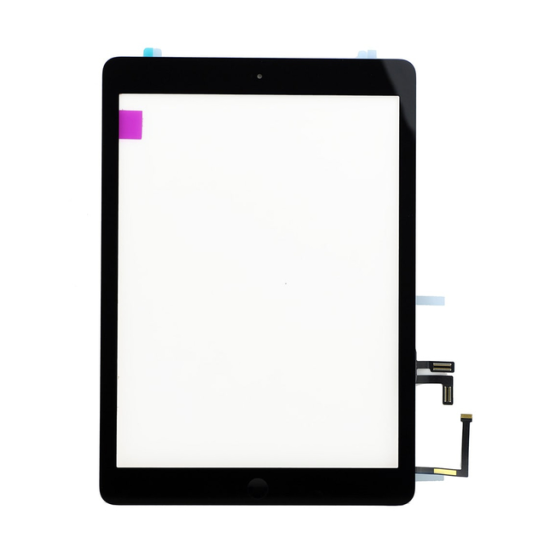
What arrives in the box, and what does not?
Glass and touch, and very little else.
The part listed here is a replacement touch screen glass digitizer for the iPad Air 1, supplied in black and tested before dispatch. It is the front glass and touch layer. It does not include the home button, the front camera bracket or the adhesive, and on a tablet this generation those three items decide whether the reassembly is clean. Ask the supplier to confirm, in writing, each of the following before the job is booked in:
- Whether the home button and its bracket are included or transferred from the original assembly.
- Whether the front camera and sensor bracket are pre-fitted.
- Which adhesive is supplied or recommended, and whether it is pre-cut for this model.
- The batch reference on the box, so a faulty unit can be traced.
- What the DOA window is, and who carries the return postage.
None of that is unusual to ask. It is the difference between a job that is quoted once and a job that is opened twice, which is the same argument made in planning an iPad screen replacement.
What does the job have to earn?
Work the numbers before the tablet is accepted, because an iPad Air 1 is an awkward repair to price on instinct.
Take a shop on £35 an hour, a digitizer bought at £28, and 90 minutes on the bench for the separation, adhesive clean-up and refit — 1.5 hours, so £52.50 of labour. Add a £6 consumable allowance for adhesive and cleaning, and the job costs about £86.50 before overheads. A £120 counter price leaves roughly £33.50 of contribution.
Now change one assumption. On a 2013 tablet the customer’s alternative is usually another used device, so the price ceiling is lower than it is on a current handset, and a 90-minute job competes directly with two iPhone screens. That is the model’s real value: it makes the trade-off visible before the tablet is on the bench rather than after. Substitute your own labour time, part cost and consumable allowance.
What are the limits of repairing a 2013 tablet?
Age, mostly, and it should be said at the counter rather than discovered later.
The iPad Air was released in late 2013 and early 2014, so a working example is over a decade old. Three consequences follow. Battery condition is a separate risk on any device of that age and should be checked before a screen job is quoted, because a tablet that shuts down under load will do it after the repair and be blamed on the repair. Part supply is finite and becoming intermittent. And the customer’s software may already be the constraint on what the tablet can do, which is a conversation to have before the money is taken.
What tools does a bonded iPad panel actually need?
Five items, and the heat source is the one that decides whether the glass survives.
| Tool | Digi4u listing | Price | What it is for |
|---|---|---|---|
| MECHANIC Mortar Mini iShell Max 6-in-1 screwdriver set | Precision driver set | £34.99 | The bracket screws and the pentalobe pair; a stripped head on a tablet is a long afternoon |
| CPB CP320 workstation heat mat | Heat mat | £59.99 | Warms the full perimeter of the adhesive at a set temperature instead of one corner at a time |
| Opening tools, teardown cards and spudgers | Pry tools | from £25.00 | Slides under the glass without levering it; the card is what protects the frame and the panel |
| Precision tweezers | Tweezers | from £7.99 | Connectors, brackets and the small parts that transfer between assemblies |
| REFOX opener range | Suction or opener | from £4.99 | Starts the lift on a corner the adhesive has already released |
The order of importance is not the order of price. A £4.99 opener and a heat mat do more for the survival of the panel than a premium driver set, and the mat is the item most often skipped — which is why the first crack on a bonded iPad usually happens on a bench without one.
How does the job run, step by step?
Seven steps, and the order matters more than the speed.
- Read the model number and photograph the glass. A1474, A1475 or A1476, and the bezel colour, before anything is ordered or warmed.
- Warm the whole perimeter. Work the heat pad or gun around the edges in passes until the adhesive releases under gentle pressure rather than needing force.
- Start at a corner with the thinnest tool you own. A teardown card, not a blade, and stop as soon as the gap opens.
- Disconnect the battery before anything else. Screen, home button and sensor flexes are all live until the battery is off.
- Separate the glass in stages, adding heat as you go. Never lever against the frame lip, and never lift the panel from a single point.
- Clean the frame channel completely. Old adhesive left in place makes the new panel sit proud, and a proud panel lifts again.
- Fit, seal and test before closing. Touch across the whole surface, the home button, both cameras and the seal line.
Budget 90 minutes for a first attempt on a tablet, and expect the adhesive removal to take as long as the fitting.
What goes wrong after a glass-only replacement?
Four failures that come back as complaints rather than as obvious faults.
- Dust under the glass. Visible in daylight against a dark screen, and permanent once the adhesive has set. It comes from working on an open bench rather than from the part.
- Touch dead spots at the margins. A digitizer that is not seated evenly, or a frame channel that still has adhesive in it holding the panel a fraction off the glass.
- The home button behaving differently. Whether it transfers from the original assembly or comes pre-fitted, it is the part that changes feel and function, and it is the first thing to check when a customer says the button feels wrong.
- Lifting edges. Almost always adhesive that was applied over residue, or a clamp that was removed before the adhesive cured.
None of those are panel faults, which is why the returns process should record what was transferred and what was tested — the method is set out in building a parts returns process.
Should the battery be done at the same time?
On an iPad Air from 2013 or 2014, usually yes — and the arithmetic is the argument, not the part price.
Take a shop on £35 an hour. A digitizer alone is about 90 minutes, or £52.50. Doing the battery in the same visit adds perhaps 25 minutes, because the device is already open and the adhesive around the cell is already warm: £14.58 of extra labour, not another 90 minutes. Quoting the two together therefore costs the customer materially less than two visits, and it removes the most likely reason for the tablet to come back.
That is a model with stated assumptions, not a quotation, and it assumes the customer wants to keep the tablet rather than replace it. Where they do not, the honest answer is that the battery is not the deciding cost.
References
- Apple Support: identify your iPad model — the A1474, A1475 and A1476 model numbers, capacities and bezel options.
- Consumer Rights Act 2015 — the statutory position on a retail repair.
FAQ
How much does it cost to replace an iPad Air 1 digitizer?
The cost is the part, the adhesive and the bench time, and the bench time is the largest of the three because the panel is bonded around its whole perimeter. A worked example on this page prices a 90-minute job at £35 an hour with a £28 digitizer at roughly £86.50 of cost; you should substitute your own figures rather than use that as a quotation.
Is the iPad Air 1 still worth repairing in 2026?
It can be, but the decision is different from a current device. Apple lists the iPad Air as a late 2013 and early 2014 product, so battery condition and the customer’s software needs matter as much as the cracked glass. Check both before quoting, and price the job against what the customer would otherwise spend.
How do I know which iPad Air 1 model I have?
Read the model number on the back cover. A1474 is the Wi-Fi version, A1475 is Wi-Fi and cellular, and A1476 is the Wi-Fi and cellular TD-LTE variant released in early 2014. The front bezel is either black or white, and the replacement has to match.
Does the replacement include the home button?
The part supplied is the touch screen glass digitizer, tested before dispatch. Whether the home button, bracket and front camera fittings are included varies by supplier and by batch, so confirm that list in writing before you order rather than assuming it.
Can a cracked iPad Air 1 screen be repaired at home?
The replacement itself is straightforward; the separation is not. The original assembly is held with a full perimeter of adhesive and the panel is thin, so the risk of a second broken panel during removal is real. The original listing for this part makes the same recommendation, and it is why the labour, not the part, dominates the cost.
Match the model number before you heat the frame. Digi4u stocks iPad Air 1 digitizers in black and white and supplies the adhesives and bench tools an iPad screen job needs.