


TBK610 Heat-Transfer Machine Review: The All-in-One DIY 3D Phone Case Printing Solution for Creators, Shops, and Wholesalers
Need this part? We stock tested replacement parts with same-day UK dispatch and a 12-month warranty.

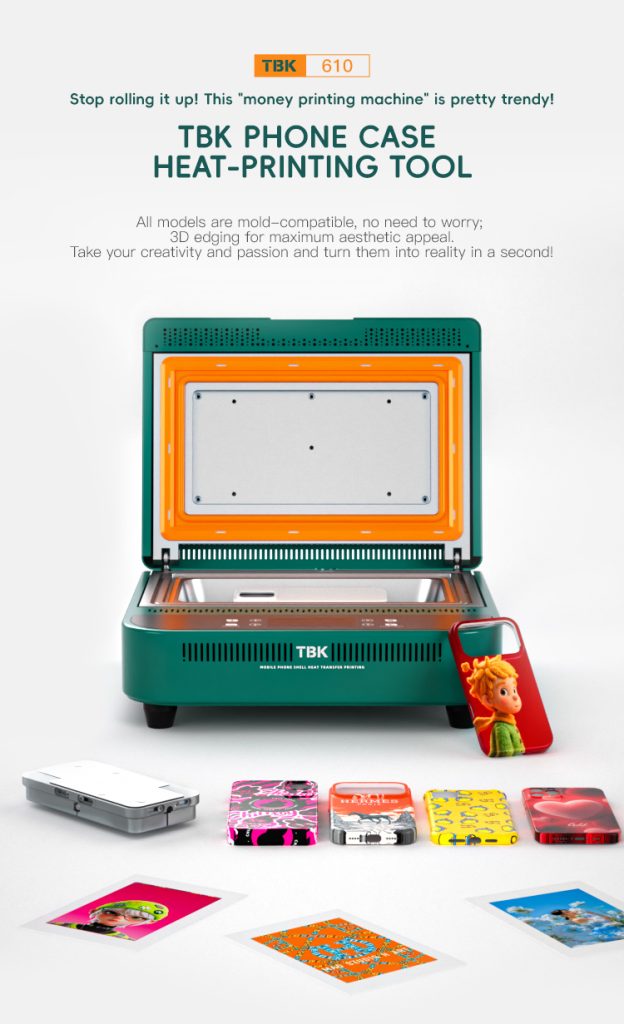
A phone case printer fails on the cost of blanks long before it fails on the print quality. The machine transfers a design onto a prepared case surface in a single cycle, and the arithmetic that decides whether it pays is sheets in against cases out: case covers start at £7.13 on Digi4u’s wholesale list, and every case that is printed badly is that cost plus the time.
(Last modified date: October 4, 2026)
What a heat-transfer case printer actually does
The process is thermal transfer rather than printing in the inkjet sense. A design is carried on a transfer film, the film and the blank are pressed together under heat for a set dwell time, and the coating on the film releases onto the case surface. The machine’s job is to hold three variables steady: pressure, temperature and dwell — and the failure modes map directly onto those three, which is why a machine with a poor pressure distribution prints well in the middle of a case and badly at the edges.
That is what separates the class of machine used by wholesalers from a hobby press. A production unit holds the platen parallel, controls the temperature at the surface rather than at the element, and repeats the dwell within a second cycle after cycle. Those three characteristics are what a specification sheet should be read for.
What it takes to run one profitably
Four cost lines decide the retail price, and only one of them is the machine.
| Cost line | Real figure to plan against | Why it decides the margin |
|---|---|---|
| Blank case | From £7.13 per case cover on the wholesale list | It recurs on every sale and on every scrap |
| Transfer film and ink | Consumable per print — ask the supplier for the cost per A4 sheet | Scales directly with volume, so it sets the floor price |
| Machine time | One cycle per case plus preparation | Decides how many units one operator can produce in a day |
| Failed prints | Blank plus consumable, no revenue | The figure that turns a good margin into a bad one |
Does it pay? A model with stated assumptions
This is a model, not a measured result. The blank price is a live listing; the consumable, labour and retail figures are assumptions you should replace.
Take a blank at £7.13, consumables at £1.20 per case, three minutes of bench time at £20 an hour (about £1), and a scrap rate of one in twelve. Cost per sellable case is roughly £10.20 including the scrap. Sold at £24.99 the contribution is about £14.80; sold at £19.99 it is about £9.80.
At 40 sellable cases a week the difference between those two prices is roughly £200 a week. Now change the scrap rate to one in six: cost per sellable case rises by about £1.20, which at 40 units is £48 a week — the same order as the difference between the two retail prices. The scrap rate, not the machine, is what to work on first.
What to verify before buying the machine
Ask for the working temperature range and how it is measured, because a machine that reports the element temperature rather than the platen surface temperature will need a correction curve you have to derive yourself. Ask for the platen size in the units your blanks come in, and for the pressure adjustment mechanism — screw clamps and gas struts behave differently over a production day. Ask for the cycle time at the temperature you will actually use, not the fastest figure in the brochure.
Then ask for the documents a UK business should keep on file for any machine of this kind: the declaration of conformity and the marking that goes with it, the electrical rating and the plug type, and the manufacturer’s instructions covering the intended materials. A supplier who cannot produce those before the sale will not produce them after it, and a workshop that cannot show them has a problem the first time a customer or an insurer asks.
Where the money actually comes back
Two businesses buy this machine and they have opposite economics. A repair shop uses it to add a personalised case to an existing sale: the blank is an accessory line, the volume is steady but small, and the machine’s payback runs through attachments rather than through the printer itself. A wholesaler or a small production operation uses it to make cases to order in batches: volume is high, the design is repeatable, and the constraint is throughput and scrap rather than demand.
Before buying, write down which of those two the shop is. The same machine is a sensible purchase in both cases, but the metric that proves it is different — attachment rate in the first, cost per sellable unit in the second — and a business that measures the wrong one will conclude the machine has not paid for itself when it has.
Materials and the boundary conditions
Heat transfer works on surfaces designed to accept it. A glossy, coated or painted case can release the transfer as it cools, and a case with a raised camera surround will not sit flat against a rigid platen without a fixture. The practical boundary is to test one blank from every new batch before committing the whole order: the same model number from a different production run can change the coating, and the failure appears as a print that looks correct in the press and lifts a day later.
What sells, and what to stock alongside the machine
The machine is only useful if the blanks it prints on are in stock in the models customers actually own, and the range is wide enough that the stocking decision is the second half of the business case. Wholesale case covers start at £7.13 and the catalogue is organised by handset family, so the practical approach is to stock the two or three best-selling current models deeply and everything else to order — a personalised case has a lead time anyway, and holding twenty low-turn variants ties up the same cash as the machine did.
Two accessories belong in the same order. A fixture for the raised camera surround on the Pro and Pro Max cases, because a rigid platen cannot press a case flat without one, and a small stock of plain samples in each stocked model so a customer can see the finish before choosing a design. The samples are the cheapest marketing the machine has, and they cost a blank each.
References
- GOV.UK: using the UKCA marking — the marking and documentation a machine placed on the GB market should carry.
- HSE INDG249 — the capture-at-source principle that applies to any bench process producing fume or vapour.
- Apple Support: identify your iPhone model — matching a case to the exact model, including the Pro and Pro Max sizes.

FAQ
What does a heat transfer machine actually produce?
A design transferred from a coated film onto a prepared case surface in one heated press cycle. The result depends on three variables — pressure, surface temperature and dwell — and on the case accepting the transfer at all.
Is it worth it for a small repair shop?
As an attachment line rather than a product line. On the model above a case costs about £10.20 to produce and sells for £20–£25, so the payback comes from attaching sales to repairs the shop already does.
What is the biggest hidden cost?
Failed prints. Moving the scrap rate from one in twelve to one in six adds roughly £1.20 to the cost of every sellable case, which at 40 units a week is about £48 — as much as the difference between two retail price points.
Why do prints look fine then lift off the case?
Usually the case surface, not the machine. Glossy, painted or inconsistently coated blanks release the transfer as they cool, which is why one case from each new batch should be tested before a full order is printed.
What documents should a UK buyer ask for?
The declaration of conformity and the marking that goes with it, the electrical rating and plug type, and manufacturer’s instructions covering the intended materials. Those are the documents an insurer or a customer will ask to see.
Cost the blank before the machine. Wholesale iPhone cases and covers are listed in the case and cover range.



